Rated 4.7 on G2Become a PartnerContact Sales
Product

CRM

Contact Management

Your customer details. In one place.

Sales Pipeline

Sell, forecast, and grow.

Projects

Affordable project management.

Tasks & Calendar

Your working day — sorted.

Automations

Eliminate manual tasks with workflows.

Reports

Pinpoint your successes & failures.

Marketing

Social campaigns

Post on X, Facebook, Instagram, & LinkedIn.

Campaign builder

Send emails to new customers.

Conversations

Provide customer service & support.

Use Cases

By Objective

Win more business

Nurture and close more sales.

Deliver fast

Satisfy client requirements.

Drive efficiencies

Run business operations better.

Customer service

Deliver top service to your customers.

By Sector

Professional services

Attract, close, give clients great value.

Manufacturing

Build your sales and project process.

Consultants

Get clients beyond your network.

Construction

Construct sales and projects easily.

Accountants

Account for more sales and better delivery.

Freelancers

Deliver great work to your clients.

By Business Size

Startups

Give your business the right start in life.

Small Business

The start your business deserves.

Medium Size business

To the moon? We’ll join you.

By Team

Sales

Learn how sales teams use Capsule.

Marketing

And marketing teams, too!

IntegrationsPricing
Resources

Support Docs

Need help with Capsule CRM?

Webinars

Industry and Capsule-specific.

Video Tutorials

Your Capsule CRM knowledge hub.

Customer Stories

How customers use Capsule CRM.

Blog

Helpful content you’ll love.

Small business diaries

Our small business podcast.

Partner Directory

Find a Capsule and Transpond Partner.

Log InTry Free
Support home
  • Setup & Configuration
  • Importing & Migrating Data
  • Account & Security
  • Contact Management
  • Calendar & Tasks
  • Workflow Automation
  • Projects & Event Manager
  • Sales
  • Business Insights
  • Mobile Apps
  • Integrations

Setup & Configuration

    Getting StartedNavigating CapsuleSystem RequirementsUser ManagementTeamsData EnrichmentUser Guide to Getting StartedStoring EmailsBest practices for managing your Tags, DataTags and Custom FieldsSending Emails and Email TemplatesBusiness and Contact Enrichment

Importing & Migrating Data

Account & Security

Contact Management

Calendar & Tasks

Workflow Automation

Projects & Event Manager

Sales

Business Insights

Integrations

Go to section

    Importing your contacts from Thunderbird

    1. In your Thunderbird address book you select the addresses folder to import into Capsule. Then click Tools > Export


    Tools drop down with import and export options

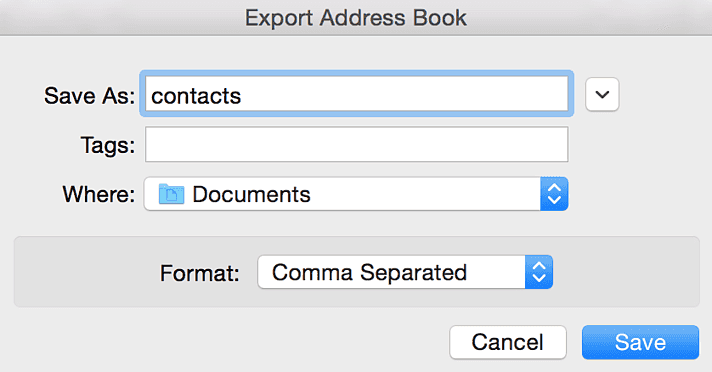
    2. When saving your file, select Comma separated under 'Save as Type'

    Save as modal with comma separated format selected

    3. Your CSV file is now ready for importing into Capsule.

    Go to section

      Your business brain, now with 100% less panic

      Contact SalesTry Free
      Capsule
      Features OverviewCRM ComparisonsiOS & AndroidPricingData SecuritySecurity FeaturesCustomizationsSwitch to CapsuleStatus 99.99%Partner ProgramTechnology PartnersCapsule's Free Plan
      Company
      AboutBrand ResourcesCareersCustomer TermsPrivacy PolicyGDPRContact Us
      Integrations
      API for DevelopersQuickBooksXeroZapierMicrosoft 365MailchimpGmailWhatsAppOutlookTranspondGoogle WorkspaceAll Integrations
      Solutions
      AI content assistantCollaborationFinanceHotels & HospitalityTravel & TourismArchitectsIT & TechReal EstateLegalSaaSNonprofitsGrowth BusinessAll Industries
      Resources
      SupportBlogVideo TutorialsCustomer StoriesSales Tracking SoftwareCapsule CRM SoftwareWhat is a CRM?CRM Glossary
      Capsule is a service of Zestia Ltd, registered in England with No 06418281. © 2025 Zestia Ltd. All Rights Reserved.