With so many AI tools hitting the market, the challenge isn't finding software – it’s figuring out how to integrate it into a functional marketing strategy. It’s easy to end up with a dozen "magic" tools that… don't actually talk to each other.
This guide takes a different path.
Instead of a standard top-ten list, we’ve mapped out a practical AI technology stack based on the actual marketing lifecycle. We look at the specialist tools that excel at specific tasks, while showing how Capsule sits at the center to keep your data – and your workflow – unified.
The workflow at a glance
A CRM marketing workflow has six distinct moments:
- Getting the right people into the system
- Understanding who to prioritize
- Writing the outreach
- Running the campaign
- Reading what worked
- Following up
Most marketers already have the right ingredients in their tech stack; the goal now is to find the recipe that helps those tools work in perfect sync.
Stage 1: Getting the right people into the system
The problem: Sales reps spend hours on tedious tasks: finding contact details, researching company backgrounds, or logging information that should populate automatically. That’s energy diverted to the “back office” when it belongs on the front lines.
The AI tool: Capsule AI Enrichment
Capsule's AI Enrichment feature handles this automatically. When a new contact is added, AI Enrichment pulls company and contact data from public sources (job title, company size, industry, social profiles, and more) and populates the record without anyone lifting a finger.

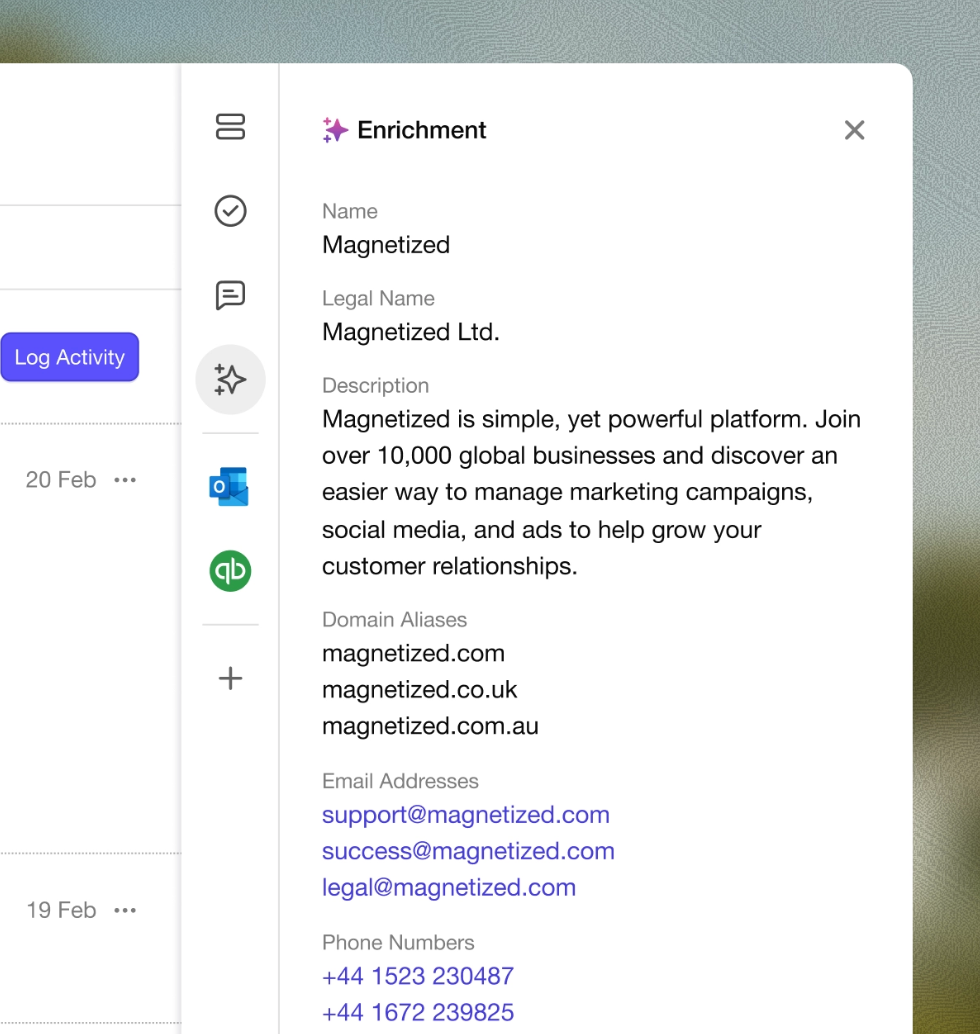
The CRM software receives clean, complete customer data from the moment a contact enters the system. Sales and marketing teams start every customer relationship with context.
This matters more than it might seem. The quality of every downstream AI capability – predictive lead scoring, AI Summaries, sales forecasting – depends directly on the quality of the data those tools run on.
For teams running high-volume prospecting at a massive scale, specialized data enrichment engines can be a powerful addition to the stack. These platforms act as a "waterfall" for contact records – pulling from dozens of sources simultaneously and using AI agents to handle deep research before syncing it all back to your CRM. They are built for high-level complexity, though.
However, for most small businesses, Capsule’s native AI enrichment handles that heavy lifting cleanly, giving you the data you need with no overhead of an extra subscription.
What this replaces: Manual research, copy-pasting between tabs, and incomplete CRM records that make personalisation impossible.
Stage 2: Understanding client prioritization
The problem: A full sales pipeline is only useful if the team knows which contacts to act on first. Treating every lead the same wastes time on low-intent prospects and lets high-intent ones go cold.
The AI tool: Capsule AI Summaries + predictive lead scoring
This is where AI in CRM does its clearest work. Capsule's AI Summaries condense the full history of any contact into a readable brief before a call or meeting.

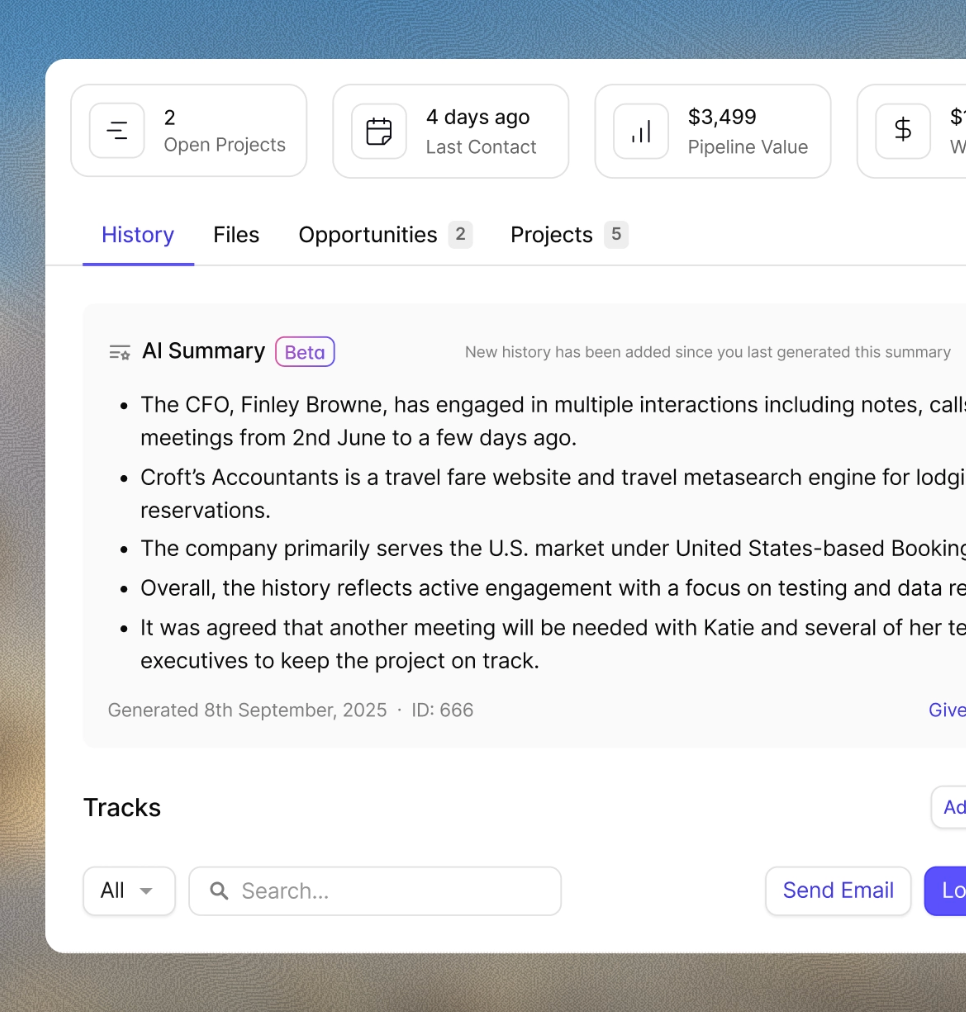
With AI summaries, you can skip the timeline scavenger hunt. Sales reps can see at a glance who’s active, who’s quiet, and what’s next on the agenda. That context makes the difference between guessing your priorities and knowing them.
Capsule's AI features also analyze data from historical sales data and show patterns the team wouldn't see manually. The AI functionality here goes beyond reporting: it's using past outcomes to actively shape current decisions. AI-driven insights flag which contacts in the current pipeline show the strongest buying signals based on engagement.
Predictive lead scoring turns a static list of names into a live heat map. Instead of working through a pipeline by gut feel, reps follow the data-backed signal of who is actually ready to buy. When that intelligence is baked directly into your CRM, you stop "managing" a pipeline and start executing it, reclaiming the hours usually lost to tool-hopping.
What this replaces: Manual pipeline reviews and the discovery that a hot lead went cold because nobody noticed.
Stage 3: Writing the outreach
The problem: Personalized outreach at scale is a contradiction. Writing a genuinely relevant message to each contact takes time that most teams don't have, but generic messages get ignored.
The AI tool: Capsule AI Email Assist + Lavender

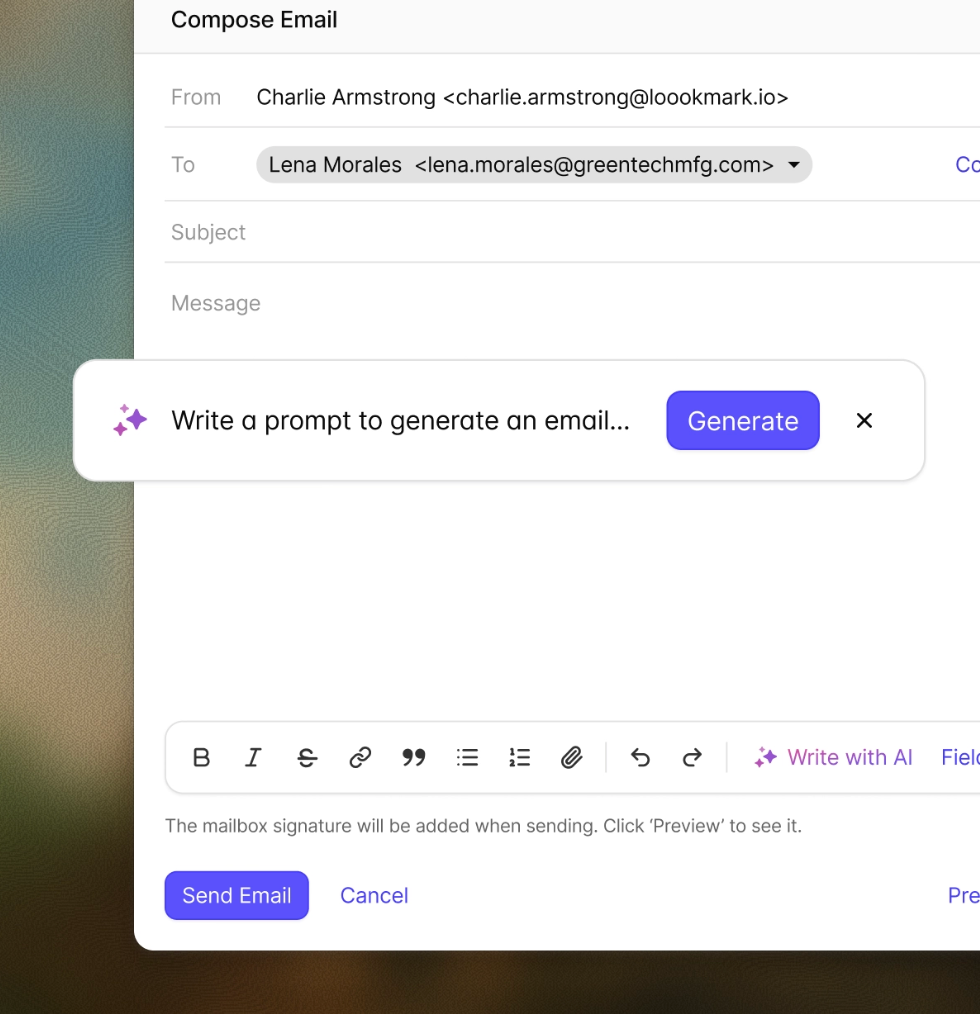
Staring at a blank "Following up" email is a thing of the past. Capsule uses the context of your previous conversations to draft relevant, tailored communications directly in the CRM. It turns hours of manual drafting into a quick review-and-send process. You get the speed of automation with the nuance of a personal note, helping you maintain high-quality relationships at a volume that used to feel impossible.
For cold outreach where no existing relationship context exists, Lavender functions as an AI-powered sales assistant that scores email drafts in real time. It flags phrases likely to reduce reply rates, and monitors sentiment analysis signals in how prospects have responded historically.
Together, these tools mean the writing stage – which used to consume a disproportionate amount of a sales rep's day – becomes a review and refine task rather than a create-from-scratch one.
What this replaces: Hours of email drafting, generic templates that everyone ignores, the uncomfortable gap between "I should follow up" and actually doing it.
Stage 4: Running the campaign
The problem: Once the outreach is written, someone still has to send it at the right time, to the right segment, across the right channels – and track what happens.
The AI tool: Capsule Transpond + marketing automation
Capsule's built-in marketing automation engine, Transpond, connects directly to the CRM data in Capsule – no export, no sync, no disconnect between who you're targeting and what you know about them. Customer behavior and engagement data all inform how segments are built.

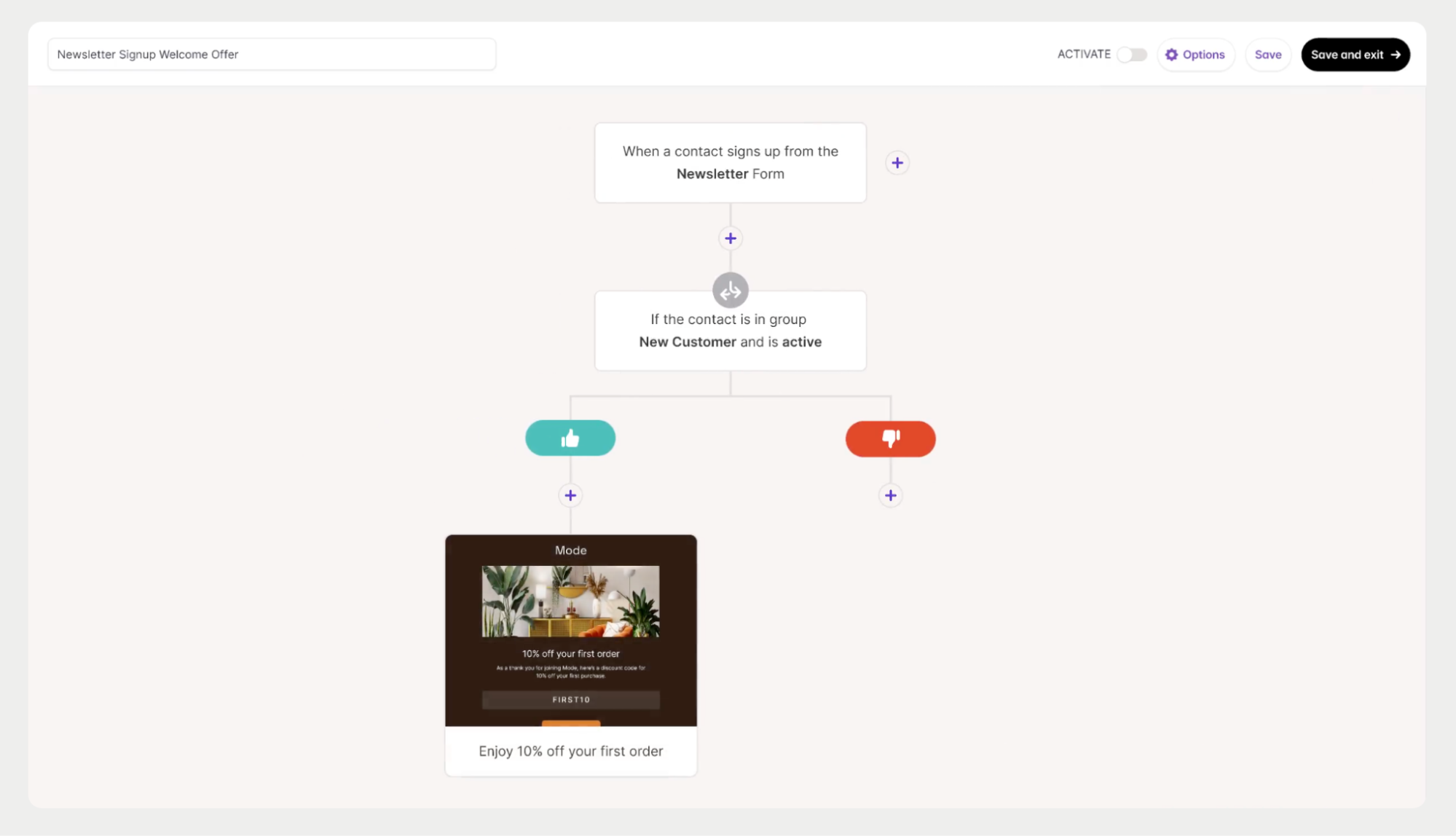
What this replaces: Manual send scheduling, static segment lists that go out of date, campaign execution that doesn't reflect what the crm actually knows about the contact.
Stage 5: Reading what worked
The problem: Campaigns run, and numbers come back. Most teams stop at the surface, using basic open and click rates as a rough temperature check. They end up relying on a “best guess” strategy that makes it hard to pinpoint what actually drove a sale… or why a lead went cold.

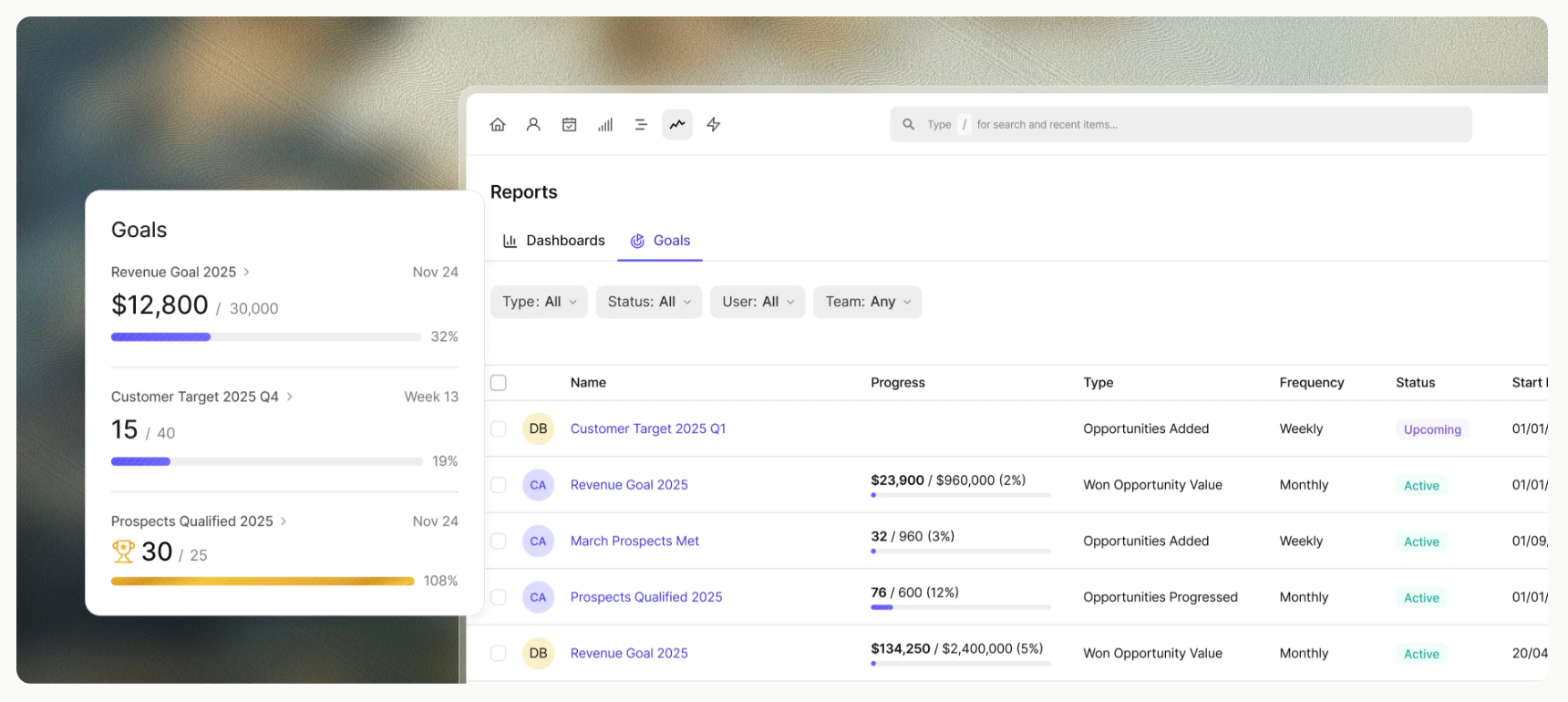
The AI tool: Capsule analytics + advanced analytics layers
Capsule’s dashboards break down pipeline health, conversion rates, and deal velocity, showing exactly where your team’s time is going. For forecasting, Capsule calculates revenue based on your specific win-probability milestones – giving you a realistic look at which deals will likely close this quarter, and where your potential profit is sitting.
For growing teams, it’s about working smarter: using Capsule’s built-in automation to flag quiet accounts, and tracking which marketing campaigns actually bring in the high-value wins. Most teams at this stage don’t need a complex data science department. They need a tool that turns their existing data into a clear plan of action without the enterprise price tag. Capsule’s paid plans unlock deeper insights as you scale, while the free plan handles the basics for smaller pipelines at $0/user.
What this replaces: Tedious reporting, intuition-based decisions about what to do next, the missed signal that a particular segment or message type consistently outperforms others.
Stage 6: Following up
The problem: Many deals aren’t lost to a bad pitch but to silence. When reps manage dozens of contacts, the loudest lead gets the attention while the quiet ones quietly exit the pipeline.
The AI tool: Capsule AI + task automation

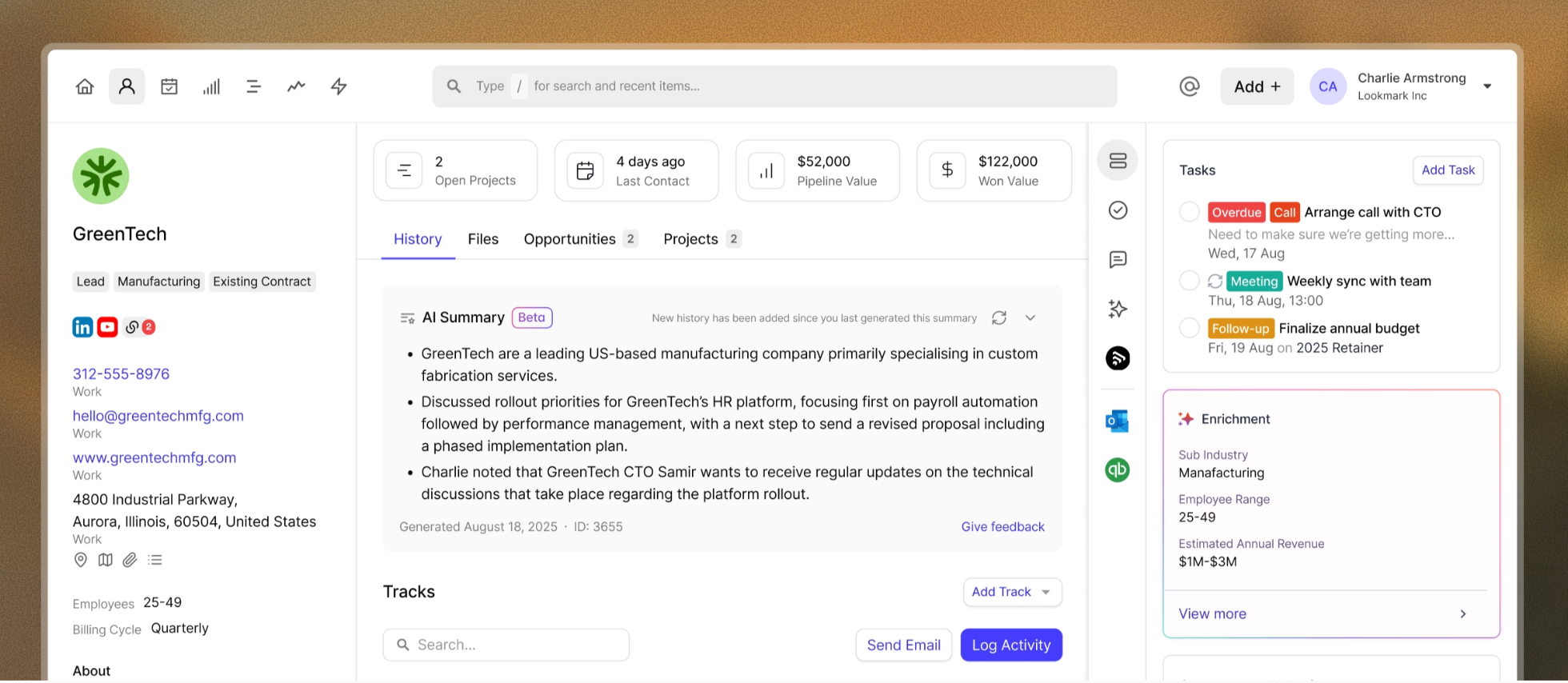
This is where a CRM shifts from a static database to an active co-pilot. Capsule monitors the "pulse" of your pipeline by automatically highlighting Stale Opportunities – deals that have sat idle for too long. By applying Tracks, Capsule ensures follow-up tasks are created the moment a deal moves through stages, making it impossible to forget a contact.
Before you jump back in, AI Summaries pulls the last 50 interactions into a quick brief. Instead of scrolling through months of history, you get a clear picture of the relationship in seconds. Then, AI Email Assist helps you bridge the gap between "I should email them" and actually hitting send.
This combination of reliable prompting and AI-assisted drafting removes the "cognitive load" of sales. The CRM identifies who needs to be contacted today, and the AI ensures those messages are relevant and timely. It’s the simplest way for a small team to maintain the relentless follow-up discipline of a much larger organization.
What this replaces: The follow-up that didn't happen, the hot lead that went cold because life got in the way, the deal lost to a competitor who simply stayed in touch.
Putting the stack together
The tools in each stage work best when the CRM is the hub and the AI tools are the spokes. Here's the full picture:

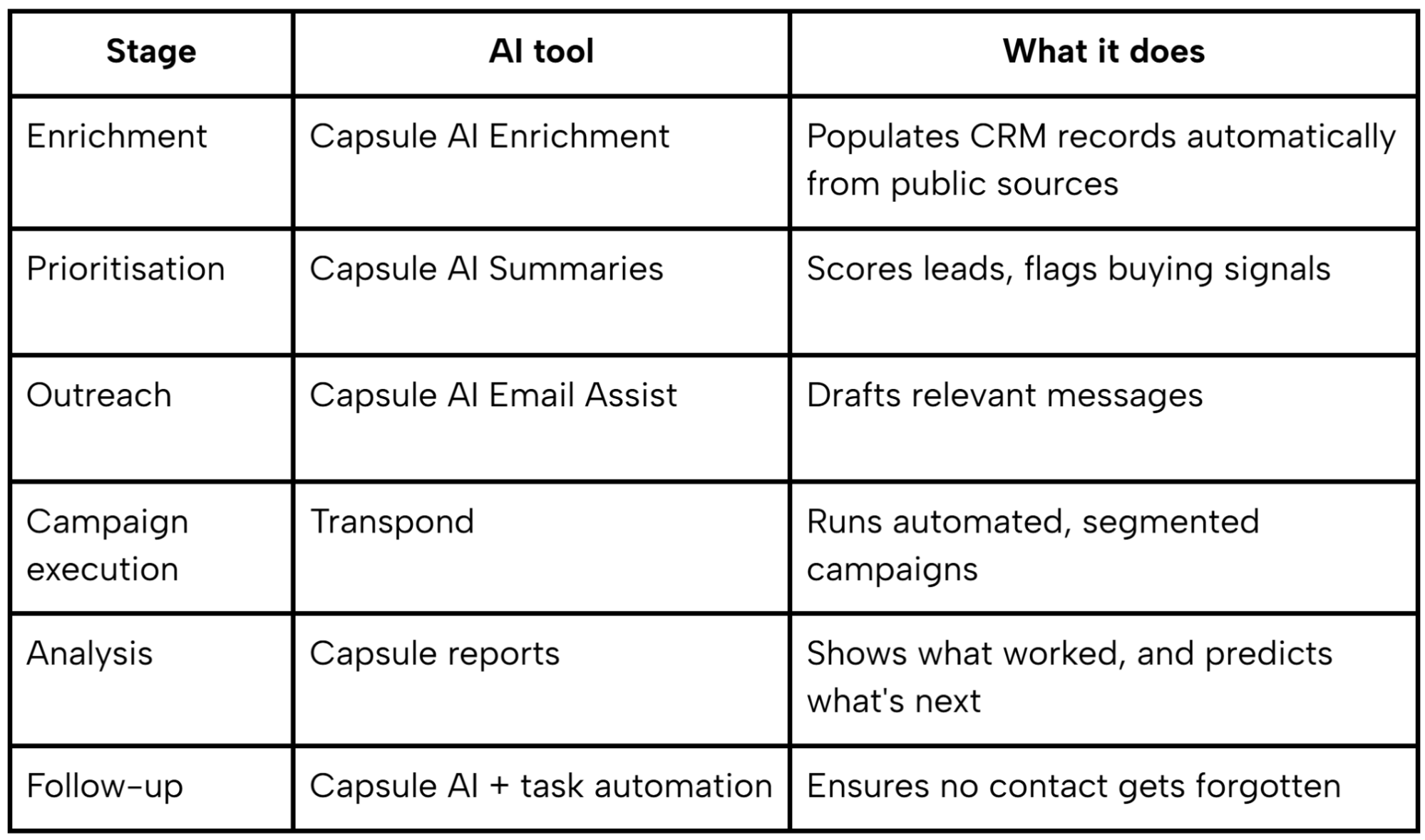
Not every business needs all six layers. The right place to start is wherever the biggest drop-off currently is. If leads are going cold between contact and follow-up, start at stage six. If the pipeline is full but conversion is low, start at stage two.
What the best AI CRM tools have in common is that they reduce the distance between knowing what to do and actually doing it:
- the CRM holds the customer relationships,
- the AI handles the routine tasks, the analysis, and the first draft,
- the team focuses on the conversations that actually move things forward.