
A sales pipeline should help your team answer three practical questions:
- Where is each deal?
- What needs to happen next?
- Which deals are not progressing?
If your pipeline cannot answer those questions quickly, the stages probably need work.
“Open,” “In progress,” and “Hot lead” may sound useful, but they rarely tell a salesperson what the prospect has actually done. A stronger stage reflects a specific point in the buying process, such as “Discovery completed” or “Proposal sent.”
This guide shows how to build sales pipeline stages that your team can use day to day – with clear entry criteria, exit criteria, tasks, and examples you can copy into your CRM.
Start with the buying process, not your CRM
Before creating stages, write down what normally happens between first contact and a signed deal.
For example:
- A potential buyer enters your pipeline.
- You confirm they are worth pursuing.
- You speak with them to understand the requirement.
- You send a proposal or quote.
- They review the offer and ask questions.
- They make a decision.
That gives you the first version of your pipeline:
Prospecting → Qualification → Discovery → Proposal → Negotiation → Closing
Don’t add extra stages yet. Run through five recent won deals and five lost deals. Check whether they followed roughly this path.
If they did, you have a workable starting point. If they did not, adjust the sequence based on what happened.
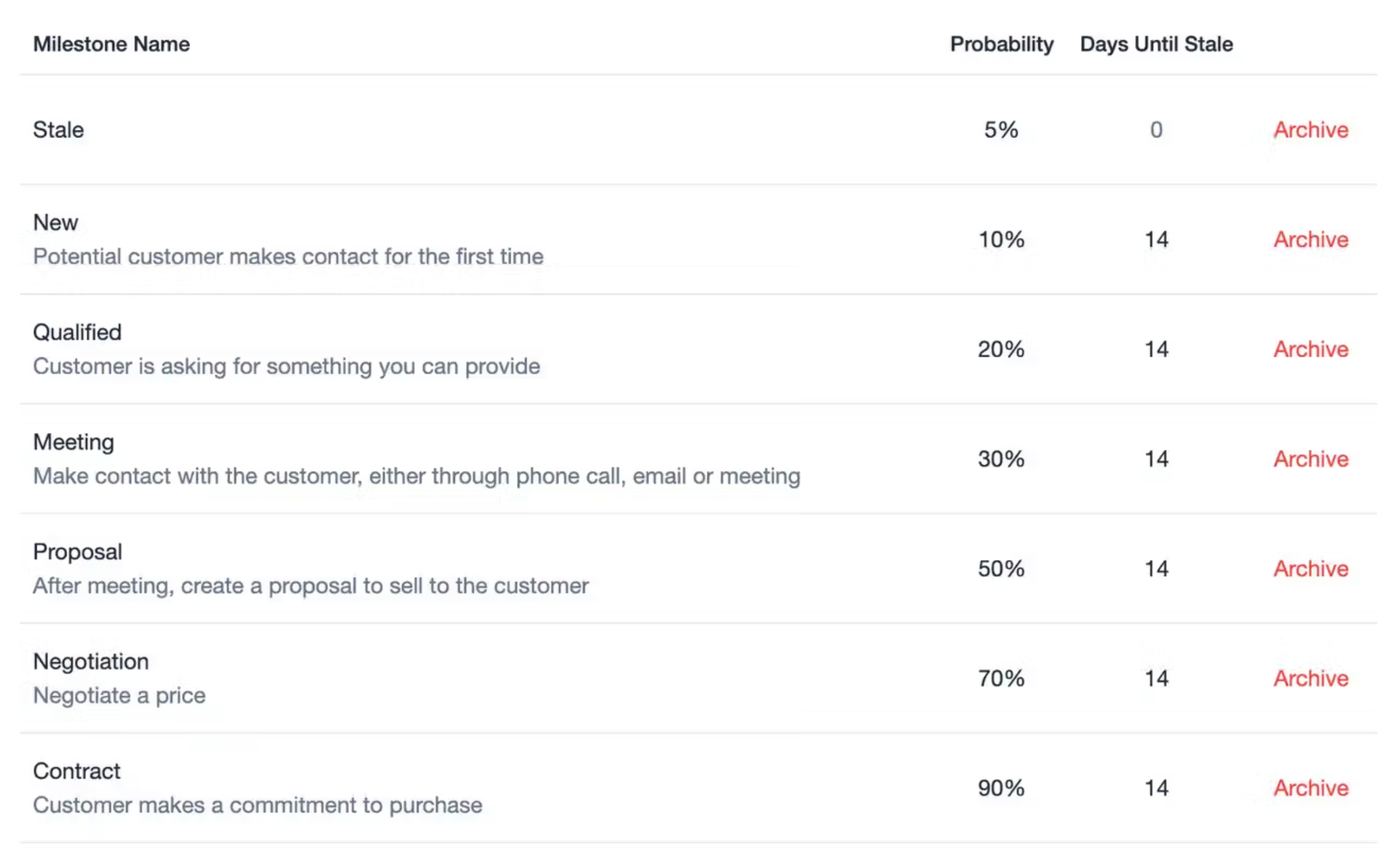
Capsule uses Milestones to represent pipeline stages, so you can configure the process around your own sales cycle rather than use a fixed default structure.
If you’re starting from scratch, our guide to building your first sales pipeline walks you through the process step by step.

How many sales pipeline stages should you create?
Start with five to seven active stages. Add another stage only when it helps your team make a different decision.
For every proposed stage, ask: What changes when a deal enters this stage? If nothing changes, you probably don't need it.
Here's how to tell which stages deserve a place in your pipeline:
- New lead: Keep it. Someone needs to review the opportunity and decide whether it's worth pursuing.
- Contacted: Usually skip it. Contacting a prospect is an activity. It doesn't necessarily mean the deal has progressed.
- Discovery booked: It depends. Keep it if booking a meeting is a meaningful conversion point in your sales process.
- Discovery completed: Keep it. You've gathered enough information to decide what to offer.
- Proposal being prepared: Usually skip it. Preparing a proposal is internal work, so track it as a task.
- Proposal sent: Keep it. The offer is now with the buyer, and you're waiting for their response.
- Follow-up sent: Skip it. Record the follow-up as an activity rather than creating another stage.
- Negotiation: Keep it. The buyer is actively discussing pricing, scope, or terms.
- Won or Lost: Treat these as outcomes. They show how the opportunity ended, rather than another step in an active sales process.
Keeping this distinction clear makes the pipeline much easier to read. Calls, emails, reminders, and tasks still need tracking, but they belong in your activities rather than your pipeline stages.
Stage 1: Prospecting
Goal
Decide whether a potential buyer belongs in the active sales pipeline. Don’t treat every contact in your CRM as a sales opportunity.
A newsletter subscriber, networking contact, and company you may contact next quarter don’t all need an open Opportunity. Create an Opportunity when there’s a realistic reason to pursue a sale.
Suggested entry criteria
Move someone into Prospecting when at least one of these happens:
- they submit a relevant sales enquiry
- they reply positively to outbound outreach
- they are referred by a customer or partner
- a salesperson identifies a strong target account
- an existing customer expresses interest in another product or service
What to do in this stage
Capture enough information to decide whether to qualify the opportunity.
At minimum:
- company
- contact
- lead source
- product or service of interest
- owner
- next action
Don’t leave a new opportunity without a next action:
- If the next step is research, assign it.
- If the next step is a call, schedule it.
- If nobody plans to do anything with the opportunity, it shouldn’t remain open.
Exit criteria
Move the deal to Qualification when:
- you know who the potential buyer is
- there is enough information to investigate fit
- a salesperson has decided the lead is worth pursuing
Close or archive it if there is no realistic opportunity.
How to use Capsule here
Create the contact and organization record first, then open an Opportunity once there is a real sales conversation to track.
Use tags or custom fields for information you will need later, such as:
- lead source
- industry
- service interest
- territory
- customer type
Add a Task immediately for the next action. That prevents new Opportunities from entering the pipeline and disappearing.
Stage 2: Qualification
Goal
Decide whether your team should invest more time in the deal. Qualification should end with a decision: Continue or stop. Avoid keeping weak leads alive because someone might buy… eventually.
Build your qualification checklist
Choose no more than six criteria that influence your chances of closing the deal. You don't need a complicated scoring system at this point. A short set of questions can help your team decide which opportunities deserve more attention.
Before moving a deal into Discovery, check the following:
- Need: Is there a specific problem the buyer wants to solve?
- Fit: Can your product or service realistically solve that problem?
- Timing: Is there a likely buying window?
- Decision process: Do you know how the purchase decision will be made?
- Stakeholders: Have you identified the people involved in that decision?
- Commercial fit: Is the opportunity financially realistic for both sides?
You won't always have complete answers during qualification. The goal is to gather enough information to decide whether a deeper sales conversation is worth your team's time.
Gather enough information to decide whether the opportunity is worth moving into a deeper sales conversation.
What to record
Instead of writing “Qualified” in a note, record the useful information.
For example:
- Need: Current CRM is difficult for the sales team to maintain.
- Timing: Wants to migrate before January.
- Decision process: Sales Director recommends, CEO approves.
- Team size: 14 users.
- Next step: Discovery call with Sales Director and Ops Manager.
Now another salesperson can understand the opportunity without asking for a verbal update.
If prioritization is becoming difficult, lead scoring can help create a more consistent way to rank opportunities.
Exit criteria
Move to Discovery when:
- the company appears to fit your target customer
- there is a genuine problem or buying reason
- the opportunity is worth more investigation
- a clear next conversation has been agreed
Mark the Opportunity as Lost if qualification reveals that the deal is not worth pursuing.
How to use Capsule here
Create custom fields for qualification information that your team repeatedly needs.
You can also use Tracks to create a standard set of Tasks for new Opportunities, such as:
- verify company details
- identify decision-maker
- confirm requirement
- book discovery call
This is useful when several salespeople qualify leads and you want the process handled consistently.
Stage 3: Discovery
Goal
Understand enough about the buyer to recommend the right solution.
A discovery call should produce usable information.
You should leave the stage knowing:
- what the buyer wants to change
- why they want to change it
- what they use today
- what requirements you must meet
- who is involved in the decision
- what could block the purchase
- what should happen next
Use a repeatable discovery structure
Instead of asking a random list of questions, organize the conversation around the deal.
For example:
- Current situation. What are they doing today?
- Problem. What is creating friction or cost?
- Impact. What happens if they do nothing?
- Requirements. What does the new solution need to support?
- Decision. Who is involved and how will they evaluate options?
- Timing. When do they want a solution in place?
- Next step. What has both sides agreed to do after the call?
A sales playbook can help standardize what reps should uncover during discovery, from pain points and buying criteria to stakeholders and next steps. It gives the team a shared framework while still leaving room for a natural conversation.
Don’t move forward without a next step
“Send some information” is weak. “Send proposal by Thursday, then review it with Operations Director next Tuesday at 11:00” is much stronger. Every discovery call should end with a defined action.
Exit criteria
Move to Proposal when:
- you understand the requirement
- you know what you plan to offer
- the commercial opportunity still makes sense
- the buyer has agreed to receive or review the proposal
If important information is still missing, keep the Opportunity in Discovery and create a Task to collect it.
How to use Capsule here
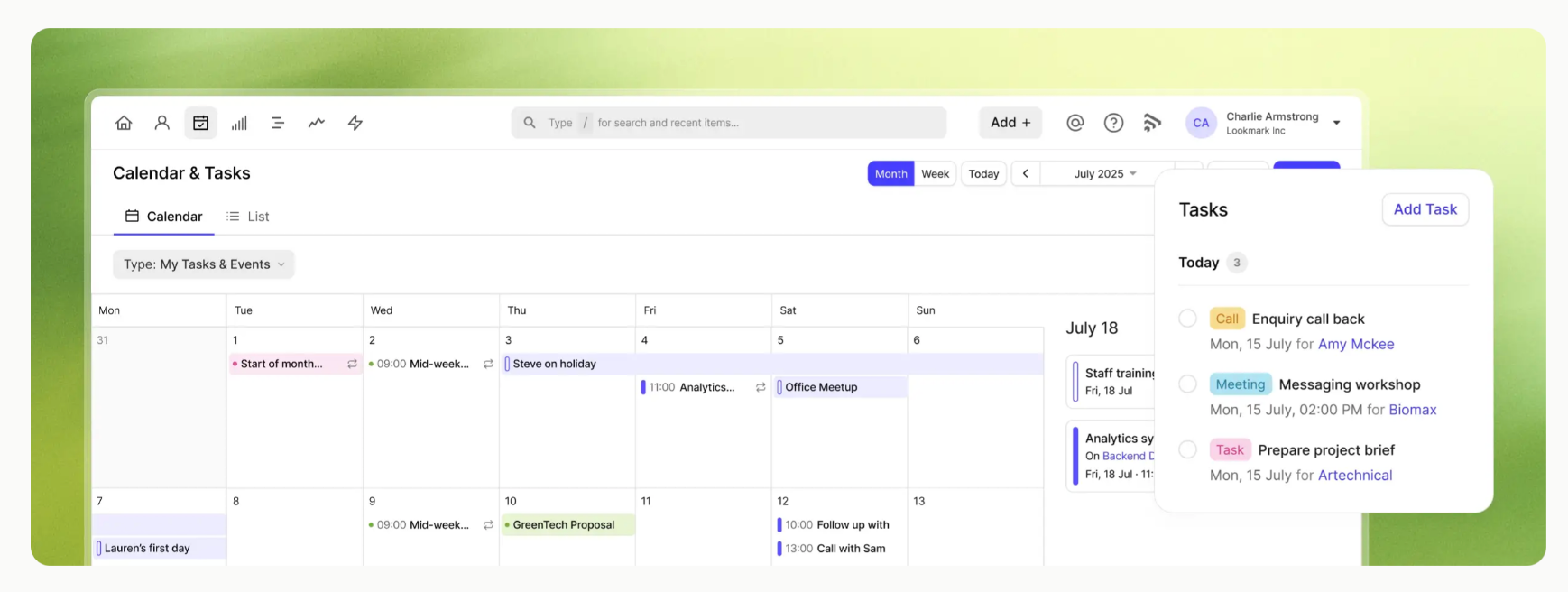
Add discovery notes directly to the relevant Opportunity or contact. Record decisions, requirements, objections, and stakeholders while the conversation is still fresh.
Then create Tasks for every agreed action.

For example:
- send technical documentation
- confirm integration requirement
- prepare pricing
- invite Finance Director to proposal review
Tracks can define the follow-up steps after each discovery call, so reps know exactly what to do next. A consistent workflow keeps the pipeline focused on meaningful deal stages.
Stage 4: Proposal
Goal
Put a specific offer in front of the buyer and secure a response. Don’t move an opportunity to Proposal because someone is preparing a deck. Move it only when the proposal has actually been sent.
Before sending the proposal
Check that it answers the questions uncovered during Discovery. At minimum, the buyer should be able to understand:
- what you are offering
- what is included
- what it costs
- what happens next
- what assumptions or limitations apply
Avoid sending a generic document with a few names swapped out. The proposal should show that you listened and understood the buyer’s situation.
Set the follow-up before you send
Never send a proposal and decide later when to follow up. Create the follow-up Task at the same time.
For example:
- Proposal sent: Monday
- Follow-up: Thursday
- Proposal review call: Following Tuesday
This removes the common “I sent it two weeks ago and forgot to chase them” problem. Our guide to following up more effectively covers ways to structure that process. For longer deal cycles, a defined sales cadence can also help avoid inconsistent follow-up.
Add commercial data
By this stage, the opportunity record should include the expected deal value, close date, and the products or services involved. If your team uses probability estimates, add those too, along with the decision date when it is known. Keeping those fields up to date gives the pipeline enough commercial context to support more accurate forecasting.
Exit criteria
Move to Negotiation when the buyer has reviewed the proposal and begins actively discussing:
- price
- scope
- terms
- implementation
- contract details
- purchasing conditions
If they reject the offer, close the Opportunity as Lost. If they go quiet, keep it in Proposal and follow your agreed follow-up process.
How to use Capsule here
Update the Opportunity value and expected close date. Attach or reference the relevant proposal documents.
Create Tasks for:
- proposal follow-up
- proposal review call
- requested amendments
- internal approvals
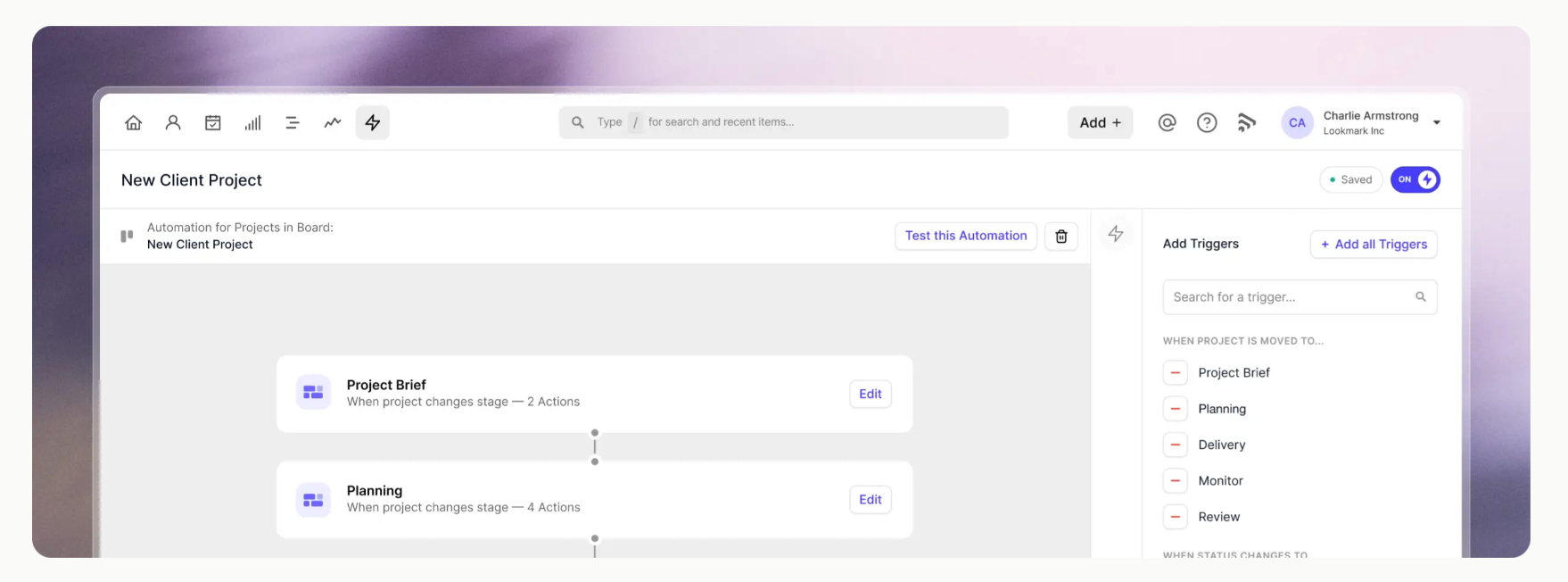
You can also use Workflow Automation to trigger repeatable Tasks when an Opportunity reaches a particular Milestone.

Stage 5: Negotiation
Goal
Resolve the specific issues preventing the buyer from making a decision. Negotiation should have visible movement. If the buyer hasn’t replied for three weeks, you are probably not negotiating – the Opportunity is stalled.
Track what is actually being negotiated
Record the open issues. For example:
This is much more useful than a note that says “Negotiation ongoing.”
Don’t discount automatically
If the buyer pushes back on price, first identify what the objection actually means.
They may:
- lack budget
- compare you with a cheaper alternative
- question the value
- want a different package
- need internal justification
- be using price as leverage
Handle the actual issue before changing the commercial offer.
For practical examples, see how to handle objections in sales calls.
Review the close date
Expected close dates become unreliable if nobody updates them. If the buyer's procurement process adds three weeks, change the date. If the stakeholder meeting moves, change the date. A forecast is only as reliable as the data behind it.
Exit criteria
Move to Closing when:
- the major commercial questions are resolved
- the buyer has indicated they intend to proceed
- only final confirmation, signature, payment, or another defined action remains
Move backward if the scope changes significantly. Close as Lost if the opportunity is no longer active.
How to use Capsule here
Use Tasks to track each outstanding action and owner. Update the expected close date whenever the buyer's timeline changes.
Capsule can flag Opportunities as stale after a configurable period without progress, which is useful for spotting deals that are still open but no longer moving.
Use filters during pipeline reviews to look specifically at:
- Negotiation-stage deals
- overdue Tasks
- stale Opportunities
- deals closing this month
That gives managers a much more useful review than opening Opportunities one by one.
Stage 6: Closing
Goal
Turn a verbal or written commitment into a completed sale. Define exactly what “closed” means in your business.
Examples:
- contract signed
- payment received
- order submitted
- subscription activated
- purchase order received
Choose one standard, then use it consistently.
Don’t mark deals Won too early
A positive call is not a completed sale.
Neither is:
- “Looks good”
- “We should be able to proceed”
- “Send the contract”
- “I just need to check with Finance”
Keep the Opportunity open until the agreed closing condition has happened. Define what Won means for your team, whether that is a signed contract, completed payment, or another clear commitment. A consistent rule keeps win rates and revenue forecasts based on closed business rather than verbal intent.
Record why deals are lost
Stop using one generic “Lost” reason for everything. Create a manageable set of reasons such as:
- price
- competitor
- timing
- no decision
- requirements changed
- budget removed
- poor fit
- stopped responding
Over time, this gives you useful data. If 35% of lost deals disappear after Proposal, review your proposal process. If pricing is repeatedly cited, investigate which customer segments and deal sizes are affected. And if “no decision” dominates, qualification may be too loose.
How to use Capsule here
Mark the Opportunity Won or Lost once the outcome is confirmed. For won deals, create the next workflow immediately.
That may include:
- customer onboarding
- internal handover
- implementation
- account setup
- first customer success review
Tracks and Workflow Automation can help standardize these post-sale actions. For lost deals, record the loss reason and relevant notes before closing the Opportunity.
Capsule's reporting features can then help you analyze performance across the pipeline.
Sales pipeline best practices
- Keep activities separate from stages. Calls, emails, reminders, meetings, and follow-ups are activities, not pipeline stages. Use stages to show where the buyer is in the sales process, and track rep actions through Tasks, emails, calls, or workflow steps.
- Give every open Opportunity a clear next action. Avoid vague notes like “follow up soon.” Add a specific task, owner, and date so anyone reviewing the deal can immediately see what needs to happen next.
- Watch how long deals stay in each stage. Compare open Opportunities with the typical stage duration of won deals. If an Opportunity has been sitting in Proposal or Negotiation far longer than usual, review the blocker, update the close date, move it back a stage, or close it.
- Use multiple pipelines only when the sales process really differs. Selling different products doesn’t always require separate pipelines. Create another pipeline when the buying journey, stages, stakeholders, or approval process are materially different.
- Keep Opportunity data current. Deal value, expected close date, owner, product, lead source, and key stakeholder information should reflect the latest sales conversation. Accurate records make forecasting and pipeline reviews much more reliable.
- Use automation for repeatable work. Tracks and Workflow Automation can handle predictable follow-up tasks, reminders, onboarding steps, and internal handoffs. Keep automation around the process rather than adding extra stages for every action.
- Run a regular pipeline cleanup. Review stale deals, old close dates, missing next actions, unrealistic values, duplicates, and Opportunities sitting in the wrong stage. A short monthly cleanup can prevent the pipeline from filling with deals nobody is actively pursuing.
A simple sales pipeline [copy now]
If you need a starting point, use this:
Prospecting
Enter: Potential opportunity identified
Do: Capture source, contact, owner, and next action
Exit: Rep decides to qualify it
Qualification
Enter: Rep begins checking fit
Do: Confirm need, fit, timing, stakeholders, and commercial potential
Exit: Discovery is justified and booked
Discovery
Enter: Qualified buyer enters deeper conversation
Do: Confirm requirements, buying process, decision-makers, and next step
Exit: You know what to propose
Proposal
Enter: Proposal or quote has been sent
Do: Set value, close date, follow-up Task, and proposal review
Exit: Buyer responds and begins active evaluation
Negotiation
Enter: Buyer is discussing terms, scope, pricing, or implementation
Do: Track open issues, owners, deadlines, and revised close date
Exit: Issues are resolved or deal is lost
Closing
Enter: Buyer intends to proceed
Do: Complete contract, payment, order, or agreed closing requirement
Exit: Mark Won or Lost
Start with that version, run it for a few weeks, then change only the parts that are creating real problems for your team.
Put your pipeline into practice
Once your stages are clear, Capsule helps turn them into a process your team can easily follow. Milestones reflect deal progress, while Tasks and automation handle the work around each Opportunity.
A well-built pipeline should make stalled deals easy to spot and next steps obvious.
Try Capsule free and build a sales process that matches how your team works.