In 2026, 87% of sales organizations run some form of AI, from forecasting to lead scoring. For a small team, that headline hides a trap. The tools making news assume a data science team, months of clean history, and a lead volume you might not have yet. You can still rank your leads well. This guide shows how to build an explainable lead scoring model from the data already in your CRM, where AI helps, and the moment a paid lead scoring tool finally earns its place.
How AI lead scoring works for a small team
Lead scoring ranks your incoming leads by how likely they are to become customers, so a rep works the queue by close probability instead of arrival order. It's the fast front end of lead qualification, and at heart it's lead prioritization: deciding who gets your attention first. Lead scoring is one of the cheapest ways to lift a sales team's conversion rate, because the same effort goes to better leads.
Traditional lead scoring vs AI lead scoring
Traditional lead scoring does this with manual points.
A demo request earns points, a free email address loses some, and the total tells a rep where to start. AI lead scoring layers machine learning on top: it reads patterns across past deals to predict which new lead looks like the ones you already closed. AI lead scoring uses machine learning to turn your deal history into a score, and automated lead scoring keeps that score current as new lead data arrives.
That prediction is where small teams get stuck.
Predictive lead scoring depends on learning from past patterns, and a five-person sales team usually doesn’t have enough clean, high-volume historical data for the model to learn anything reliably. The rise of AI in sales is real, and adoption keeps climbing among small businesses, so the pressure to buy a scoring engine is real, too. Feed an AI tool a few hundred messy records, though, and it will happily produce a confident score built on noise.
None of this means a small team should ignore AI. It means starting where the leverage is: a clear, manual model first, with AI filling specific gaps once the logic holds.
The benefits of AI lead scoring
The benefits of AI lead scoring are easy to list and easy to oversell.
Done right, scoring helps a rep skip the busywork of guessing, and it improves lead quality at the top of the funnel by sending follow-up to the leads worth the call. Lead scoring is one of the few places where marketing and sales agree on what a good lead looks like. Sales teams using AI to score leads well report a steadier conversion rate and less time lost on dead ends.
The benefits break down fast, though, when the inputs are weak. An AI lead scoring model can rank thousands of leads in seconds, and it can rank them all wrong if the data behind them is stale. Speed with no accuracy just helps you ignore good leads faster.
Do you need predictive lead scoring yet?
Before you shop for an AI lead scoring tool, ask the uncomfortable question: Do you have enough clean data to train one?
A useful rule of thumb: predictive lead scoring starts to pay off at around 100 leads a month and six months of accurate deal history. Below that, predictive analytics is learning a hunch and then repeating it at scale. You can't train your AI on a pattern that isn't there yet.
The data problem runs deeper than volume. Research finds that 94% of organizations suspect their customer records are inaccurate, and analysts estimate close to 70% of CRM data decays every year as people change jobs and companies move. Predictive scores built on records like that don't just miss; they bake yesterday's assumptions into tomorrow's queue.
There's a market caution worth noting, too. Gartner expects more than 40% of agentic AI projects to be scrapped by 2027, often because teams automate a process before they understand it. Scoring is an easy place to make that mistake.
Cost and skills sharpen the point for smaller teams. Across SMBs, 61% name cost as the top barrier to AI, and 54% point to a lack of in-house expertise. Another 41% flag poor data quality, which is exactly what a scoring model lives or dies on. The return math agrees: Nucleus Research now pegs average CRM ROI at $3.10 for every dollar spent, down from $4.90 a decade ago as deployments grow more complex. For a small team, simpler and explainable tends to pay back faster than an expensive AI lead scoring platform you can't feed.
A four-part lead scoring model any small team can build
You can build a scoring model that you can explain to a new rep on day one. It rests on four signals, each answering a different question about the lead.

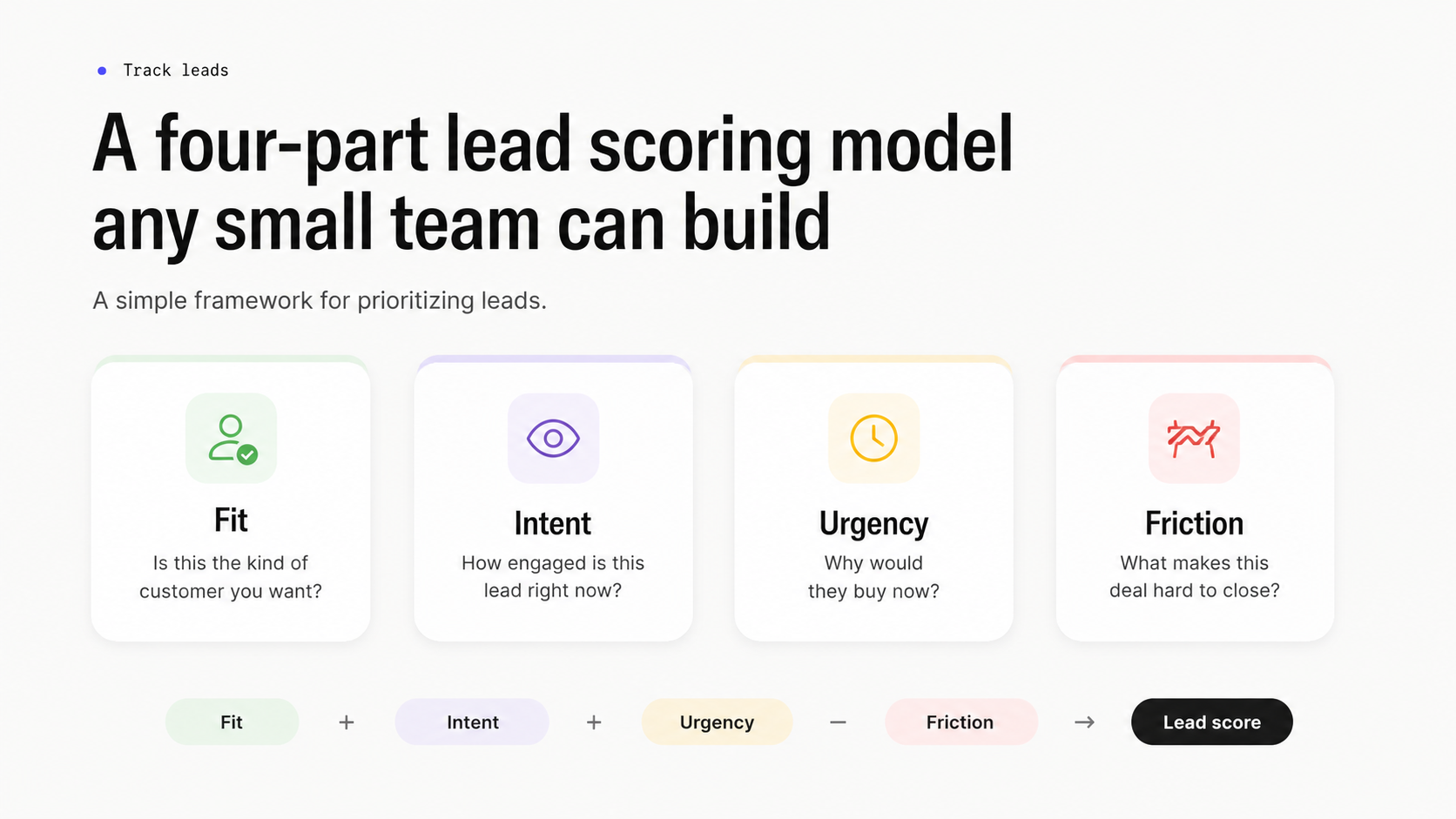
Read the four together. Fit and intent decide if a lead makes the list. Urgency sets how fast you move, and friction keeps you honest about the work involved. These four become your scoring criteria, and the weights behind them become your scoring rules.
Fit: Is this the kind of customer you want?
Fit covers the traits that rarely change during a deal, like company size and industry. They map cleanly to your best existing customers. Pull your last 20 closed-won deals, look for what they share, and those shared traits become your fit criteria. A 30-person manufacturer that looks like your best accounts starts higher than a 2,000-person enterprise that never buys from teams your size.
Intent: How engaged is this lead right now?
Intent reads behavior: replies to your emails and repeat visits to your pricing page. A reply or a booked meeting carries far more weight than an open email. Treat an open as curiosity, and you'll keep the score honest. The pattern matters more than any single action. Three touches in a week beats one touch a month, even if the monthly lead looks busier on paper.
Urgency: Why would they buy now?
Urgency captures the trigger, like a deadline or a contract ending. A lead with a clear reason to act this quarter deserves a higher score than an identical lead with no timeline. Many teams skip urgency, then wonder why their highest-fit leads stall for months. Log the trigger in a note the moment a rep hears it, or it disappears by the next call.
Friction: What makes this deal hard to close?
Friction is the only signal that subtracts. Long procurement or a heavy security review: each lowers the score because it lengthens the path to yes. A high-fit, high-intent lead with brutal friction can still be worth less than a simpler deal you'll close this month. It's the signal that stops a team from pouring weeks into a deal that was never going to close this quarter.
The lead data you already have in your CRM
You don't need new tools to score leads. The signals live in records you already keep, so the job is to analyze the lead data you already collect.
- Contact and company fields: company size and industry feed the fit score.
- Behaviour: pricing-page visits and demo requests feed intent.
- Email engagement: replies and meeting bookings outrank opens and clicks every time.
- Deal stage and velocity: a lead moving through your sales pipeline quickly signals real momentum.
- Sales activity: a rep's logged notes hold the urgency and friction signals no automated field catches.
Score your sources, too. Track where each lead came from in a single field, and after a quarter, you'll see which channels send leads that close and which send noise. A referral and a cold form-fill rarely deserve the same starting score. That habit ties lead scoring and sales follow-up back to the lead generation work upstream, and it often improves the model faster than any tweak to the weights.
One discipline keeps the model trustworthy: treat engagement as a clue you still need to confirm. A prospect who opened four emails and read a case study after visiting your pricing page twice is showing intent. A prospect who opened one newsletter is showing nothing yet.
A worked lead scoring model with thresholds
Use this starter scorecard and adapt the weights to your own deals. The aim is to create custom scoring that fits your pipeline, then refine it every quarter.

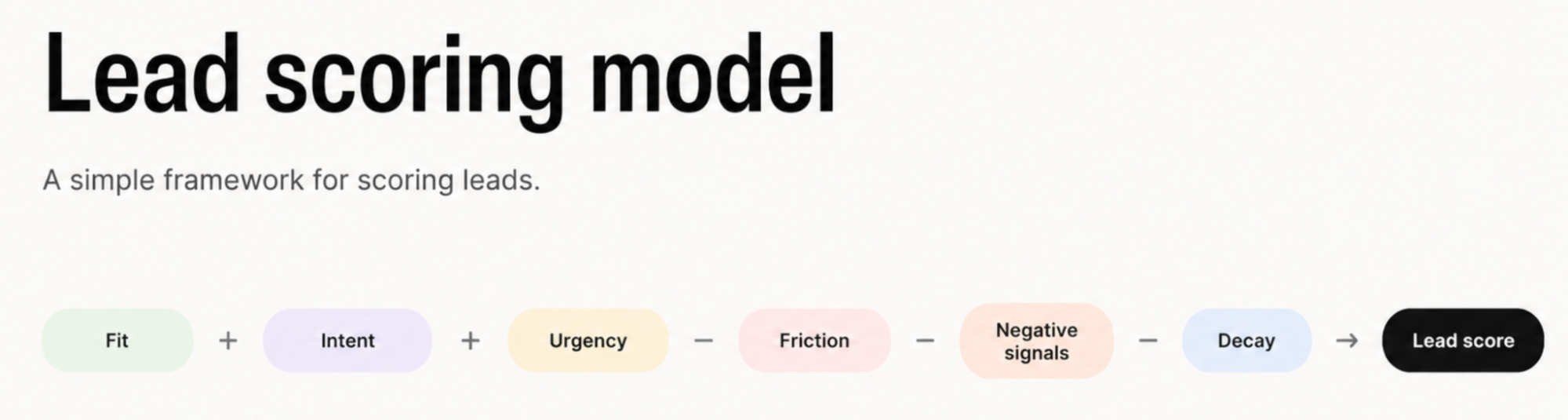
Fit (0 to 40 points)
- Target company size: +15
- Target industry: +15
- Decision-maker role: +10
Intent (0 to 40 points)
- Replied to an email or booked a call: +25
- Visited the pricing page twice or more: +15
Urgency (0 to 20 points)
- A stated deadline or trigger event: +20
Friction (subtracts)
- Heavy procurement or security review: minus 15
- No budget confirmed: minus 10
Negative signals (subtract immediately)
- Free email domain on a B2B deal: minus 10
- Competitor or job seeker: minus 20
Decay
- No activity in 14 days: minus 10, and again every 14 days after
Read the total as three bands:
- 70 and above means call today.
- 40 to 69 means nurture and watch for new intent.
- Below 40 means leave the lead in the pool until something changes.
Every lead now carries a number a rep can defend.
Run a real lead through it. A 30-person agency (target size, +15; target industry, +15) replies to your proposal email and books a call (+25), and mentions a contract ending in September (+20). No heavy procurement, no negative flags.
That lead lands at 90: call today. A solo founder on a free email address who opened two newsletters and did nothing else scores in the teens, and waits.
A different shape: a two-person SaaS startup requests a demo (intent, +25) but lands on a free email domain (minus 10) with no stated timeline. Decent intent, thin fit, and urgency. It scores around 30, which puts it in nurture until a clearer signal arrives.
Set the weights from your own history instead of these defaults. If your last 20 wins skew toward one industry, that industry earns more points. Tune the scorecard each quarter, and that tuning is where real score accuracy comes from. Review the scoring results against closed deals, and the model gets sharper every time.
Lead scoring best practices: avoiding five common mistakes
AI in lead scoring only works as well as the data under it. Even an effective lead scoring system fails in predictable ways, so these lead scoring best practices are framed as the mistakes to avoid.
- Scoring on bad data. A score built on dead emails and duplicate records is worse than no score, because it looks authoritative. Clean the data before you score it. A quick dedupe and a bounce check on emails clears the worst of it, and it's what makes an accurate lead score possible at all.
- Rewarding vanity signals. Email opens and page views inflate scores and tell you little about real intent. Weight replies and pricing-page depth instead.
- Automating bias. An AI-driven lead scoring model trained only on the leads you chased learns your old assumptions and repeats them. A review of 44 lead scoring studies found that many models lack any framework to catch this. Keep a human reading the misses.
- Letting the model go stale. A scoring model set once and left alone drifts as your market shifts. Refresh the weights every quarter against closed-won and closed-lost.
- Trusting a black box. Over-reliance on AI scoring backfires the moment a rep can't see why a lead scored high. They'll stop trusting the number and fall back on gut feel. An explainable score you can defend beats a clever one you can't.
Where AI helps, and where to keep it manual
AI earns its place in the supporting work, well clear of the judgment call. Let it enrich a record with public company data or summarize a long history before a call. It can draft a follow-up email you'll edit, too. Each of those saves a rep real minutes… and changes nothing about why a lead scored the way it did.
Keep the scoring logic itself manual and visible for as long as you can. The weights and the negative signals are decisions your team should be able to read and challenge. An AI model nobody can question shouldn't hold them.
The promise of AI-powered lead scoring and advanced AI tooling is real, and it's worth far more once you already trust the simple version underneath. Use AI to remove the busywork around a score, and keep the score itself something a person owns.
How to implement AI lead scoring in your first week
You don't need a project plan to implement AI lead scoring. A working rollout fits inside five days.
- Monday: pull your last 20 closed-won deals and list the traits they share. That becomes your fit profile.
- Tuesday: draft the scorecard above with weights that match those traits, and sanity-check it against three deals you lost.
- Wednesday: add the Lead Score custom field and score every open lead in your pipeline.
- Thursday: sort the list and have reps work the top band first, logging what they find.
- Friday: review the misses. Any low-scored lead that closed, or high-scored lead that ghosted, points to a weight worth changing.
By the second week, you have a lead scoring process that the team helped shape, which is the surest way to get the scores trusted. Implementing AI scoring later is far easier once this manual-based runs.
How to set up lead scoring in Capsule
With the model defined, setting up lead scoring in Capsule is straightforward, and it fits neatly into your existing lead management process. Capsule isn’t a predictive lead scoring platform, but that can be a strength for small teams: you decide what makes a lead valuable, and the CRM helps your reps act on that logic.

Start with the score itself. Add a numeric Custom Field called Lead Score to your contacts or opportunities. Capsule’s Custom Fields let you store the information that matters to your business, and number fields can be used in filters, making it easy to create a live list of every lead above a threshold, such as 70. That saved list becomes a simple call-first queue each morning, without needing a separate scoring tool.

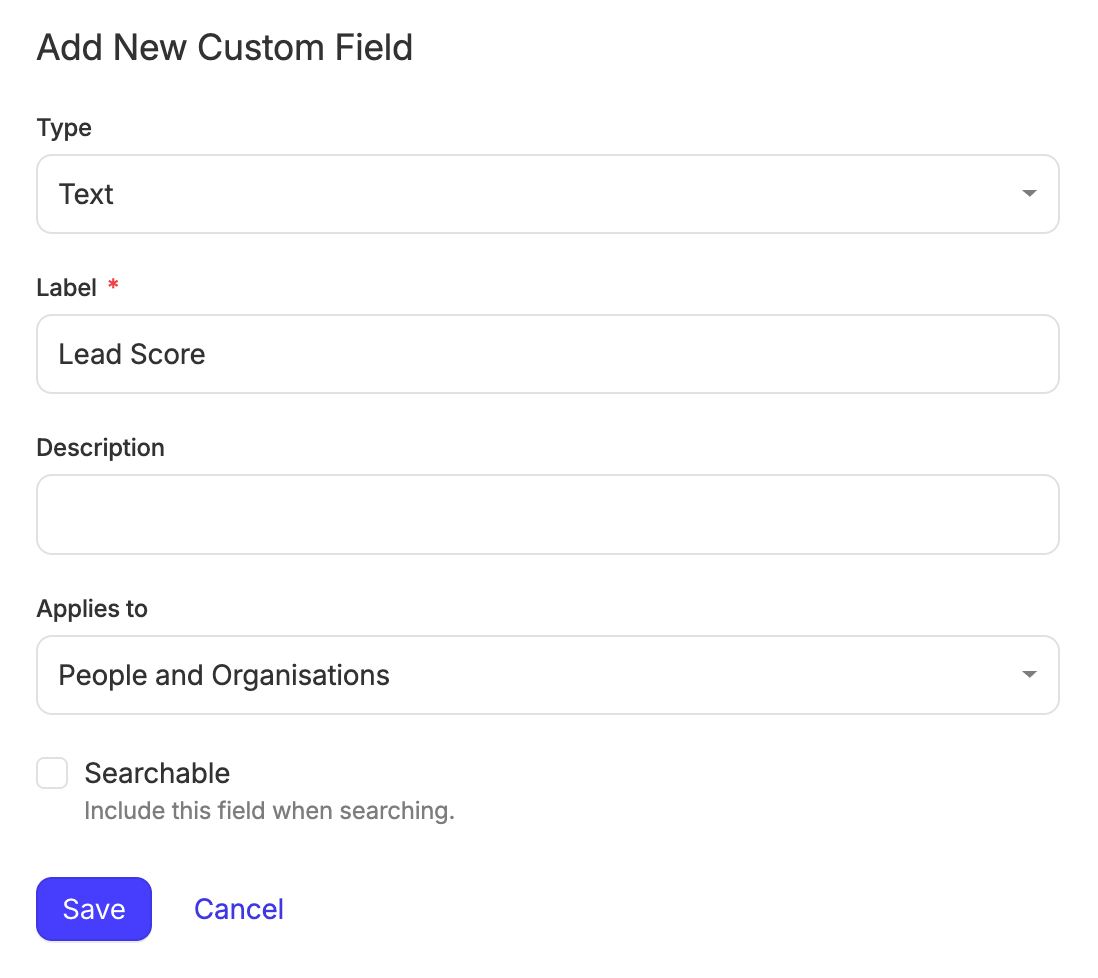
Group the fit traits with a DataTag. Capsule’s Tags, Custom Fields, and DataTags give you a tidy way to structure lead data. A “Lead” DataTag can hold inputs like industry, company size, role, budget, use case, or source in one block. That gives reps the full reasoning behind the score, not just the final number.
Then, use Tracks and Workflow Automations for follow-up.
Tracks let you apply a predefined sequence of sales tasks to an opportunity, so every qualified lead gets the same follow-up rhythm. On plans with Workflow Automations, Capsule can trigger actions when an opportunity or project moves into a specific milestone or stage, or when its status changes. The cleanest setup is to use your score to decide when a lead should move into a “High priority” or “Qualified” stage, then let Capsule create the next tasks, apply the right Track, or assign ownership from there.
If you want the score itself to trigger routing automatically, you may need to connect Capsule to another tool through an integration or API. Capsule can support a practical score-based workflow, but it is better treated as a transparent rules-based process than a native predictive scoring engine.
Fill the gaps with AI you control.
Capsule’s AI features can help small teams prioritize and act faster without handing over the whole sales process.

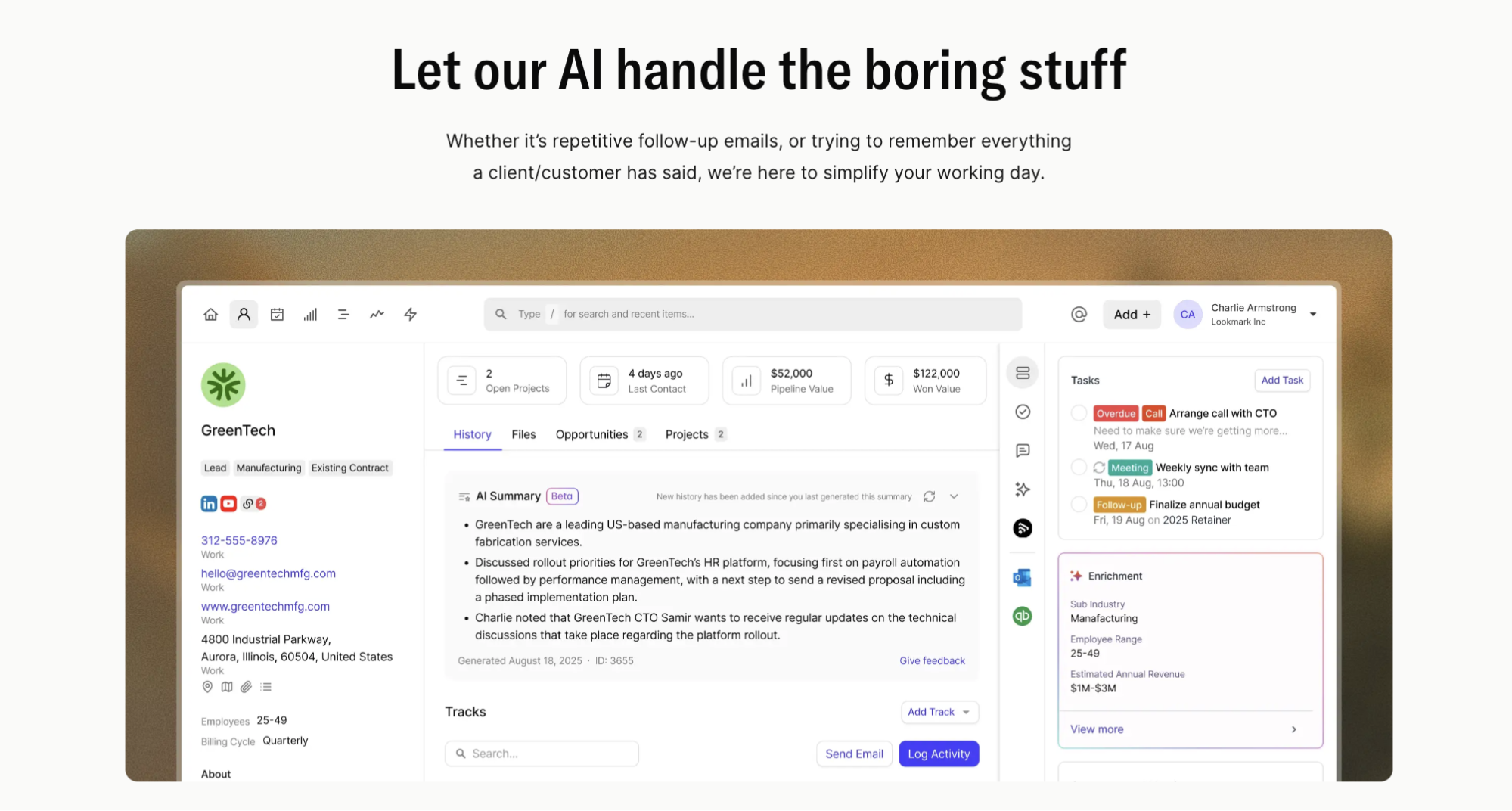
- AI Business and Contact Enrichment can help complete public company and contact details, so your fit score isn’t blocked by blank fields.
- AI Summaries condense recent activity into a quick overview, helping reps understand why a lead matters before they call.
- And when a high-priority lead is ready for outreach, AI Email Assist can turn a short prompt into a draft that the rep edits instead of starting from a blank page.
You can start with a manual model on Capsule’s free plan, which includes two users, up to 250 contacts, and custom fields. More advanced workflows and AI features sit on paid plans, with Workflow Automations available from Growth.
Check Capsule’s pricing page for the latest plan details and trial options.
Close the loop with reporting. Once a quarter, compare the leads that scored high against the deals that actually closed. If company size mattered less than expected, reduce its weight. If one lead source consistently converts, increase its value. That habit turns a fixed scoring model into one that gets more accurate over time.
When to graduate from manual lead scoring
A manual model scales further than people expect. A solo seller and a six-person sales team can both run one well. You'll know you're outgrowing it when two things happen at once: lead volume climbs past a few hundred a month, and your segments start behaving so differently that one scorecard can't fit them all.
At that point, you shouldn’t rip everything out. You add automation to the parts that have earned trust and split the model by segment, letting the cleaner history you've built feed richer rules. The signs are practical. Reps start saying the score feels off for a whole segment, or you find yourself keeping mental overrides that the field doesn't capture. That's the cue to look at a dedicated AI lead scoring solution now that you can finally feed it. At that point, your sales and marketing data is clean enough for an AI lead scoring tool to add value instead of making assumptions.
Lead scoring that your team will trust
Good lead scoring does one job well. It tells a rep who to call first in a way they can trust and defend. That trust comes from a model people can see into, fed by data they already collect, tuned against deals they closed.
Capsule gives a small sales team the place to run exactly that:
- custom fields to hold the score,
- DataTags to explain it,
- saved lists to rank the queue,
- and Tracks to act on it.
No data science team, no six-week onboarding, no black box deciding your pipeline for you in 2026 and beyond.
Start with the free plan and score your next lead today.