
How to keep track of sales for a small business: a simple 5-step system
Keeping track of sales gets harder long before a business feels “big.” A quote sits in an inbox somewhere while payment data lives elsewhere, and the next follow-up may not be recorded at all. The owner can know the business inside out and still struggle to answer a basic question: what has been sold, and what still needs attention?
The fix, fortunately, isn't a more complicated reporting setup. It's separating closed sales from open opportunities, then giving each one a simple place to live. Today, we’ll show you how to do it.
First, decide WHAT you're trying to track
“Sales tracking” can mean different things depending on how a business sells.
A shop may care about completed transactions. A small agency also needs to see which proposals are still open and which clients need a follow-up. Those businesses shouldn't track sales in the same way.
Start with the question you want the numbers to answer. Different goals call for different information and, sometimes, different tools.
- What have you already sold? Record the sale date, product or service, amount and payment status in your POS, accounting software or spreadsheet.
- What may close next? Track the customer, deal value, sales stage and expected close date in your CRM.
- Who needs a follow-up? Keep the last contact, next action and due date in your CRM so nothing gets overlooked.
- Where does new business come from? Record the lead or referral source in your CRM or sales tracker.
- What have customers paid? Use accounting software to track invoices, amounts, due dates and payment status.
- Which products sell best? Review products, quantities and revenue in your POS, ecommerce platform or accounting system.
The distinction becomes important when a business sells through conversations, not transactions.
Accounting software can tell a design agency that a $4,000 invoice was paid last month. It may not tell the owner that another proposal has been unanswered or that someone promised to follow up with the prospect.
That's pipeline data.
A CRM covers the work leading up to the sale, while accounting software records the financial result after it happens. Some businesses only need one view. Service companies and small B2B teams often need both. Once the records are clean, you can start analyzing sales data to see what is driving revenue.
What should a small business sales tracker include?
Start with the minimum information you need to know what happened and what happens next.
You can always add fields later.
If you sell services or B2B
Imagine a small marketing agency. Its tracker could include three active opportunities:
Green & Co | Website redesign
- Deal value: $3,500
- Stage: Proposal sent
- Last contact: September 18
- Next action: Call about proposal
- Due date: September 22
Northside Dental | SEO retainer
- Deal value: $1,200/month
- Stage: Discovery
- Last contact: September 19
- Next action: Send scope
- Due date: September 21
Bell Architects | PPC management
- Deal value: $950/month
- Stage: Negotiation
- Last contact: September 17
- Next action: Revise quote
- Due date: September 20
That already tells the owner much more than a revenue total.
Green & Co hasn't bought anything yet, so the $3,500 shouldn't appear as closed revenue. But forgetting the follow-up could still cost the business the deal.
In a company like this, the tracker is less about counting transactions and more about keeping opportunities moving.
We have a separate guide to the sales metrics worth tracking once you want to measure conversion rates, sales cycle length or win rates. You don't need all of those fields in your day-to-day tracker from the beginning.
If you sell products
A small product business may need a much simpler record. For example, a ceramics shop could track its sales like this:
- September 18, website: Two ceramic planters sold for $84. Payment received.
- September 18, physical store: One large vase sold for $72. Payment received.
- September 19, market stall: Four ceramic planters sold for $168. Payment received.
Each record captures the sale date, product, quantity, amount, payment status and sales channel. That's enough to review daily revenue and see which products are selling.
If your ecommerce platform or POS already records this information, keep it there. Copying every transaction manually into a CRM would create work without giving you much back.
If your ecommerce platform or POS already records this information, keep it there. Copying every transaction manually into a CRM would create work without giving you much back.
A CRM makes sense when sales need follow-up. Use it for wholesale leads, corporate orders and custom projects, while accounting stays focused on transactions.
The fields should follow the decisions you make.
How to keep track of sales in 5 steps
You just need a clear way to record what’s happening and a habit of keeping it current.
1. Put every sale or opportunity in one place
Pick the place your business will treat as the record.
- A solo consultant with only a few active prospects may still be fine with a Google Sheet. As the list grows, a CRM for solopreneurs can make follow-ups easier to manage.
- A consultant selling longer projects may need to track discovery calls, proposals and expected start dates. A CRM for consulting can keep those stages visible.
- Someone working mainly through referrals may want to record who introduced each lead and when to follow up.
- A shop may already have completed transactions recorded in its POS or accounting software.
- An agency handling proposals at different stages may benefit from a CRM for agencies, where opportunities stay linked to customers and conversations.
Each opportunity can stay linked to the customer and the conversations around it.
Don't keep part of the sales process in a spreadsheet while the rest lives in inboxes or private notes.
If customer information is already spread across several places, a client management system can give the team a shared record to work from.
2. Record the same information every time
A tracker becomes hard to trust when every row works differently.
One salesperson enters expected deal value while another leaves it blank. Someone writes “hot” in the stage column while somebody else uses “proposal sent.”
Agree on a small set of fields and use them consistently.
A service business might start with:
Customer | Deal value | Stage | Last contact | Next action | Due date
That tells you who you're speaking to, where the deal stands and what should happen next.
Once those basics are being recorded consistently, you can add source, expected close date, or lost reason. Leading sales indicators become more interesting later, once you have enough clean history to compare.
3. Give every open deal a next action
“Proposal sent” isn't a plan. “Call Lucy on Thursday if she hasn't replied” is.
Every active opportunity should make the next move clear.
Imagine opening your tracker and seeing:
Bright Dental | $2,800 | Proposal sent
You still need to open your inbox to work out what's happening.
Now compare it with:
Bright Dental | $2,800 | Proposal sent | Follow up with Lucy | Sep 23
The tracker tells you what to do.
In a CRM, that next action can become a task connected to the customer and opportunity. Capsule supports tasks and follow-up workflows alongside the sales pipeline, so reminders stay connected to the work.

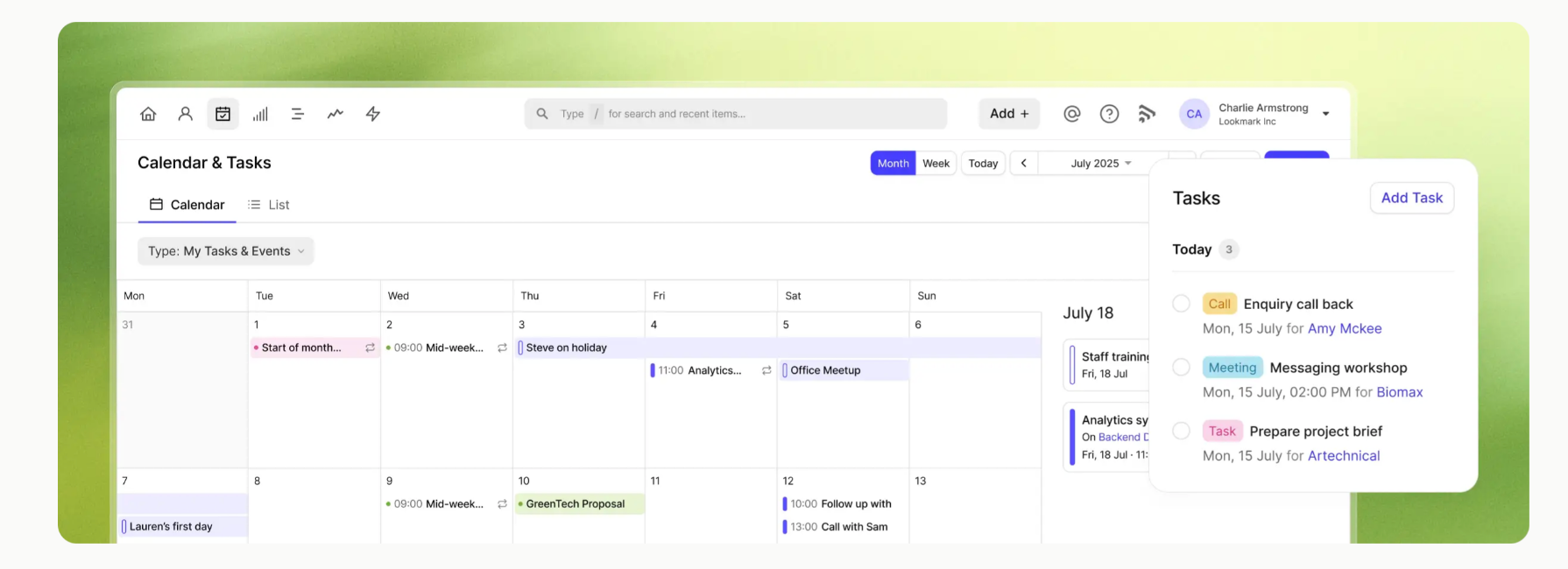
Repeatable processes can also be handled with Tracks, so the same follow-up sequence doesn't have to be rebuilt each time.
4. Update the tracker when something changes
Sales tracking becomes painful when all the admin is left until later.
Update the record while the information is still fresh:
- If a customer replies, change the stage if needed.
- A sent quote belongs in the tracker.
- A prospect asking to be contacted next month needs a next action.
- A lost deal should be closed.
Most updates are small. Leaving them until later means reconstructing the sales process from sent emails, calendars, and call notes. That's when records go stale.
Email and CRM connections can reduce some of the manual work. Capsule can keep customer communication linked to contact records, which helps when several people need to understand the same relationship.
5. Review the tracker regularly
Open every active opportunity often enough that nothing stays unnoticed.
The review doesn't need to become a formal sales meeting.
Look for overdue follow-ups and deals without a next action. Check the opportunities that haven't moved recently and close anything that's dead. Then look at what came in and what could close soon.
As the data builds, you can start using it for sales forecasting and base revenue projections on real pipeline activity. That gives you a clearer view of what may close – and when.
Spreadsheet, CRM or accounting software?
Small businesses often get stuck here because the tools overlap just enough to be confusing.
They have different jobs.
Small businesses often get stuck here because the tools overlap just enough to be confusing. They have different jobs, though, and the right choice depends on how you sell.
Spreadsheet: Best for simple manual tracking
A spreadsheet works when you have relatively few deals and one person manages the process. You can record deal values, stages and follow-up dates without introducing another tool.
POS or accounting software: Best for completed transactions
Use these systems to track completed sales, invoices and payments. They're a natural fit for shops and businesses that mainly need accurate financial records.
CRM: Best for managing opportunities and follow-ups
A CRM makes more sense when sales involve several conversations, proposals or team members. It keeps leads, opportunities and follow-up tasks connected to the customer relationship.
CRM + accounting software: Best for the full sales picture
Combining the two gives you visibility into the path from initial enquiry to paid customer. Your CRM shows what may close next, while accounting software records what has been invoiced and paid.
If you want a deeper comparison before changing anything, we published a full guide to spreadsheets vs CRM as well as a more focused CRM vs Excel comparison.
When you've probably outgrown the spreadsheet
The warning signs are usually mundane:
- You open the spreadsheet but still need Gmail to understand the deal.
- A colleague asks if someone followed up and nobody knows.
- The same company appears on separate rows with slightly different information.
- Reminders live in another calendar, while the tracker shows the stage but not the conversation behind it.
- You can’t tell which deals have been inactive for weeks.
- Notes from calls stay in personal docs or inboxes.
- Updating the pipeline means copying the same information across several tabs.
- You miss a follow-up because the due date was never added to the tracker.
At that point, you're maintaining a list instead of managing a sales process.
A CRM can link the opportunity to the contact history and give each open deal a next task. A visual sales pipeline also shows how many deals are in each stage, so you don’t need another spreadsheet view.

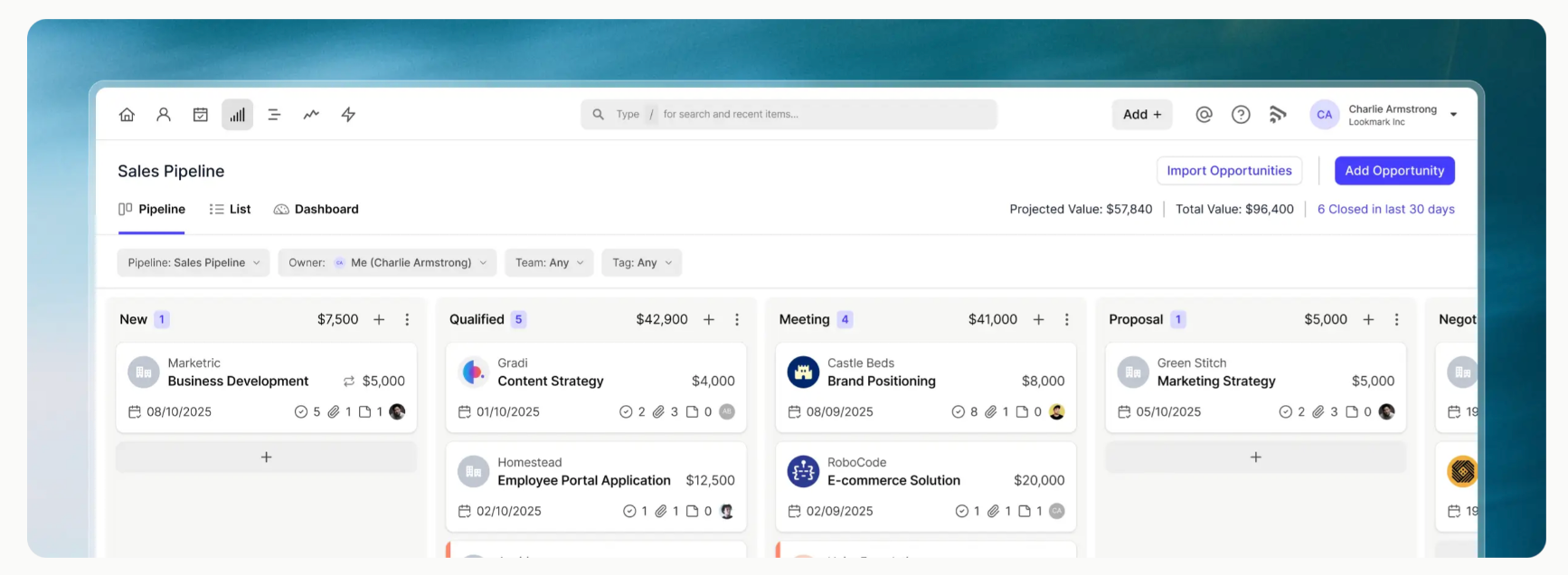
Moving doesn't mean starting again. Capsule supports importing Opportunities from spreadsheet files, so fields such as pipeline, milestone and expected close date can come across with the records.
Here’s a full guide to importing contacts and Opportunities from a spreadsheet if you're considering the switch.
A simple sales tracking routine for a small business
Regular tracking makes the system easier to maintain and keeps the sales data useful day to day.
After a meaningful sales interaction
Update the opportunity if something changed and set the next action before you move on. If the deal is over, close it.
During your regular sales review
Go through open opportunities and look for anything overdue. Check whether expected close dates still look realistic.
If several opportunities keep sticking at the same point, that's worth investigating. Capsule's guide to sales analytics goes further into spotting those patterns.
At the end of the month
Step back from individual deals and review the wider picture:
- How much did you close? Compare it with last month and note what changed.
- How much is still open? Check which deals are moving and which need a follow-up.
- Which sources sent customers who bought? Identify the channels worth putting more time or budget into.
- Which opportunities disappeared? Review where they dropped off and look for patterns you can fix.
Use the review to decide where your attention should go next month. You might find that a few promising deals need another conversation, some leads aren’t a good fit in the first place, or one source consistently brings customers who are more likely to buy. Those patterns can help you decide what to follow up on, what to change and where to spend more of your time.
How Capsule helps keep sales from getting lost
Think back to the agency example.
Without a CRM, an opportunity may appear in a shared spreadsheet while the conversation itself sits in email. Someone looking at the row can see “Proposal sent” but still has to search elsewhere to find out when it was sent and what was promised next.
Inside Capsule, the opportunity can look more like this:
Green & Co | Website redesign
The opportunity is worth $3,500 and currently sits at the Proposal sent stage. The last contact took place on September 18, and the next task is to follow up with Helen on September 22. The expected close date is September 30.
All of that information sits alongside the customer record and activity history. Whoever opens the opportunity can see where the deal stands and what needs attention.
The opportunity is visible alongside the customer record and activity history. Whoever opens it can see where the deal stands and what needs attention.
Capsule's sales pipeline keeps opportunities organized by stage, while tasks give each deal a next move. Teams with repeatable processes can add workflow automation, too.
That doesn't mean every small business needs a CRM from day one. Start with the simplest system you can keep current. Move when keeping the spreadsheet alive starts taking more work than selling.
If you're at that point, our guide to sales CRM software for small businesses covers what to look for before choosing a platform.
You can also start a free Capsule trial and import the sales data you already have.