Ever sent an email and instantly wished for an unsend button?
Everyone in sales has.
The good news: most email regret comes from structure, not talent, and structure is learnable.
A solid professional format does half the persuading before the recipient reads a single full sentence, because the message looks easy to deal with. Our guide breaks down the format piece by piece, then gives you ready-to-use layouts for the sales emails you send most, from the first cold touch to the final nudge.
What is a professional email format?
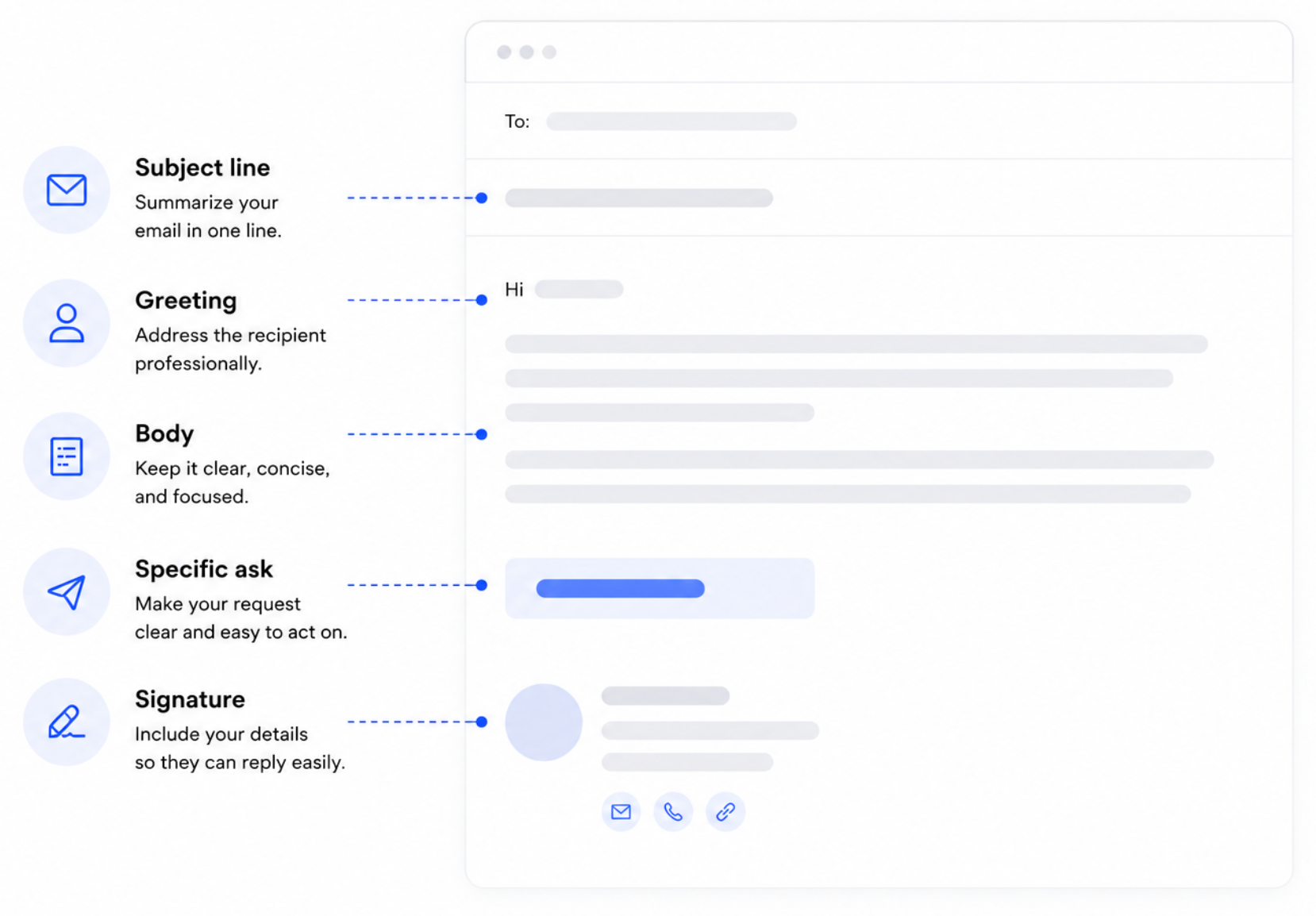
A professional email format is the standard structure that makes a message easy to scan and act on: a clear subject line, an appropriate greeting, a focused body, a specific ask, and a complete signature.

Your email is being judged almost immediately. In those first couple of seconds, the reader has often decided whether to keep reading or archive it – long before your argument gets a fair shot.
The format is a promise to the reader that the next 30 seconds of their attention will be well spent, and readers reward senders who keep that promise.
Format carries extra weight in sales. Your email is often the first impression a buyer forms of you and, by extension, of your company. A well-written email shows respect for the recipient's time and signals that working with you will be just as frictionless. Sloppy structure suggests the opposite, no matter how good the offer is.
You don’t need talent, flair, or a professional copywriter to get this right. It requires a checklist, applied every time, which is exactly what the rest of this guide gives you.
Components of a professional email
Every business message runs on the same handful of elements. Handle them in order, and the rest of the message assembles itself, in any industry and at any level of formality.
#1 Subject line
The subject line is the gatekeeper. The purpose of your email should be obvious from it alone: "Proposal for Q3 onboarding project" beats "Quick question" every time.
Keep it under about seven words, lead with the most specific noun, and skip clickbait – a recipient who feels tricked into opening never opens again.
If the message is time-sensitive, say so in the subject itself, plainly and once. A practical habit is to write your email first and the subject line last, when you know exactly what the message turned out to be about.
And if the thread changes topic midway, change the subject to match, because a thread called "Re: Re: Re: Intro" helps nobody find anything later.
#2 Salutation and email opening
Start with a greeting matched to the relationship: "Dear Ms. Alvarez" for a first formal contact, "Hi Tom" once a thread exists. When in doubt, err one notch more formal. Nobody was ever offended by politeness.
Then get moving. Skip warm-up lines like "I hope this email finds you well" – if the message finds you well-prepared, the reader can tell. "I'm writing to…" followed by your actual reason is unfashionable and effective, which is a good trade.
#3 Body of your email
The body carries the substance, so resist the urge to make it carry everything you know. Before you write, pick the email's one job. State the context in a sentence, make your point, support it briefly, and stop.
Use short paragraphs of one to three sentences and make the message easy to read on a phone screen, because that's where most of it gets read. Try to stay under 150 words. Past that point, response rates fall off a cliff. If a paragraph makes you scroll, it's two paragraphs, or it's a call.
#4 Call to action
An email with no clear ask is a newsletter. End with exactly one ask, sized to the relationship: a first touch justifies "worth a 15-minute call?", and it doesn't justify "can you introduce me to your CFO?".
Make the next move trivially easy to take, propose a concrete time, and close the loop politely: "Please let me know if Thursday works, or suggest a time that suits you better." One email, one ask. Two asks get half-answered, three get none.
#5 Sign-off and email signature
Write a short closing line, then choose a sign-off that fits the register: "Best regards" or "Kind regards" as the safe defaults, "Sincerely" for contracts or first contact with senior stakeholders.
Below it, the signature does quiet credibility work: full name, job title, company, plus contact information that helps – a direct email address and phone number, minus the banner collage. Keep it to four lines or fewer so it looks deliberate. If the signature links anywhere, link to a profile worth landing on, and a sharp LinkedIn headline at the other end does credibility work of its own.
Formatting a formal email: rules that scale
Everything above tightens further when you write a formal email: a contract negotiation, outreach to an executive, or any time you write on behalf of a company to someone who has never heard of you.
Use a clean, professional font in standard size and a single color. Visual restraint looks professional in a way no design flourish can match. Maintain a formal tone from greeting to sign-off, write dates and names in full, and avoid abbreviations the recipient may not share.
Numbers deserve extra care in formal contexts: spell out currencies, time zones, and deadlines completely. A misread date in a casual thread is an inconvenience, and in a contract thread it's a dispute. Watch the mechanics, too. Many email clients clip messages past a certain length and mangle exotic formatting, so plain paragraphs with a blank line between them remain the safest layout ever invented.
One last calibration rule? Mirror the recipient. If their replies are crisp and formal, stay formal. If they loosen up, you may follow, one step behind. Mirroring also applies to length and channel: a person who answers in two lines wants two-line messages, and a person who keeps moving to the phone is telling you where the deal will close.
8 sales email layouts that get replies
Sellers write emails all day, and nearly every effective sales email follows one of a handful of shapes. Knowing the shapes means you never start from a blank screen again. Steal the skeleton and swap in your specifics.
1. The cold email
One line of directly relevant context, one line of value, one small ask.
Subject: Reporting bottleneck at Northwind
Hi Dana, saw your team is hiring three ops analysts, which usually means reporting has become a time sink. We help ops teams cut report prep by half. Worth a 15-minute call next week to see if it applies to you?
Best regards, Alex Chen
Notice what the example skips: company history, feature lists, apologies for intruding. A cold email buys its reading time by being short.
2. The follow-up email
Reference the last touch, add one new piece of value, repeat a smaller ask.
Subject: Re: Reporting bottleneck at Northwind
Hi Dana,
Following up because we just published a case study on an ops team that cut weekly reporting time from six hours to two.
Thought it might be relevant given your team’s growth.
Worth sending it over?
Best,Alex
The classic mistake here is "just checking in," which adds nothing and reads as pressure. Attach a reason to surface: a relevant case study, a new feature, a date-driven prompt. Persistence with value feels like service, but persistence alone feels like nagging.
Plan the sequence in advance – three to five touches spaced a few business days apart – so each message can build on the last.
3. The thank you email
Send it within a day of any meaningful interaction: a demo, a referral, a long call.
Subject: Thanks for today
Hi Dana,
Thanks for walking me through how your team handles monthly reporting today.
Your point about analysts spending more time assembling reports than interpreting them really stood out.
I’ll send the workflow example we discussed by Thursday, and we’ll reconnect Tuesday at 10 a.m.
Best,Alex
The restated step is the real payload, and gratitude is the wrapping that makes it welcome.
This layout also creates a written record of what was agreed, which saves both sides from the "I thought we said" conversation three weeks later. Few habits separate organized sellers from forgettable ones as cheaply as this one.
4. The introduction email
Used when a mutual contact connects you.
Subject: Intro via Marcus
Hi Dana,
Marcus Lee suggested I reach out because you’re both working on scaling operations without adding more reporting overhead.
We help ops teams automate the repetitive reporting work that tends to grow with headcount.
Would you be open to a quick introduction call next week?
Best,Alex
Borrowed trust is one of the strongest assets in selling, so spend it gently. Keep the connector copied on the first message, then move them to BCC with a thank-you once the conversation starts. They get the credit, and their inbox gets its peace.
5. The proposal email
A one-paragraph summary of the problem in the buyer's own words, the proposed solution in two or three sentences, the price stated plainly, and the decision step.
Subject: Northwind reporting proposal
Hi Dana,
You mentioned that the main goal is to cut the time your analysts spend building recurring reports without changing the systems your team already uses.
The attached proposal covers an automated reporting workflow for the three teams we discussed, including setup, integrations, and onboarding.
Total investment: $18,000 annually.
If everything looks right, reply with approval, and I’ll send the agreement for signature.
Best,Alex
Attach the full document, but never make the recipient open it to learn the essentials. Burying the price signals you're nervous about it.
If the proposal followed a call, open by quoting the buyer's strongest stated motivation back to them. A proposal that begins with their words reads like a confirmation, and a confirmation is far easier to approve than a pitch.
6. The meeting request
The reason in one line, the agenda in two or three bullets' worth of prose, then two concrete time options.
Subject: 15 minutes on reporting workflow
Hi Dana,
I’d like to compare your current reporting process with the workflow we use with similar ops teams.
We can cover where the biggest time loss is happening, what could realistically be automated, and whether there’s enough upside to keep talking.
Would Tuesday at 11 a.m. or Wednesday at 2 p.m. work better?
Best,Alex
Offering specific slots converts far better than "let me know your availability," because choosing between options is easier than generating one.
End with a fallback – a scheduling link for the recipient who prefers it. State the meeting length honestly, and keep the first one short. A 15-minute ask gets accepted where a 60-minute ask gets deferred.
7. The re-engagement email
Reopen without blame, give them a new reason to care, then ask an easy yes-or-no question.
Subject: Worth revisiting?
Hi Dana,
Looks like timing got away from us both.
Since we last spoke, we’ve added an integration with the reporting system your team uses, which removes one of the setup issues we discussed.
Worth revisiting this, or should I close the loop for now?
Best,Alex
Don’t recap the three messages they ignored. They already know. Make getting back into the conversation feel easy, not guilty. Lead with what's new on your side and let the past stay past.
8. The break-up email
When several attempts have landed on silence, one final email is the best way to get a definitive answer.
Subject: Closing the loop
Hi Dana,
I haven’t heard back, so I’ll assume this isn’t a priority right now and stop reaching out.
If that changes later, feel free to get in touch and we can pick it back up.
Wishing you and the team all the best.
Alex
Keep it brief, and mean what you say. State plainly that you'll stop reaching out, leave the door visibly open, and wish them well. Paradoxically, this layout gets the highest reply rate of any follow-up, because an expiring option suddenly has a price.
Email etiquette for professional settings
Format gets the message read. Etiquette keeps the relationship healthy, and in sales the relationship is the asset.
Respect the reader's attention
Reply within one business day, even if only to set expectations for a fuller answer. Use CC sparingly and BCC rarely, because surprise audiences erode trust. Default to "reply" over "reply all" unless every name on the thread truly needs the update, and write every email as if a wider audience may read it – eventually one will.
Sweat the pre-send ritual
Proofread out loud before sending. The ear catches what the eye forgives. Verify the recipient field last, after the message is final, which neatly prevents the half-written misfire. Confirm attachments are attached, and if the message mentions a document, attach it before writing the sentence. Small rituals, repeated, are what a reputation for reliability is made of.
Send from the right address
The address you send from carries as much signal as what you send. Use a professional address on your company domain, never your personal one, for anything commercial. For a small operation, a custom domain through an email host built for small business costs little and buys credibility no signature can.
It protects deliverability too: shared free domains carry other senders' sins, and email blocklists don't check intent before they act. And never send an email in frustration. Archives are long and screenshots are forever.
How Capsule helps you send better emails, faster
Writing professional emails consistently is a habit, and habits stick when the tools do the remembering. That's exactly the job Capsule takes over.

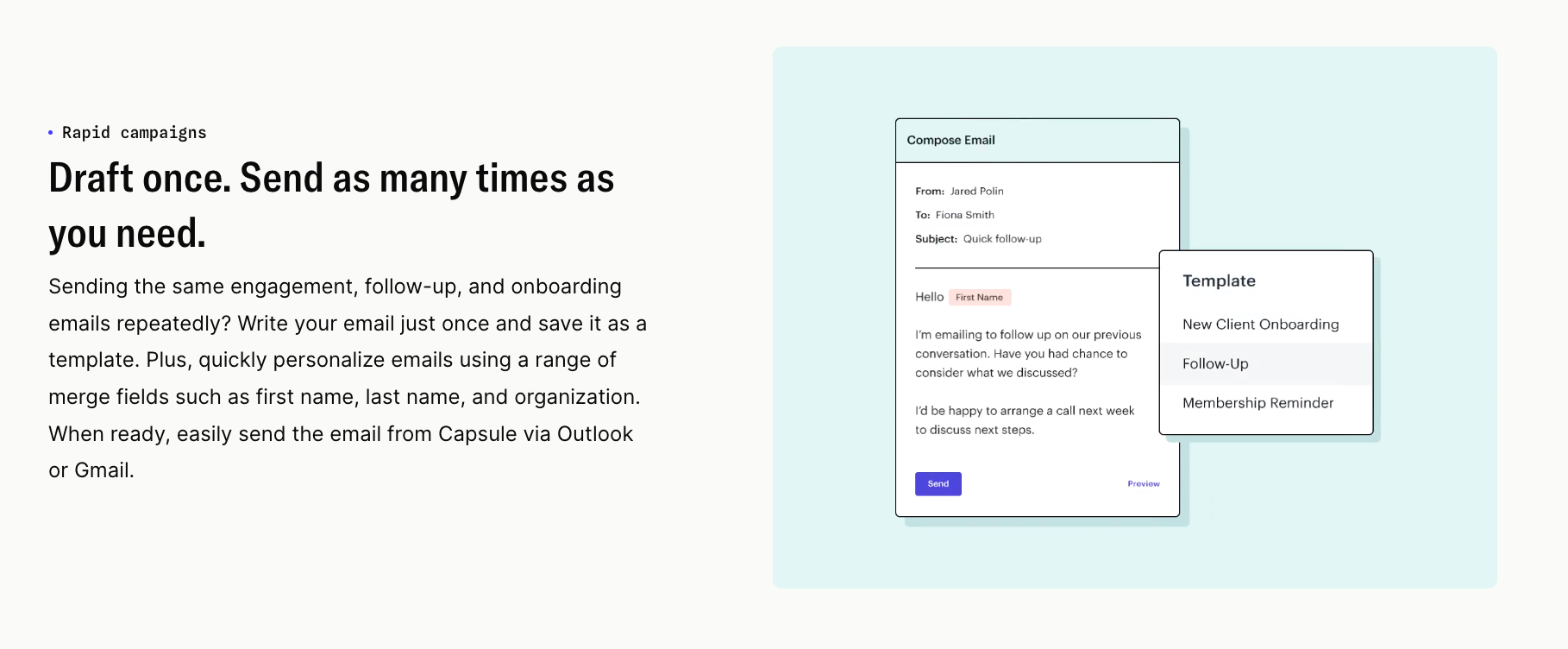
Connect your mailbox and send messages straight from a contact's record, with email templates that lock your best-performing layouts in place for the whole team.
Merge fields personalize the name, company, and details automatically, so consistency stops depending on memory.
AI Email Assist drafts a message from a one-line prompt, using the context already stored in contact management, which turns the blank-screen problem into a review-and-send task. AI Summaries briefs you on the whole relationship before you reply to a months-old thread.
And when you graduate from one-to-one messages to campaigns, Transpond handles email marketing at scale from the same contact data.
Your best email shouldn't be a lucky one.
With the layouts saved as templates and the follow-ups on autopilot, every message goes out looking like something you'd write on your sharpest morning. Set it up on the free plan and let the eight layouts above do their work from inside your pipeline.