
Customer success now decides who stays with you and who moves on. It also shapes upgrades and word-of-mouth. New logos still matter, but growth comes from keeping customers active and confident in their choice. That change puts new pressure on the tools teams use every day.
Sales-first CRMs often lose their edge once the deal closes. Pipelines disappear. Context slips. Customer success managers switch between notes, tasks, and inboxes. Follow-ups turn reactive. The system that helped close the deal rarely helps manage the relationship long term.
A solid CRM for customer success focuses on visibility and flow. It keeps the full customer story in one place. It supports onboarding, tracks momentum, and makes renewals easier to plan. It also needs to stay simple enough for daily use.
This guide sticks to tools that work after the sale.
How we picked the tools
We chose these tools with customer success efforts front and center. The goal was simple: find CRM platforms that help teams manage customer relationships across the entire customer lifecycle, not just during the sale.
Here’s what guided the picks:
- Strong support for communication and customer retention
- Clear visibility into customer health and past customer interactions
- A CRM system that stays easy for customer success managers to use every day
- Automation that speeds up work rather than overcomplicating it
- Pricing that fits growing teams and doesn’t punish success
- Flexibility for companies that don’t run enterprise-size operations
Each tool delivers value through context and actionable insights. The list skips anything bloated or confusing and focuses on options that help teams improve customer outcomes and build strong customer relationships.
Best customer relationship management systems for customer success
Capsule CRM: Best all-round CRM for customer success teams
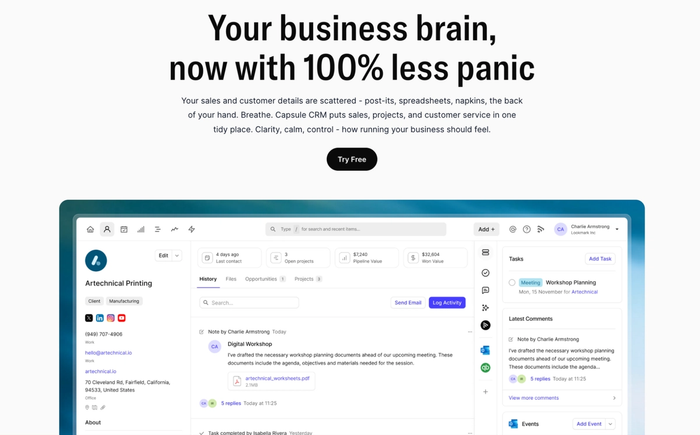
Why Capsule stays strong after the sale
Once the contract is signed, the real work begins: onboarding and building long-term relationships. Capsule CRM keeps all customer data in one place. You can access emails, calls, files, and notes, so a 360° view of every customer.
Tailored pipelines for onboarding, renewal, and expansion
You can build custom pipelines (or “opportunity flows”) for tracking renewal cycles or managing expansion efforts. That means you (and your customer success team) can always see where each customer stands: onboarding in progress, renewal approaching, ready for upsell, etc.
The drag-and-drop interface makes it intuitive, so teams stay focused on customers, not on moving cards around.
Timeline & contact history for full customer context
Every contact or organization in Capsule shows a full history. This makes it easy when multiple people interact with the same customer over time, or when you need to quickly check what was discussed months ago. Even then, anyone on the team can pick up without losing continuity.
Task automation and follow-ups for CSMs
Capsule supports task and activity management: calls, meetings, emails, follow-ups, and reminders. On higher plans, workflow automation (“Tracks”) can trigger follow-up tasks when a customer moves from one stage to another, for instance, from onboarding to live, or when renewal is due.
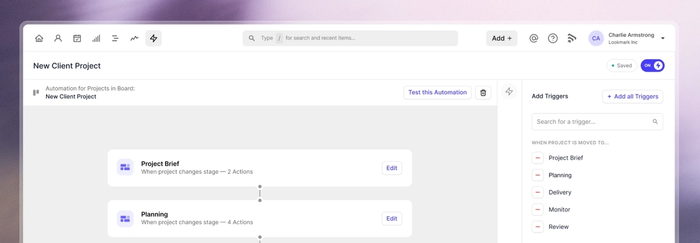
That helps customer-success managers stay on top of everyday to-dos.
Clean reporting
Capsule avoids overwhelming dashboards full of rarely-used features. Instead, it delivers relevant reporting: pipeline overviews, conversion trends, activity summaries, enough to get clarity without complexity.
Such simplicity helps teams focus on customer engagement and outcomes rather than getting lost in analytics overload.
Why Capsule fits small to mid-sized customer success teams perfectly
For teams who can't leverage a full enterprise-level tech stack, Capsule offers the right balance of power and ease. It’s easy to adopt, doesn’t require extensive setup, and integrates with common tools.
Because it avoids feature bloat, teams actually use it consistently, which means the data stays clean and the whole approach to customer success becomes scalable.
HubSpot Service Hub
HubSpot Service Hub anchors its ticketing system directly into the core CRM. Every time a customer sends a message (via chat, email, form, or social channel) it can become a ticket, and that ticket lives alongside their full contact record: past interactions, purchase history, notes, and feedback.
This unified view gives support and success teams full context when handling requests, helping them understand the customer journey in one place.
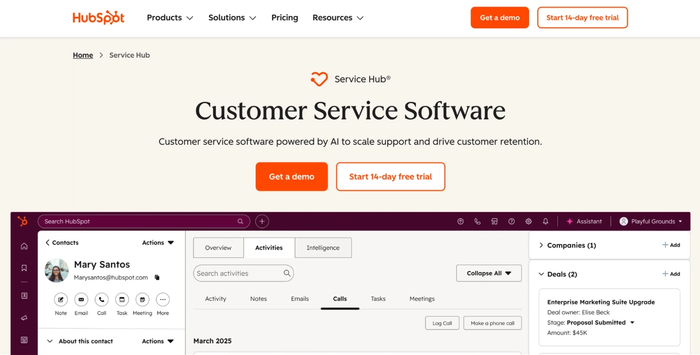
Service Hub offers automation rules and SLA tracking so you can route tickets based on priority, send reminders, or escalate unresolved issues. That’s useful if your support team needs consistency and fast response times. You can also automate feedback requests or post-resolution surveys to monitor customer satisfaction.
For small to mid-sized, support-led organisations keen to keep all customer data and interactions unified, HubSpot Service Hub works because it reduces tool sprawl and improves context. However, once ticket volume rises or customer journeys become complex, some users report that the interface and workflows can feel limiting or cluttered, and customization is harder than with portfolio-dedicated help-desk tools.
HubSpot Service Hub is an attractive “all-in-one” choice when you want to consolidate CRM, support, ticketing, and customer history, and when your support volume remains manageable. It helps you deliver structured support and consistent service.
The trade-off: as complexity grows, some limitations start to show.
Intercom
Intercom stands out because it doesn’t wait for customers to hit support: it reaches them inside the product. You can use in-app messages, product tours, or push notifications to guide users through onboarding, nudge them toward key features, or address issues before they become tickets.
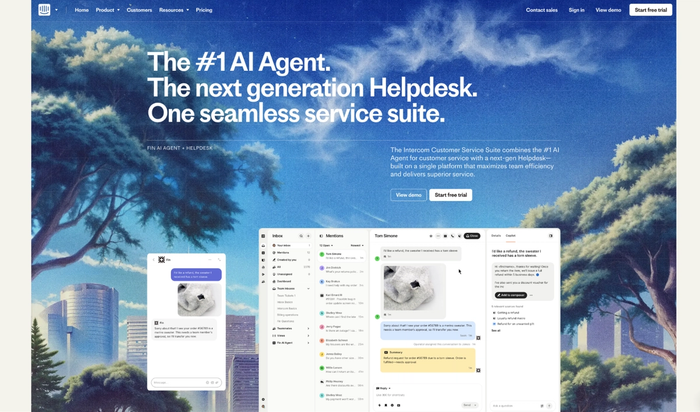
Live chat, email, and messaging all flow into a shared inbox, so your support or success team sees the full customer context regardless of channel. On top of that, AI-powered bots handle common queries, freeing your human agents to solve the complex ones, which helps you scale support without ballooning headcount.
Intercom works especially well for teams building product-led growth, where user engagement, feature adoption, and in-app behavior drive long-term value. Its in-app messaging + onboarding workflows + conversational support help deliver personalized, proactive care.
However, Intercom is first and foremost a customer messaging and support platform, not a full-blown CRM system. It lacks advanced capabilities around detailed account management, renewals tracking, expansion pipelines, or deep customer lifecycle metrics. For customer success operations needing robust customer lifetime value tracking, health scoring, or complex customer segmentation over time, Intercom alone may feel limited.
In short, Intercom works best when you want to elevate customer engagement, onboarding, support responsiveness, and proactive communication. If what you need instead is structured, long-term relationship management, you might need a more full-featured CRM on top.
Gainsight
Gainsight stands out for its ability to turn customer data into actionable insights. Its health-score functionality pulls in product usage, support history, engagement, and other metrics to predict which accounts are primed for renewal or at risk of churn.
This makes it easier for success teams to forecast revenue and focus on accounts most likely to drive growth.
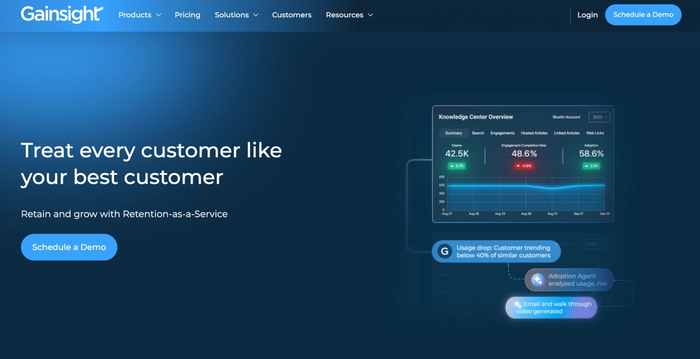
Gainsight lets you build structured workflows (“playbooks”) for customer success: onboarding flows, renewal sequences, expansion nudges, or at-risk-account interventions.
The trade-off: Gainsight isn’t light. Its power comes with complexity and a steep learning curve. Many users report that onboarding and configuring it properly (especially for full lifecycle management) takes significant time and often a dedicated administrator. Also, pricing tends to reflect enterprise scale: this tool delivers value when the customer base and account complexity justify the investment.
Gainsight is ideal for larger organizations or SaaS companies with many accounts, recurring revenue, and a need for data-driven customer success strategies. If your team needs to monitor customer health scores, predict churn or expansion, automate lifecycle workflows, and maintain granular visibility across dozens or hundreds of accounts, Gainsight can function as your backbone customer success platform. For smaller teams or simpler customer pools, its depth may be overkill.
Zendesk
Zendesk’s core strength lies in its help-desk and ticketing capabilities. It consolidates customer inquiries from email, chat, phone, and social media into one unified workspace, making it easy for support or service teams to manage high volumes of customer service interactions without losing track.
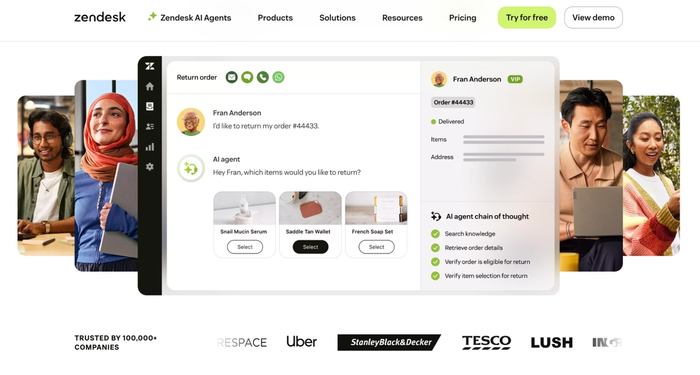
With built-in ticket routing, SLA management, macros, and workflow automation, Zendesk helps ensure customer issues are addressed consistently.
Its analytics and reporting tools can track response times, volume trends, and basic customer satisfaction metrics: useful for support-led operations.
However, because Zendesk is optimized for reactive support rather than proactive client management, its view on long-term account health, expansion opportunities, or customer lifetime value tends to be shallow. Detailed CRM-style relationship data and renewal/expansion pipelines aren’t its strong suit.
Zendesk is ideal for service-led organizations, especially those operating in B2C/SaaS with high customer inquiry volume, frequent tickets, and a focus on fast issue resolution and user support. If your priority is support efficiency, scalable ticket handling, and consistent customer service, Zendesk is a solid choice.
For teams aiming for deep customer success metrics, expansion tracking, or complex lifecycle management, you might want a dedicated CRM in addition.
Freshdesk
Freshdesk is built around a powerful, centralized ticketing system that captures customer inquiries from email, chat, phone, and social channels into one workspace. That focus on ticket management helps support teams stay organized and respond quickly: a core need for customer-centric, support-led operations.
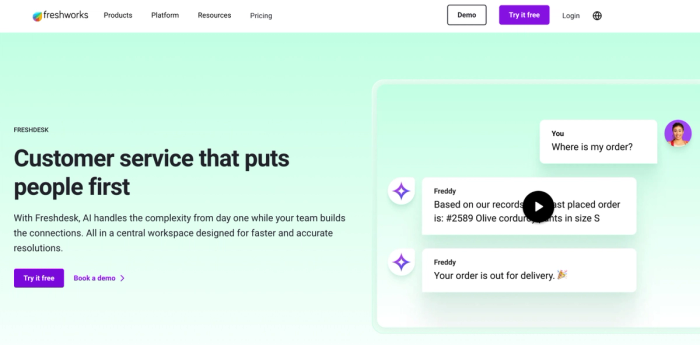
With smart automation rules and AI-powered assistants, Freshdesk can route tickets, escalate issues, set SLAs, and trigger follow-up tasks – reducing manual workload and helping teams resolve problems before they turn into churn drivers.
Despite handling support interactions well, Freshdesk isn’t a full customer relationship management system. Its capabilities for long-term relationship tracking or renewal forecasting are limited compared to dedicated CRM software.
Freshdesk works best for small to mid-sized support and service teams that need reliable ticketing, automation, and rapid response at a budget-friendly price, without deep CRM-level customer management needs.
Quick comparison: which CRM fits which type of customer success team?
For small CS teams in SaaS, the priority is clarity: one place for all your customer data, simple contact management, and tools that help you improve customer relationships without slowing the team down.
Capsule CRM fits that need because it offers the essentials of customer relationship management software – pipelines, follow-ups, and clean visibility – without the overhead. It helps teams anticipate customer needs and stay consistent as the customer base grows.
A product-led growth team relies heavily on understanding customer behavior inside the product. Intercom works well here, providing in-app messaging, nudges, and data-driven guidance that lift adoption. It’s strong for onboarding and proactive engagement, though lighter on long-term customer success management or advanced CRM depth.
A support-heavy organization needs to resolve issues quickly and maintain high customer satisfaction scores. Zendesk or Freshdesk can streamline processes for customer service teams, automate ticket routing, and help identify trends in incoming issues. They support fast resolution and predictable workflows, though they’re not full customer success software for long-term lifecycle management.
For enterprise CS ops, advanced customer success tools like Gainsight offer health scoring, renewal forecasting, and data-driven insights across complex accounts. These teams track detailed key performance indicators and need automation that scales.
If your team looks like a small to mid-sized SaaS customer success group, start with Capsule CRM.
Frequently Asked Questions
In customer success, a customer relationship management CRM system helps teams understand the full customer journey, not just the sales process. It centralizes customer information, customer feedback, product usage insights, and touchpoints so teams can anticipate customer expectations and enhance customer satisfaction over time.
Instead of focusing on closing deals, CRM in customer success focuses on long-term value: reducing churn and helping customers achieve the outcomes they signed up for. The result is stronger customer loyalty and a more consistent customer experience across every interaction.
A sales-focused CRM can work for customer success, but only if it gives teams enough visibility into post-sale activity and room to build repeatable workflows. Many sales CRMs are built for sales teams and pipeline tracking, not for ongoing health monitoring or resolving customer issues proactively. If the tool lets you track CRM data, automate follow-ups, and adapt views to customer success systems, it can support basic lifecycle work.
But if you need deeper insights, customer goals tracking, or structured renewal management, you may outgrow a sales CRM quickly. In those cases, a purpose-built CS platform or a hybrid CRM works better.
The best CRM for managing ongoing customer interactions is one that keeps context clear, organizes touchpoints, and supports exceptional customer experiences without adding friction. Look for CRM tools that centralize messages, track customer preferences, surface valuable insights, and help teams enhance customer success through consistent workflows.
Capsule CRM, for example, keeps interactions clean and easy to navigate for everyone. For support-heavy teams, a help-desk-centric tool paired with light CRM features may fit better. The key is choosing a system that helps your team act quickly, stay organized, and drive business growth through strong relationships.