
Growing firms reach a ceiling fast when leads, clients, and data outpace the tools meant to manage them. Many CRMs simply can’t keep up as teams expand or processes grow more complex. A scalable CRM avoids that slowdown and supports growth without extra cost or friction. Keep reading to see what matters most, and why Capsule stands out first.
What makes a CRM “growth-ready”?
Growing firms need a CRM system that adapts as lead volume, team size, and processes expand.
The right setup supports new products and new workflows without slowing the sales cycle or forcing a costly rebuild. Here’s what defines a CRM that truly grows with you:
- Ability to expand from 1–2 users to 50+ without costing a fortune. A scalable CRM solution adjusts seat counts and storage without sudden price jumps. It keeps your customer data and sales activity in one place as the team grows.
- Flexible pipeline structure for new product lines, new markets, or additional sales motions. A customizable CRM helps you mirror your evolving business model without rebuilding the entire setup. Clear stages make it easier to track leads as your offer expands.
- Strong API and integrations that let you connect new tools as your stack matures. As firms adopt more marketing tools and ops platforms, reliable CRM integrations keep workflows connected. A good API prevents data silos and supports better customer insights across the stack.
- Automations that reduce admin work as lead volume rises. When workflow automation handles tasks, reminders, and follow-ups, reps avoid repetitive updates. This kind of process automation supports sales efficiency.
- Data cleanliness + permissions that support a larger sales team. Growing organizations rely on accurate CRM data and clear access levels for smooth collaboration. Clean data also improves forecasting and strengthens data-driven decision-making.
- Mobile + remote access as teams spread out. Modern mobile CRM apps help reps update contact records and log customer interactions from anywhere. It keeps sales activity moving even when teams work across locations.
Best CRM software for growing businesses
We reviewed each of these CRMs hands-on, testing how they perform as a business scales.
We evaluated their flexibility, ease of use, and whether they stay reliable when lead volume, team size, and business processes grow. Based on those tests, we picked only the solutions that proved their worth beyond the startup stage.
Capsule CRM: best CRM for growing firms
Capsule starts lightweight, so small teams get value fast and skip early setup headaches. As the business expands, the platform adds depth, structure, and automation while staying easy to handle.
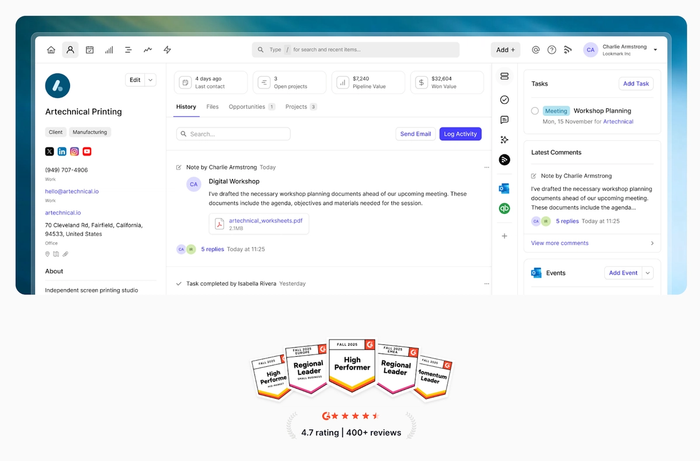
Capsule supports growth in a way that lets firms keep their stack and workflows intact instead of switching tools or rebuilding processes.
Key features for growing firms
- Flexible, customizable pipelines. You can adapt pipelines as new products, services, or territories come into play. Teams keep their sales cycle clear without redesigning the entire system.
- Clean contact and relationship management. Capsule helps teams track conversations, tasks, and customer interactions in a simple workspace. Nothing feels overloaded, even as customer data grows.
- Built-in sales automation. Routine admin like follow-ups and task reminders run automatically, which helps reps stay focused on deals instead of updates. Rising lead volume doesn’t slow the team down.
- Smooth email integration. Capsule syncs with your inbox so messages, threads, and actions stay connected to contacts and opportunities. It reduces manual copy-paste and keeps the account history complete.
- Integrations with marketing, finance, and project tools. Capsule connects with accounting software, marketing automation tools, and project management platforms. Teams can build a mature stack with no complex CRM implementation work.
- Fast performance at any size. Capsule stays clean and intuitive even with more users and data. Many CRMs get cluttered at scale, but Capsule keeps performance steady for growing firms and mid-sized businesses.
Why growing firms love Capsule
- It scales in a straight line, not in unexpected jumps: both in workflow complexity and pricing.
- Teams stay productive because the system stays simple, even as new users join.
- It supports the natural journey from small business to mid-sized company without requiring a switch to a heavier platform.
Pricing
Capsule includes a free plan for small teams getting started, which removes the pressure to commit early. Upgrading is straightforward, and pricing scales predictably as you add more users or unlock advanced features with zero friction or forced jumps into enterprise tiers.
Ready to use a CRM that actually grows with your firm?
Explore Capsule and see how easy scaling can feel.

HubSpot CRM
HubSpot CRM gives growing firms a polished, cloud-based platform with strong marketing and sales capabilities under one roof. Teams get solid tools for lead management and customer relationships, especially if they want sales and marketing activity in one place.
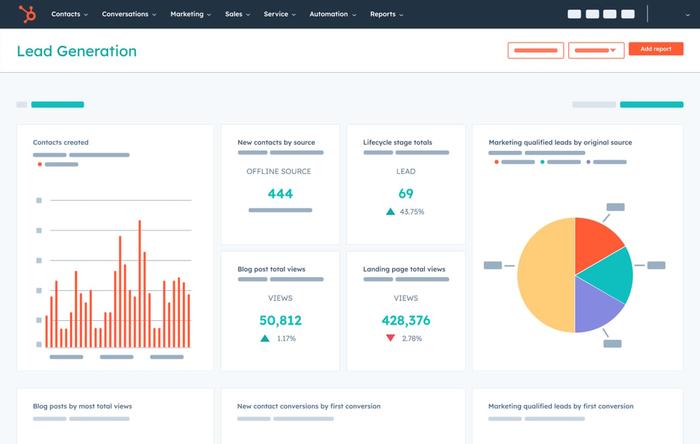
HubSpot works well for companies that plan to scale their sales and marketing engine together.
Pros for growing businesses
- Strong all-in-one ecosystem. HubSpot brings marketing, sales, and service into one customer relationship management system for streamlined sales and unified customer data.
- Good for lead management at scale. The CRM offers clear pipelines and strong sales tracking, making it easier to follow deals across multiple channels. It works well for firms with rising enquiry volume.
- Powerful reporting options. Paid tiers unlock advanced analytics, giving leadership clearer insight into what drives performance. Teams can therefore make decisions based on real activity rather than assumptions.
- Smooth integrations across tools. HubSpot offers an array of integrations with email, ads, and workflow apps. It slots neatly into growing stacks and connects customer interactions across channels.
Cons for growing businesses
- Scaling costs rise quickly. The platform starts free, but advanced features, automation, and reporting push companies into higher-priced tiers.
- The system can feel heavy. HubSpot’s breadth creates complexity for teams that don’t need a full marketing suite.
- Automation is locked behind paid plans. More sophisticated workflows sit in premium tiers, which can slow early operational improvements.
- Overkill for some workflows. HubSpot tries to support many different processes at once, which can create clutter for straightforward sales teams.
Pricing
HubSpot’s CRM pricing starts with a free plan, which is useful for early exploration. Real growth features (automation, deeper reporting, and advanced handoffs) sit inside the paid Marketing and Sales Hubs, which become expensive as the team expands. Capsule often scales more predictably and keeps costs lighter for firms moving from small business to mid-size.
Salesforce CRM
Salesforce CRM suits firms that expect rapid expansion and need an enterprise-level structure from day one. It offers extensive customization and a wide ecosystem built for teams that manage complex sales cycles.
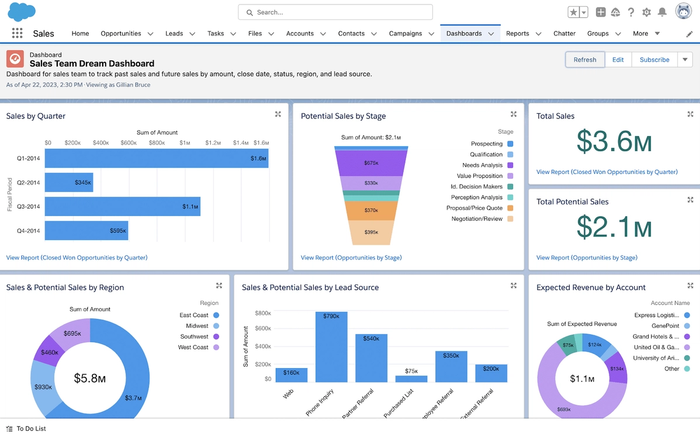
Salesforce becomes relevant once a growing firm needs scale, governance, and detailed control across teams and processes.
Pros for growing businesses
- Extensive customization for complex operations. Salesforce CRM adapts to almost any workflow or sales funnel, which helps teams shape a structure that mirrors their entire business model. It supports detailed tracking of interactions across accounts and service requests.
- Enterprise-grade security. The platform includes strong data encryption and tools that help meet regulatory compliance needs. This matters when firms expand into regulated industries or handle sensitive customer information.
- AI-powered insights. Salesforce’s built-in artificial intelligence features highlight patterns, forecast outcomes, and guide reps to next best actions.
- Rich automation capabilities. Teams can build powerful flows for task automation, approvals, and handoffs. It reduces manual workload as teams and processes grow more complex.
Cons for growing businesses
- High cost of ownership. Beyond licenses, customization and maintenance often require specialist support.
- Complex setup and steep learning curve. Salesforce’s flexibility comes with operational weight, which can slow early adoption.
- It may be too advanced for mid-sized teams. Many growing firms don’t need the level of sophistication Salesforce delivers with its CRM features.
- Ecosystem sprawl. Because Salesforce CRM connects so many modules, the environment can become crowded.
Pricing
Salesforce pricing starts at tiers designed for small teams, but real value appears only in higher plans where automation, AI tools, and customization open up. Those tiers become expensive as user counts rise. Capsule tends to suit growing firms that want predictable costs and structure without enterprise-level overhead.
Zoho CRM
Zoho CRM appeals to growing businesses that want a broad toolkit. It sits in a busy CRM space, yet stands out for the amount of functionality built into an accessible platform.
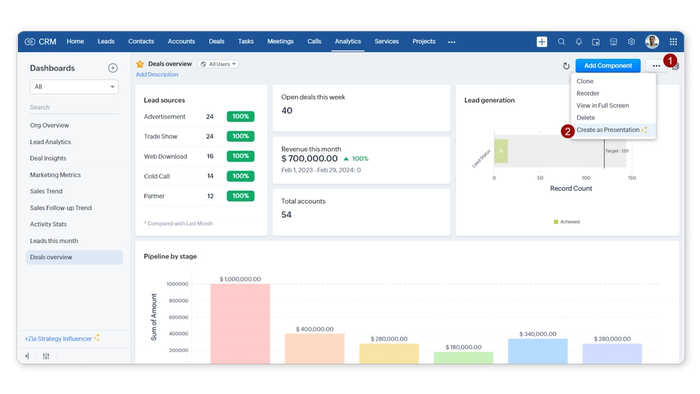
Zoho works well for firms that want a wide ecosystem rather than a narrow, sales-only CRM.
Pros for growing businesses
- Large suite of connected apps. Zoho offers a wide ecosystem that creates a more unified system for sales, support, and marketing. This improves operational efficiency in firms that prefer one vendor for multiple functions.
- Strong customer segmentation features. Zoho also helps teams group contacts based on behaviour, deal stage, or profile. Actionable insights support better outreach strategies and clearer forecasting as the database expands.
- Flexible workflows for evolving sales processes. The platform adapts well as new products or sales motions appear. It helps support unique workflows through custom fields, rules, and automations.
- Extensive integrations. Zoho connects with accounting, email, analytics, and project tools, offering seamless integration across the wider stack for reduced manual data movement.
Cons for growing businesses
- Complexity increases quickly. Zoho’s breadth means teams handle a lot of configuration work before the CRM supports their day-to-day rhythm.
- Learning curve for non-technical teams. New users often need more CRM onboarding to feel confident in the interface.
- An ecosystem can feel fragmented. Even though Zoho offers many apps, they don’t always feel cohesive.
- Automation features may require higher tiers. Firms looking for advanced workflows often upgrade sooner than planned.
Pricing
Zoho CRM starts with modest pricing, but the cost rises as firms adopt more Zoho apps and advanced workflow features. It remains a flexible choice for multi-department teams, though growing businesses that want a more focused CRM often find Capsule easier to scale.
Nutshell CRM
Nutshell is a practical small business CRM that gives growing teams straightforward tools for sales activity, outreach, and reporting. It focuses on simplicity, making it a solid fit for firms that want structure with no heavy enterprise systems.
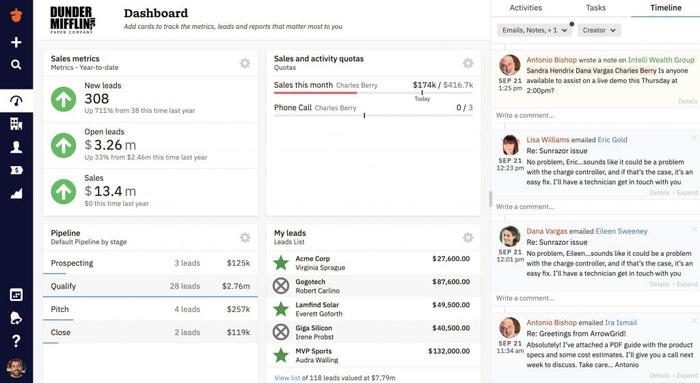
Nutshell works well for companies that want a clean, sales-focused platform to use daily.
Pros for growing businesses
- Clear and intuitive contact management. Nutshell keeps conversations, notes, and tasks organized, which helps teams manage customers as inquiries rise. It avoids the clutter seen in more complex CRM platforms.
- Good lead management tools. Pipelines stay visual and easy to follow, which helps reps spot movement early. Firms using a CRM for small teams often appreciate this clarity as volume increases.
- Reliable automation for sales activity. Nutshell helps automate sales processes with simple rules that support reps at each stage of the pipeline.
- Reporting built for everyday decision-making. Teams gain access to robust reporting capabilities that highlight trends and performance gaps. It’s strong enough for growth planning without being overwhelming.
Cons for growing businesses
- Less broad than other CRM tools. Nutshell focuses on sales and doesn’t try to replace project systems or marketing suites. Capsule offers a cleaner balance of simplicity and integrations for teams that want flexibility later.
- Predictive analytics are limited. Advanced forecasting tools remain basic compared to larger platforms.
- Integrations depend on third-party connectors. It works well with many existing tools, but some connections need extra middleware.
- Not ideal for complex, multi-department workflows. Firms with layered operations or various business models may outgrow the structure sooner.
Pricing
Nutshell’s pricing is mid-range and transparent, which suits growing teams that want predictable costs.
It remains a good option in the best CRM platforms category for small and growing firms, though teams wanting more flexibility, stronger integrations, or smoother long-term scalability often find other CRM cloud solutions a more resilient choice. Capsule often feels more future-friendly for firms expecting expansion.
Nimble CRM
Nimble is a cloud-based, relationship-focused CRM. It’s a straightforward system that emphasises pipeline organization, useful for firms growing from a solo or small-team stage.
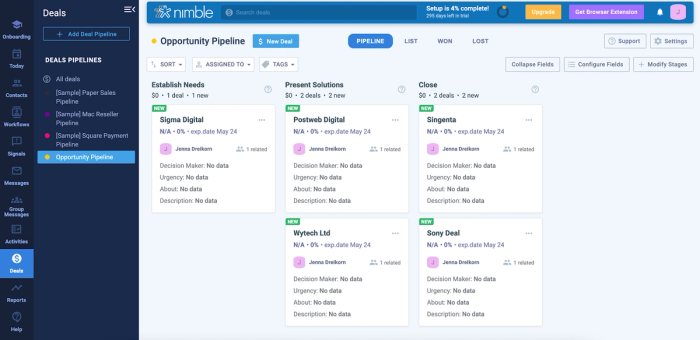
Nimble works best when you care about customer relationships, manageable workflows, and keeping things lean while your business grows.
Pros for growing businesses
- Unified contact management and relationship tracking. Nimble consolidates contacts, email history, social-profile insights, and communication records into one place.
- Lead management tools with easy pipeline visibility. The CRM provides visual pipelines, deal tracking, and clear workflows so you can follow leads as they move through your sales funnel. It’s especially helpful for teams that value clarity and structure as their lead volume grows.
- Built-in outreach and communication tools. You can handle email outreach, follow-ups, and even group messaging directly within Nimble.
- Accessible and easy to adopt for small teams. Nimble’s interface and basic workflow are intuitive, which reduces onboarding friction for small businesses or lean teams. For organisations that don’t need heavy customization, it helps begin CRM implementation quickly and effectively.
Cons for growing businesses
- Limited advanced features and customization. Users often note that once workflows become more complex or require fine-tuned automation or segmentation, Nimble feels basic. For growing firms with evolving processes, it may not offer enough depth long-term.
- Reporting and analytics remain relatively basic. While Nimble covers pipelines and contact history, its reporting tools aren’t as robust as those found in more advanced CRM solutions, which may hinder data-driven decisions as you scale.
- Storage and contact limits may pose constraints. The business plan includes storage and contact-record caps; exceeding them can lead to additional fees, which may complicate scaling for firms with rapidly growing customer bases.
- Less ideal for multi-department or complex workflows. Nimble’s simplicity works for small teams, but organisations with distinct sales, marketing, and support departments might outgrow its feature set quickly.
Pricing
Nimble offers a straightforward pricing plan: roughly $24.90 per user/month when billed annually (or $29.90/month billed monthly). That makes it relatively affordable for small teams or firms in early growth stages, though you may need add-ons or external tools if you outgrow the core features.
If you expect to scale into mid-sized business territory or prioritise heavy data-driven decision-making, you may find Nimble’s limitations restrictive. In those cases, a CRM like Capsule CRM or another more scalable platform might offer better long-term value.
Signs your current CRM won’t scale with you
- Manual updates increase as deal and lead volume rise. Reps spend more time fixing data than moving opportunities forward.
- Pipeline clutter appears when new products or sales motions enter the mix. The structure no longer reflects how the team actually sells.
- Reporting can’t keep up with new KPIs. Leadership loses visibility, and forecasts become guesswork.
- Adding users slows the system or inflates costs. Growth becomes harder to support on both the technical and financial side.
- Teams start improvising spreadsheets around the CRM. It’s the clearest sign the system no longer matches your process.
How to choose a CRM that grows with you
- Start with the core: pipeline fit, sales process fit, and team workflow. A CRM should match how your sales reps actually work, not force them into a rigid structure. When the foundation aligns with your process, data integrity stays strong as the team grows.
- Don’t overbuy. Pick a tool that handles today and tomorrow without overwhelming users. Many platforms, including heavier options like Microsoft Dynamics, introduce complexity long before you need it. A growth-ready customer relationship management CRM should stay intuitive even as features expand.
- Look at pricing per added user and integrations; avoid future bill shock. Costs often rise sharply once you add more seats or connect extra tools used by sales or marketing teams. Predictable pricing helps you scale without financial surprises.
- Map likely growth: new products, more reps, new markets. A flexible CRM should adapt as your offering widens or your team steps into new regions. Planning ahead prevents repeated system rebuilds.
Capsule stands out here because it scales linearly, not exponentially. You add users and features at a pace that matches your growth instead of jumping into enterprise tiers.
Try it today.
The right CRM is the one you won’t outgrow
Growing firms need tools that feel simple at the start yet gain strength as they expand. Capsule fits that evolution more naturally than most alternatives, keeping workflows clear while supporting long-term growth. A scalable CRM also prevents the migration headaches that appear when a system reaches its limits. If you want a platform that grows at the same pace as your business, Capsule is the smartest first stop.
Frequently Asked Questions
Scaling becomes messy fast, so the best CRM is the one that stays manageable as pressure rises. Capsule stands out here: it supports bigger teams, more pipelines, and expanding workflows without dragging you into enterprise-level complexity. It also grows at the same pace as your business, not ahead of it.
Growth exposes every gap in your stack, so the right integrations matter. Email and calendar syncing keep daily activity organised, accounting connections reduce financial bottlenecks, and marketing automation links help teams move leads through the funnel with less manual work. Together, these integrations create a better operating rhythm as your firm expands.
Small teams need leverage, not clutter, which makes three features essential: flexible pipelines that match how you sell, clear contact management that keeps every conversation visible, and simple automation that removes repetitive tasks. These elements create a structure strong enough for today and scalable enough for tomorrow.