The interesting question about AI in a CRM isn't "what can it do," but "what does it remove from the workday that nobody enjoyed in the first place." Almost every minute an AI feature saves is a minute that used to go to writing or summarizing, or to maintaining records that the team never had time to update. Multiply that across a sales team, and the time savings turn into capacity the business can spend on conversations and closing.
Today, we’ll show you how AI in a CRM can save small and mid-sized businesses time in ways they’ll notice quickly. It focuses on everyday tasks that slow teams down and shows how AI can make that work lighter, faster, and easier to manage.
Use case #1: Walking into a conversation already prepared
Often, the most common AI moment in a CRM happens before the conversation starts. A salesperson opens a contact record 15 minutes before a call and has to reconstruct the relationship from a wall of emails and notes alongside the activity log.
The reconstruction takes 10 of those 15 minutes. The conversation itself gets the remaining 5, with the salesperson still unsure if they missed something important.
AI Summaries removes the reconstruction work.

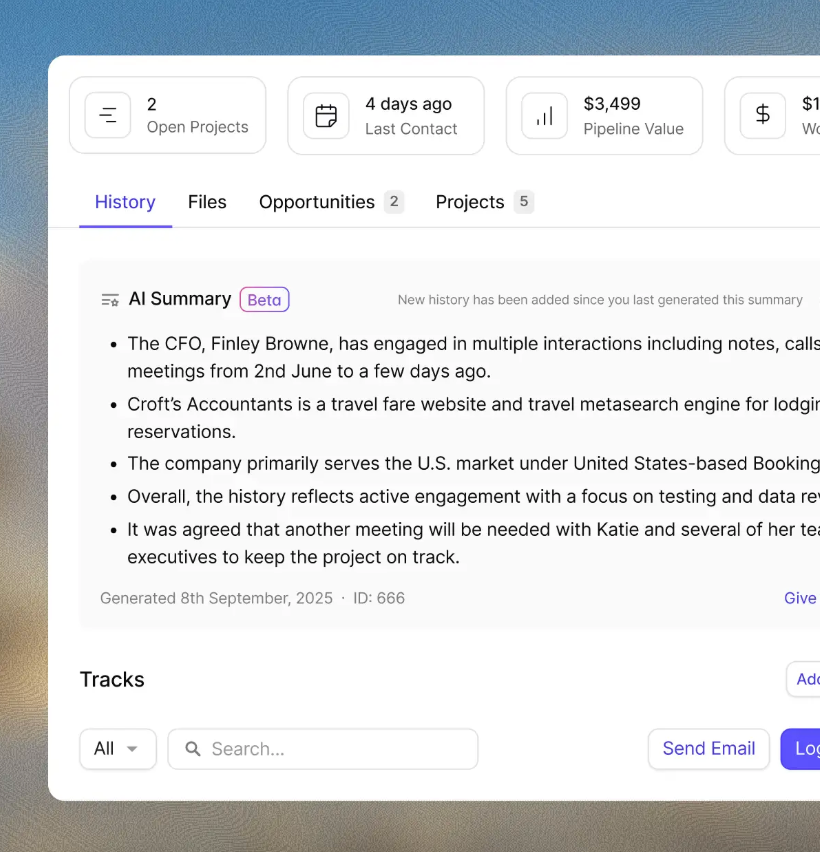
The CRM produces a brief covering recent emails and notes, plus calls and other activity, for any contact or opportunity. Reading the brief takes thirty seconds. The salesperson walks into the conversation with the context they need and the time to actually use it.
The practical scenario shows up most often in two cases:
- A rep picks up a dormant prospect after several months of silence and needs to remember what happened last.
- Or, a colleague covers a call for someone out of office and has zero history with the contact.
In both situations, the AI Summary helps teams move from a rushed catch-up to a confident, informed conversation.
Capsule's AI Summaries handles this work directly inside the contact or opportunity record. The summary pulls from the last 50 activities, including emails and notes alongside calls and logged tasks, and produces a readable brief in seconds. The information was always there; the AI just gets it into a usable form.
Use case #2: Drafting follow-up emails that the team would otherwise put off
The second AI case happens right after the conversation ends. The salesperson knows what needs to be said, but writing it from scratch takes longer than the conversation itself. The follow-up gets pushed to "later today," then to tomorrow, then to the end of the week.
By the time it goes out, the moment has passed.

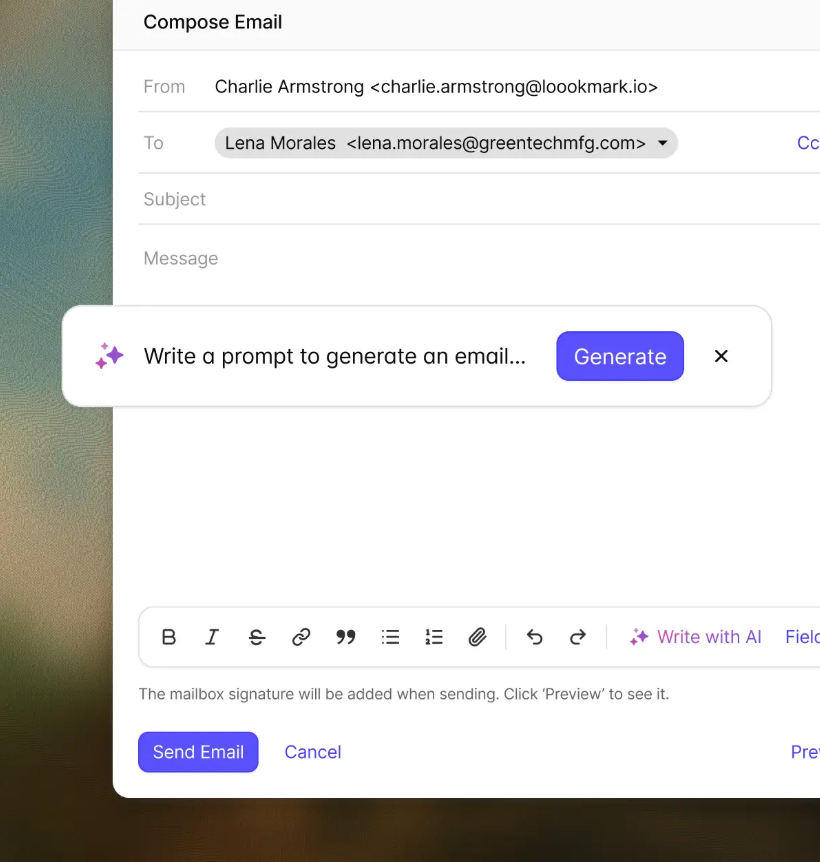
AI Email Assist makes the next step easier.
The user describes what the email is about and picks the tone they want. Based on that, the CRM drafts the message immediately. Then, the user reads it, tweaks the wording, and hits send.
The whole loop takes a minute.
The use case applies across many customer communication moments:
- routine follow-ups after a call,
- confirmation of next steps after a meeting,
- status updates on an active project,
- replies to pricing questions,
- check-ins with leads who have gone quiet.
None of these messages need to be brilliant; they simply need to be timely and clear.
Capsule's AI Email Assist drafts inside the CRM, with the customer record open alongside the draft. The salesperson doesn't switch between Gmail and the CRM to write the message. The whole interaction lives in one place, and the email gets logged against the contact record as it sends.
Use case #3: Setting up a sales pipeline
The third AI use case happens before the CRM is even in use. A new team or a new line of business needs a pipeline configured, and the standard advice is to pick a template and customize. The customization usually means a half-day workshop, several rounds of debate about stage names, and a final pipeline that approximates how the team actually sells.

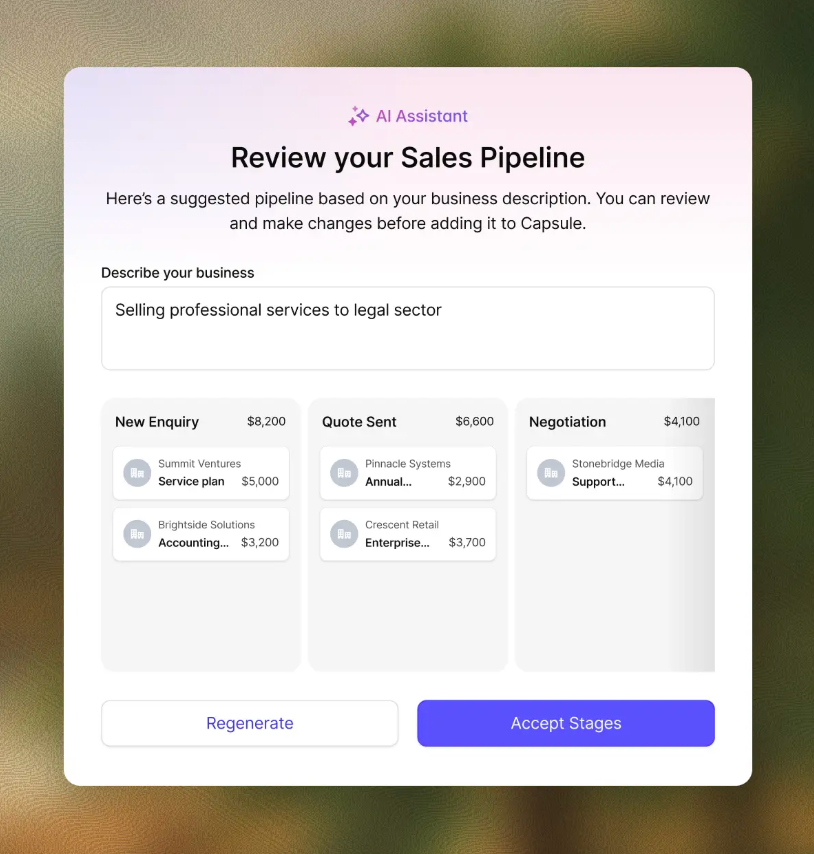
AI Pipeline Generator removes the blank template problem. The user explains how their business works and what a typical sale looks like. From there, the CRM sketches out a pipeline with the right stages and fields already in place. The user fine-tunes anything that feels off, then starts using it straight away.
A new Capsule user setting up their first pipeline doesn't have to commit to a generic "lead, qualified, won" structure. And, a business adding a second pipeline for a different product line or customer segment doesn't have to rebuild the whole flow manually.
Use case #4: Keeping contact records complete as a byproduct of normal work
Our next use case targets the data quality problem that quietly undermines every other AI feature:
- AI Summaries are only as good as the record they summarize.
- AI Email Assist drafts better messages when the contact record actually contains useful context.
- A pipeline only forecasts well when the deals in it have accurate company information attached.
The traditional fix for data quality is manual research. A salesperson opens LinkedIn, copies a job title, then pulls company revenue from a public source before updating the CRM record. The work takes up to ten minutes per contact, and many teams stop doing it within a month of starting.
At 50 contacts a week, that adds up to more than eight hours of admin. At 200 contacts, it becomes over 30 hours: almost a full working week spent cleaning records instead of speaking to customers.

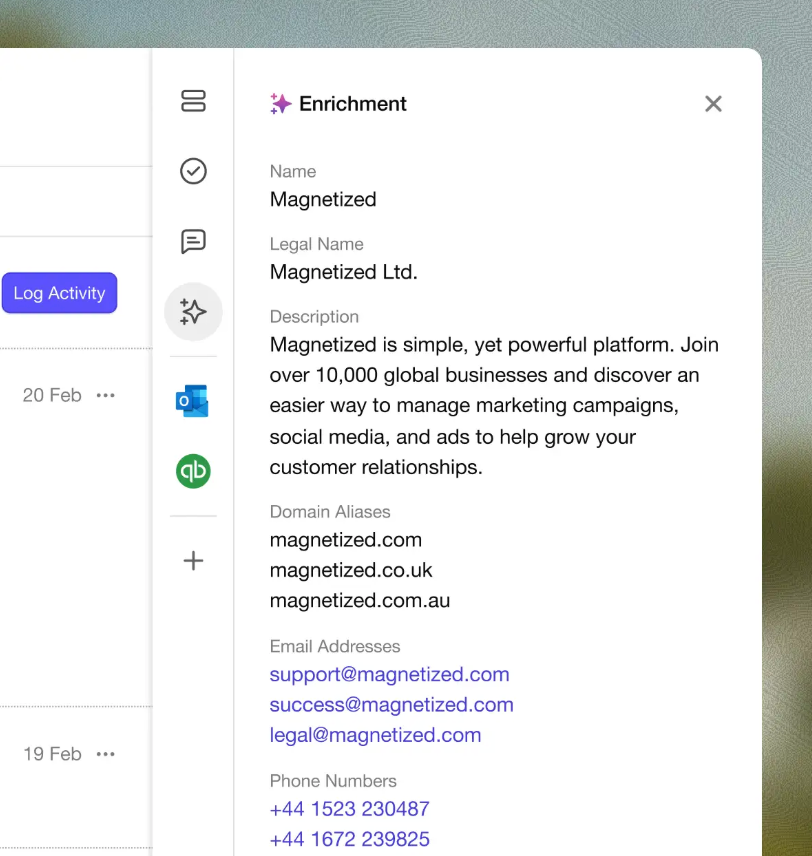
AI Business & Contact Enrichment automates the research. The CRM uses an email address or company website to populate the record with company information: revenue and headcount, plus industry and other public data. The enrichment runs automatically when a new contact is added, and the record stays current as the underlying data changes.
The downstream effect compounds quickly. Cleaner records mean better AI Summaries, more contextual email drafts, and pipeline reports that segment cleanly by industry or company size. The use case is foundational: it's the AI that makes the other AI work properly.
The enrichment runs on contact and company records, with no manual research required from the sales team.
Use case #5: Automating the follow-up cadence
The fifth use case sits at the edge of AI proper, but it's where many teams see the largest practical time savings. The work being automated is the repeating follow-up cadence that should happen on every deal, but rarely does when the team is busy.
It usually goes like this:
- A new lead comes in and gets an initial response.
- The next follow-up should happen three days later.
- Another follow-up should happen the following week.
- The second follow-up gets delayed because the rep only remembers on Friday.
- The third follow-up never happens.
- The lead drops out of view.
- The business never finds out whether the opportunity was worth pursuing.

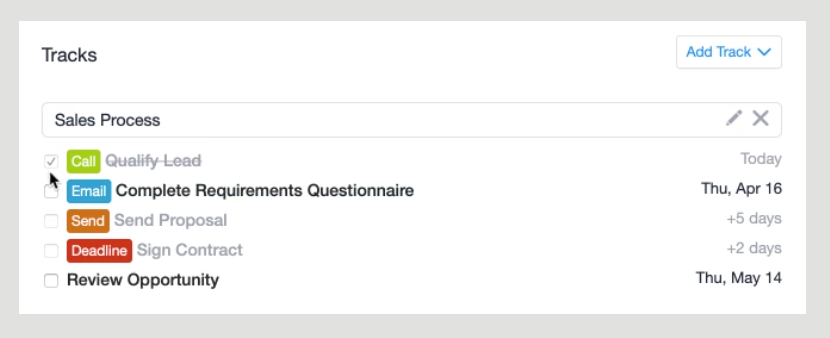
Tracks automate the cadence. When a deal enters a stage or a new contact gets added, the CRM creates the sequence of tasks, follow-ups, and prompts automatically. The rep doesn't have to remember the schedule. The schedule remembers itself, and the rep just executes when the prompts come up.
This works across the customer lifecycle, including new lead intake, proposal follow-up, onboarding after a deal closes, and recall outreach on a fixed cadence.
Any repeatable process that tends to break down when someone forgets a step can benefit from a Track.
How these use cases add up in a real workday
Each use case on its own saves between five minutes and an hour, depending on volume. Combined, the time savings shift the shape of the workday meaningfully.
A salesperson running five customer conversations a day saves 15 to 30 minutes on preparation (AI Summaries), 20 to 40 minutes on follow-up writing (AI Email Assist), and another 20 to 30 minutes on data maintenance (AI Business & Contact Enrichment).
Set-up tasks like pipeline configuration and follow-up cadences happen once and produce ongoing savings.
The end result is roughly an hour to 90 minutes of recovered time per salesperson per day. For a five-person team, that's 25 to 35 hours a week of capacity that used to disappear into admin. Teams can put that time toward the conversations most likely to advance a deal.
What to look for when evaluating AI CRM features
The features that actually save time share a few characteristics. Worth checking each one when evaluating any AI CRM, not just Capsule:
- The AI works on day one, with no configuration project. AI that requires a data warehouse or a six-week onboarding rarely produces value for small or mid-sized businesses. Look for AI that runs on the data already in the CRM.
- The AI focuses on the work that consumes time, not the work that sounds impressive. Predictive lead scoring sounds exciting, but adds little value in a 20-deal pipeline. Summarizing a long contact history saves real minutes every day.
- The AI is included in the seat price. Flat-seat AI pricing is meaningfully easier to budget than credit-based or per-action pricing, especially at a small business scale.
- The data stays inside the business's CRM. AI features that send customer data to public models for training create privacy and compliance issues. Capsule's AI uses customer data to provide support inside the account, and the data isn't used to train public models.
The combination of those four characteristics narrows the field of AI CRM platforms quickly. The right AI is the AI that takes work off the team's plate from the first week and keeps doing it consistently as the team grows.