
CRMs are often built for teams, not individuals.
If you work solo, all that complexity can get in the way. A single-user CRM strips things back to the essentials.
In this guide, we’ll explain what a single-user CRM is, when it’s the right choice, how it compares to team-based platforms, and how tools like Capsule let you start solo and grow with your business.
What is single‑user CRM software?
A single‑user CRM is a customer relationship management system suited primarily for one person managing their own deals. A good CRM for solo users focuses on an individual approach:
- Personal productivity. Centralized data and smart automation to reduce admin work.
- Relationship tracking. A full 360° view of every contact → history, roles, and engagement.
- Lightweight sales flow. Simple, visual pipelines to drag and drop items between stages.
This type of CRM is optimized for individual workflows. However, even basic platforms still include automations, integrations, and reporting capabilities.
Who does a single-user CRM fit best?
- Freelancers and consultants. You talk to clients directly and need a reliable place to keep context between conversations.
- Solo founders validating an idea. Early leads come from many sources. A simple system helps you understand which conversations move forward.
- Independent sales reps or agents. You manage sales activity independently.
- Coaches, advisors, and service professionals. You manage client relationships and rely on a single source of truth.
Single‑user CRM system vs traditional multi‑user CRM
Complexity
If you’re working solo, a traditional CRM often creates more work than it removes.
Features like granular permissions, role-based access, and enterprise integrations are powerful, but unnecessary when you’re the only user.
A solo CRM is designed to be lightweight. It delivers the core tools you need to manage contacts and track deals.
The result is a system that works for you, not the other way around.
Setup & maintenance
Getting a team-based CRM up and running is rarely quick. Onboarding, customization, and governance requirements can stretch setup into weeks or months, and often require specialist help.
A personal CRM flips that experience. With minimal configuration and a clean interface, you can be up and running in minutes.
Cost structure
Enterprise CRMs scale costs as aggressively as they scale features.
Single-user CRMs don’t. Pricing stays predictable, affordable, and aligned with solo work.
Daily experience
Multi-user CRMs often feel heavier than they need to be for one person. Extra features and reporting layers slow simple actions and shift attention toward managing the tool instead of doing the work.
A basic CRM keeps the experience calm and functional. Contact management stays straightforward, while automation only steps in where it genuinely saves time. The interface remains unobtrusive, so daily work flows without constant friction.
Single-user platforms focus on essentials only. They avoid bundled extras and unnecessary pricing layers, allowing the tool to adapt naturally to a solo workflow rather than the other way around.
Why Capsule is the best CRM for solo use
Most CRM tools grow around teams and complex workflows. Capsule takes a different approach: it starts with the work you actually do, and builds from there. Its focus on simplicity and essentials makes it easier to adopt and keep using in everyday practice rather than feeling like a project in itself.
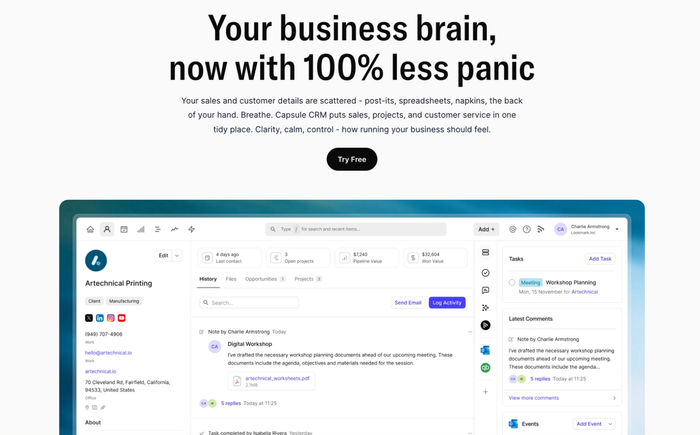
You can make the most of:
- Contact management. Capsule goes beyond storing names and emails. It builds a living history around every person and company, with calls, notes, and attachments all in one place. Many people switching from spreadsheets or inbox folders find they can finally open a record and know what happened last without hunting through threads. Context stays visible as relationships evolve.
- Sales pipelines. The pipeline view isn’t an abstract chart; it is your active day-to-day workflow laid out visually. You push deals along stages you define, which makes watching progress both natural and immediate.
- Tasks and reminders. Capsule treats tasks as part of your daily workflow. You can link them directly to the contact or opportunity they belong to, which keeps your next actions tied to real context. You can set up reminders and even repeat tasks for calls, meetings or deadlines. Daily email reminders show you what’s due each morning, giving you a clear plan for the day before you open another tab.
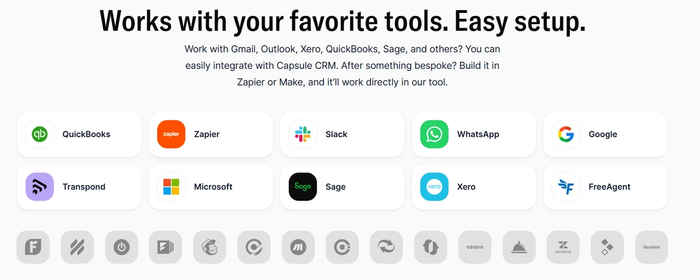
- Integrations. Capsule links your inbox and calendar with your CRM so emails you send or receive and your scheduled events appear right on the relevant contact’s record. It also connects with accounting tools like Xero and QuickBooks, letting you see payment history and invoice status alongside sales activity. You can also use Zapier to bring form submissions, booking events or other app activity into Capsule automatically.
Many professionals mention that Capsule just feels comfortable to use quickly, with a clean view of contacts and tasks that doesn’t get in the way of real work; you can have a working system up in an afternoon instead of weeks of setup.
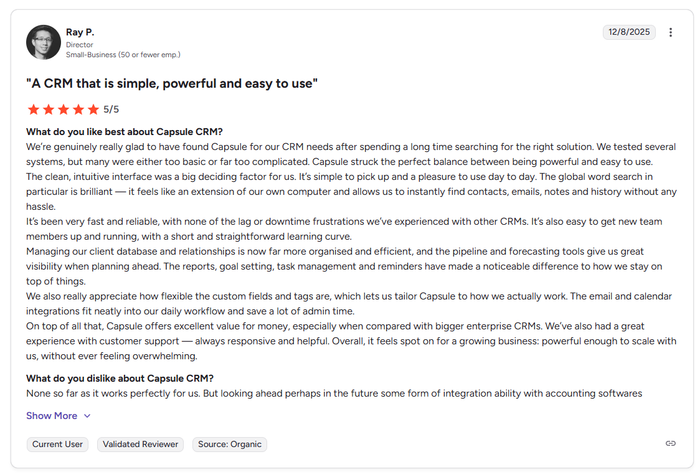
Capsule doesn’t make you learn a whole new system before you can use it: contacts, deals, tasks, and your calendar flow together in a way that feels like an extension of how you already work.
It helps you scale from your first few clients into a fuller sales rhythm, but it doesn’t force you into complexity that never felt relevant in the first place.

Scaling beyond a single user - what happens next?
Outgrowing a solo CRM and facing a painful migration is a common concern. Markers of growth that suggest it’s time to scale
Signs you’re ready to scale
- Multiple people managing contacts or deals: when more than one person touches customer records, you need shared visibility into what was said and what happens next.
- Workflows crossing hands: leads regularly pass between marketing, sales, and suppor,t and you can’t easily trace who’s responsible at each step.
- Growing volume of opportunities: you find yourself assigning tasks or deals to others and want everyone to see the same up-to-date picture.
What matters when scaling
A CRM that scales for a growing business doesn’t just hold more contacts; it keeps your work organised as things become more complex. Look for these capabilities:
- Flexible workflow management. You should be able to shape sales stages and processes around the way you actually sell, adding parallel flows or variations as your offerings diversify.
- Role-based access control. As more people join, it becomes important to choose who can see or change certain information. Modern small-business CRMs handle basic permissions so everyone can act with context.
- Automation that’s easy to set up. Automation should kick in at predictable moments, assigning leads, prompting reminders or launching follow-ups so manual work doesn’t balloon as activity grows.
- Integrations with the tools you already use. Your CRM should connect with email, calendars and other key apps, bringing conversations and schedules into a shared view. Capsule supports integrations across inboxes and dozens of apps, which helps keep your data aligned across tools you rely on every day.
- Meaningful reports and visibility. You want clear signals about which prospects convert and how long your sales cycles last. Reporting that answers concrete questions helps you understand what to work on next instead of staring at raw tables.
Capsule brings these elements together in a way that stays approachable while still giving you the structure and connections you need as your business and teams grow.
The right CRM tools fit who you are today and tomorrow
A solo CRM should feel like a natural extension of how you work, not like another system you have to “manage.” Capsule brings your contacts, conversations and tasks into one space with an interface that stays clear even as the list grows.
Try Capsule CRM today.