
You can’t build a real business without relationships. Before revenue shows up, someone has to trust you enough to reply, buy, refer, or renew.
In 2026, relationship management means keeping context alive so every interaction moves forward. The right platform helps you protect trust at scale instead of relying on memory. Here are our picks for the relationship management tools that truly support growth.
Best relationship management platforms
Capsule CRM
If you think relationship management is just a bunch of spreadsheets, Capsule CRM will quietly prove you wrong. It’s the kind of tool you don’t notice because it just fits into your day, until one morning you realise you’ve stopped losing follow-ups or forgetting who said what.
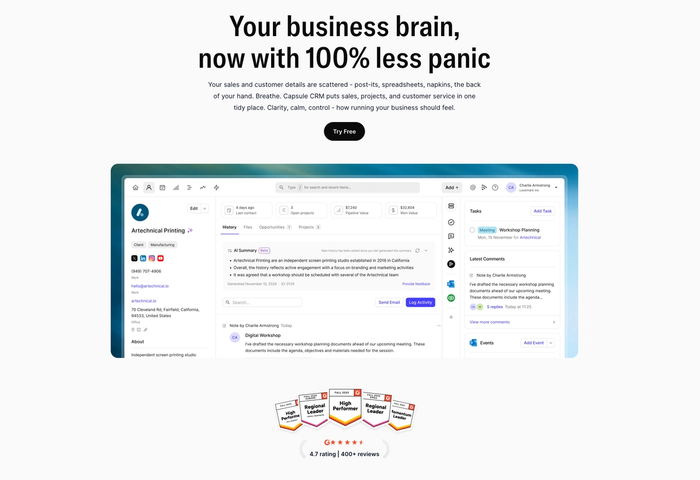
Built around simplicity and real-world use, Capsule brings your contacts, conversations, and pipeline together so that your relationships start to feel like assets.
Key features explained
#1 Contact & relationship management
Capsule keeps all the people and companies you care about in one place. You can attach emails, notes, and files to a contact record and everything stays linked to the right person – so when you come back later, the context is there waiting for you.
#2 Sales pipeline
Instead of guessing where each opportunity stands, Capsule shows it visually in your pipeline. You can drag deals between stages, see potential values, edit client details, and know exactly which ones need your attention today.
#3 Tasks & calendar
Forget about switching tabs and tools. Capsule includes built-in tasks and reminders. You can create tasks tied to specific contacts, deals, or projects, set due dates, and even view them in a calendar so that deadlines don’t sneak up on you.
#4 Integrations with tools you already use
Your CRM should work with the systems you already depend on. Capsule doesn’t live alone: it connects with Gmail, Outlook, Google Calendar, Mailchimp, Xero, QuickBooks and more. All the emails, events, and invoices sync into the same system instead of living in different apps. You can also hook into automation platforms like Zapier or Make for deeper workflows.
Best for
- consultants and solo professionals tracking long-term client work
- agencies and service teams dealing with various delivery touchpoints
- small and medium businesses that don’t want overblown systems
- founders who need clarity
What people are saying
Real users rave about how easy Capsule feels compared with bigger CRM platforms: it’s intuitive enough to use daily and powerful enough that teams don’t outgrow it too quickly.

Reviews frequently mention how it helps manage tasks and activities linked to contacts, which makes staying organised feel less like a separate job and more like part of your workflow.

Pricing
Capsule has a free forever plan for basic use, and paid tiers starting at around $18 per user per month, with more capabilities on higher plans. That keeps it accessible for small teams who don’t want to spend big on tools they barely use.
With vs. without Capsule
❌ Without Capsule:
You might keep contacts in a spreadsheet, tasks in a separate list, and messages in your inbox… which simply means none of them live in the same context. It’s harder to remember what was discussed last time or plan what should happen next.
✔️ With Capsule:
Contacts, tasks, and opportunities live next to each other. When you open a person’s record, you see their history, current activity, and what’s due soon. Tasks you create are linked directly to people and milestones, and reminders help you stay on track. That gives you a consistent way to manage follow-through at all times.
You know that moment when you remember a client’s favorite coffee after you’ve walked in without it? Capsule CRM is built to help you avoid those moments entirely. Try it today.

It often only takes a short time before you notice the difference in how you stay organized and prepared for every conversation.
Copper CRM
Copper CRM is a customer relationship management tool built with Google Workspace at its core, meaning it’s designed to work especially well if your team lives in Gmail, Google Calendar, and Drive.
It automatically pulls in your Gmail contacts and interactions and layers CRM functions over familiar tools, so updating contact details or moving a deal forward feels like part of your routine rather than a separate task.
Key features
- Native Google Workspace integration. Copper embeds itself right into Gmail and Google Calendar. You can view contact records, log emails or meetings, and see deal information in seconds.
- Pipeline & deal management. It gives you a clear visual way to track leads and opportunities through stages. Pipelines can be viewed in list or Kanban style and updated with drag-and-drop.
- Task & follow-up tracking. Copper lets you attach tasks and reminders to contacts and opportunities.
- Mobile access & multi-device support. The mobile app means you don’t lose visibility on deals or tasks when you’re away from your desk. You can log activity, update pipelines, or review contact history on the go.
Pros
- Smooth Google Workspace embedding. Contacts, emails, and calendar events flow into the CRM automatically.
- Intuitive and easy to adopt. <any users find it straightforward even without prior CRM experience?
- Good for small, email-centric teams. When most client communication happens through Gmail, Copper can feel very natural.
Cons
- Limited for non-Google setups. If you don’t use Gmail/Calendar, the experience isn’t as smooth.
- Higher costs at scale. Advanced features and larger team support push you into pricier plans.
- Customization & reporting limits. Deeper reporting and flexible workflows are weaker compared with bigger platforms.
- Not ideal for larger collaborative sales teams. Features like shared pipelines and complex access controls are limited.
Pricing
Copper’s pricing usually starts around $9–$12 per user per month for basic tiers when billed annually, moving up through Basic (~$23–$29), Professional (~$59–$69), and Business (~$99–$129) plans, depending on the source and billing cycle you choose. There’s no free forever plan, but a 14-day trial lets you test it out before committing.
Our verdict
Copper CRM is a solid choice if your team uses Gmail daily and you want CRM that fits into that routine; its integration with Google tools really is its defining strength. For straightforward pipelines and contact tracking inside familiar apps, it earns respect.
At the same time, as teams grow and require more flexibility, deeper reporting, and broader integrations, many find that alternatives like Capsule CRM offer similar core features with greater versatility and more approachable pricing overall.
Insightly CRM
Insightly CRM is a business platform that brings contact management, sales process tracking, customer service tools, and project-oriented work into one system. It’s designed for companies that want to manage prospects and ongoing delivery.
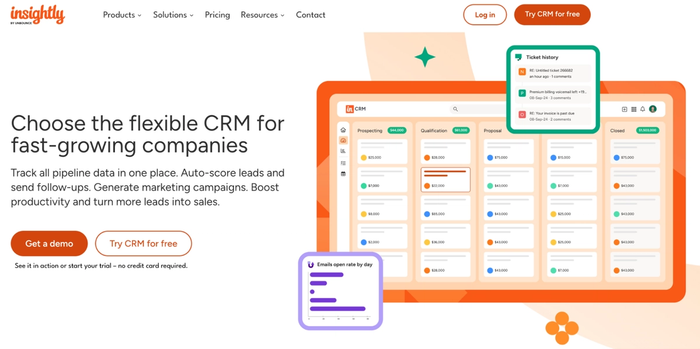
Many teams choose Insightly because it combines pipelines, marketing, and task automation in a single product you can expand as your needs grow.
Key features
- Opportunity tracking. Insightly gives you a clear view of your sales stages and lets you capture details about leads or assign ownership. That makes it easier to plan what happens next with each contact.
- Contact and customer record management. All key customer information lives in a unified profile. When you open a contact, you see their pipeline status and related activities in one place.
- Workflow and process automation. You can automate recurring actions (like assigning tasks, sending reminders, or updating statuses) so teams spend less time on manual steps.
- Task management is built in. Insightly includes tools to track work after deals are won, linking tasks and milestones to customers and opportunities. This extends the CRM beyond sales and into execution.
Pros
- Integrated CRM and project tools in one system, so there’s no need to buy separate software.
- User interface is clean and organised, which helps teams adopt it with no long lead-in.
- Strong integration support with email, calendars, and third-party apps for unified workflows.
Cons
- Starts at higher price points than some small-team-focused CRMs, which can matter if you’re budget-conscious.
- Some advanced automation and reporting features only come on premium plans, so you may need to upgrade to get deeper capabilities.
- Customization options are not as deep as in enterprise-class platforms, which might limit complex workflows.
- Onboarding and setup can take some effort if you turn on the more capable modules, which isn’t ideal for teams that want something very simple.
Pricing (2026)
Insightly’s paid tiers usually start at around $29 per user per month (Plus) and move up through Professional and Enterprise plans at approximately $49 and $99 per user per month when billed annually. There’s typically a 14-day free trial to test features before you commit.
Our verdict
Insightly CRM is a good choice for teams that want a single platform covering contacts, sales pipelines and project tracking together, and its feature set grows with your organisation. It sits solidly in the mid-market CRM space with strong integration support and real-world workflow tools.
That said, when your core priority is straightforward relationship management with a lower barrier to entry and simpler pricing, Capsule CRM might offer a clearer experience.
Nimble CRM
Nimble CRM is built around contact and relationship intelligence rather than heavy enterprise-grade automation, so it works well for consultants and teams that spend their days in social platforms.
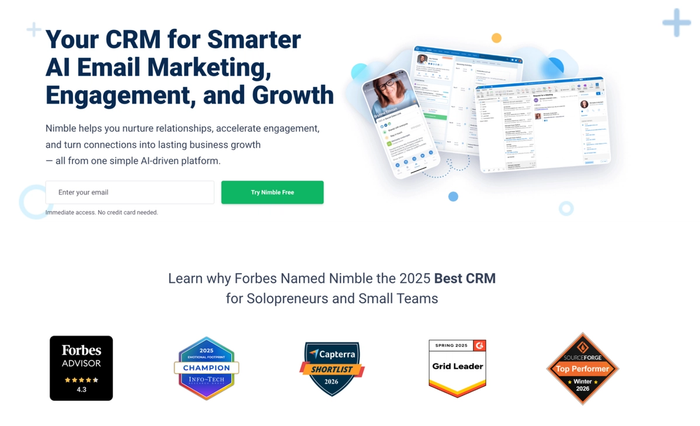
The interface is clear and feels approachable to new users, and you can access your CRM information from desktop, mobile and browser extensions.
Key features
- Prospector & enrichment tools. With built-in tools like Nimble Prospector, you can build or enrich contact profiles from LinkedIn, websites and other sources directly, which saves time on manual research.
- Unified contact & social insights. Nimble gathers contact details from email, calendars and social profiles, automatically enriching records so you see more about who you’re engaging with.
- Workflows. You can organise and track your opportunities through different stages, and the CRM lets you manage multiple pipelines depending on how you structure your sales activities.
- Group messages & email sequences. Nimble supports sending personalised group emails and automated email sequences right from the platform, bridging contact management and outreach.
Pros
- Users frequently praise how intuitive Nimble feels and how quickly they can start working with it due to its clean design and unified contact views.
- The social and email integration helps bring context into contact records.
- It combines CRM and outreach features like email sequencing in a single plan, which some small teams find more convenient and budget-friendly than using several separate tools.
Cons
- The storage limit (such as 2 GB/user and 25,000 record caps) can feel restrictive for heavier email histories or document needs.
- Reporting and analytics are often described as basic compared with more advanced CRM platforms, which may matter for teams that want deeper insights.
- Integration options, while broad, don’t always offer two-way sync with every external tool, which can lead to gaps in data flow.
- Support availability and automation limits (such as caps on workflows) can feel constraining if your organisation starts to scale.
Pricing (2026)
Nimble uses a clear pricing model with a single plan that costs about $24.90 per user per month when billed annually or $29.90 per user per month if billed month-to-month. This all-in-one approach means you don’t have to pick tiers for basic CRM, outreach, or pipeline features since they’re all included.
Our verdict
Nimble CRM is genuinely useful for teams that value simplicity and real-world context in contact management. Capsule CRM tends to offer more extensive reporting, better options for scaling up, and pricing that adapts more easily as your needs change, so many teams find it a more complete solution over time.
Pipedrive CRM
Pipedrive is a cloud-based CRM built around visual pipeline management and activity-based selling, designed to help sales teams track deals and activities in a process-oriented way.
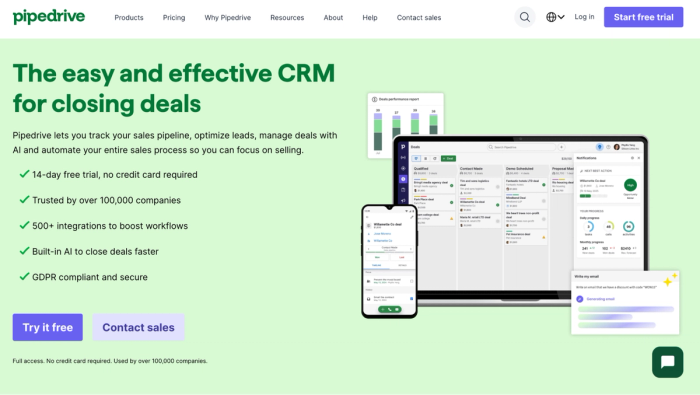
It grew out of a simple idea: make CRM useful for salespeople rather than overwhelming, with an interface that’s easy to learn and pipelines you can customize to match how your team actually works.
Key features
- Visual deal pipelines. Pipedrive’s core is its pipeline view, where deals are displayed in columns representing stages. You can drag and drop opportunities as they progress.
- Email sync and activity tracking. With two-way email sync, you can send and receive messages directly in Pipedrive and link activities to contacts and deals. This keeps correspondence and task history linked to the right records.
- Automation and workflows. Workflow automations help reduce manual steps — you can trigger actions like task creation or status updates as deals move through stages.
- Forecasting and reporting. Pipedrive includes reporting dashboards and forecasting tools that give insight into your sales health, helping you plan and set priorities with more confidence.
Pros
- Very intuitive and easy to adopt; users often say they can start working with it quickly.
- Strong visual pipelines help teams focus on where deals stand and what actions matter.
- Large marketplace of integrations and an open API mean you can connect Pipedrive with many other business tools.
Cons
- There’s no free tier – only a 14-day trial – which means a cost commitment if you want ongoing use.
- Useful sales automations and advanced features are tied to higher tiers, so entry plans feel limited
- Add-ons like lead capture tools or visitor tracking add to your bill beyond base pricing.
- Reporting and deeper automation are sometimes seen as less flexible or rich compared with more expansive CRM platforms.
Pricing (2026)
Pipedrive’s pricing is tiered, usually starting around $14 per user per month on the entry plan when billed annually and increasing through plans at roughly $39, $59, and $79+ per user per month as you add features and capabilities. All plans include pipelines and core CRM tools, and a 14-day free trial lets you test the platform before subscribing.
Our verdict
Pipedrive CRM works well for sales-driven teams who want a CRM built around pipelines and activity tracking, supported by email sync and a healthy ecosystem of integrations. It provides useful visibility into deals and sales processes.
However, if your focus is on broader relationship management beyond just sales pipelines, or you want a platform that stays more affordable as you add users and features, Capsule CRM offers wider applicability across business functions.
Over to you
At this point, you’ve seen how Capsule helps you hold real conversations with real people. It doesn’t pretend to be the biggest or flashiest CRM on the market, but it does keep track of what matters: the last time you spoke with someone and the next thing you promised.
If you’re running a team where relationships drive revenue and retention, Capsule can quickly become the place you look first every morning.
Try Capsule CRM now and experience a CRM built around real relationships.