Feel like you’re nailing the business development part of your work?
You’re finding leads in all different places: outreach, events, networks. Maybe you’ve been using tools like Typeform to capture new leads.
For many small teams, the difficult part comes next: getting that data into your CRM often means manual copy-pasting or relying on disconnected tools.
Cue Capsule CRM’s Contact Forms.
Instantly add form-fill contacts to Capsule CRM
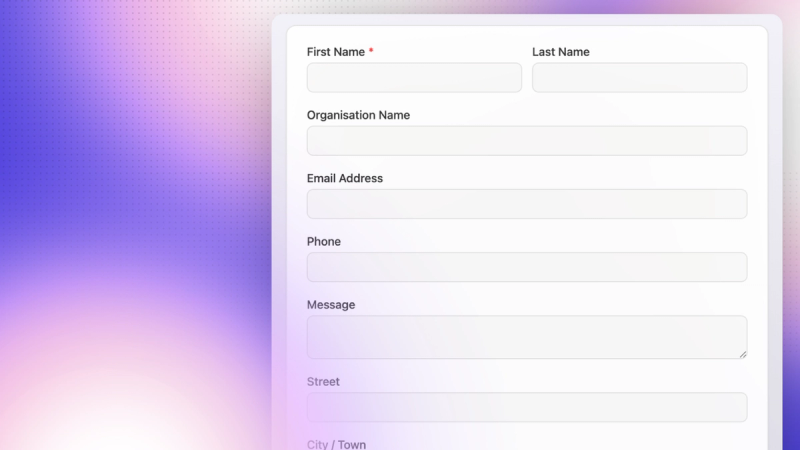
Create your own contact forms directly within your Capsule CRM account. When you receive a new enquiry via the form, we’ll create a new contact record in your CRM.
Believe it or not, Contact Forms have been part of Capsule for a while, nestled in your Account Settings. And they’re exactly what they say on the tin: create simple forms for enquiring visitors, enabling you to create new contact records in Capsule CRM fuss-free.
Now, they’re easier to create and implement wherever you need them, whether that’s embedded in your website or linked from outreach like an email.
And since the form is part of Capsule’s CRM, every new lead that fills it in is automatically created as a contact record: no need for third-party tools or manual admin misery.
New contacts in your CRM (in a couple of clicks!)
Contact Forms are designed to do one job really well: capture clean, usable contact data directly into Capsule CRM. So how does it work? It’s really simple.
- Create your form in Capsule
- Share it (website, email, or in-person)
- Submissions appear as contacts instantly.
That’s it!
How can I use Capsule CRM’s Contact Forms?
If your goal is simply to get accurate contact details into your CRM quickly and reliably, Contact Forms are just the ticket.
Simple to create, embed, and share - so you can get started, get more leads, and get things done.
Let your website capture new leads
I’m sure you’ve heard that your website is the only sales rep working 24/7. Adding a Contact Form to your website makes it easier for both you and your prospects: to keep your lead list growing, and to get in touch via a straightforward form.
Whether you position it as “Contact sales” or “Get in touch” is totally up to you. Either way, it’s a straightforward means to capture interested inbound prospects directly within Capsule CRM.
Enable easy signup at in-person events
Attending conferences, expositions, and other in-person events? They’re a great opportunity to network and get your brand in front of potential customers.
Perhaps you’ve had a great conversation and promise to follow up with a call. Here’s where business development managers often fall foul: failing to get sufficient contact details, relying on expensive lead-capture gizmos (that may or may not work), or forgetting to add the data you worked hard to get and letting the lead go cold.
It gives me a headache just thinking about it.
Try this instead. Create a simple Contact Form. Then create a QR code directing to the link provided with the form you made. You can encourage anyone who stops by your stall to scan a printout, a flyer, or business card with that QR code on. They can fill in simple details (like their name, work email address, and phone number if necessary) in a jiffy, and continue with their day.
It helps you, too. Once you pack up and commute home, exhausted from the event, you won’t have to sit and add in each lead individually. Capsule CRM will create a record for each new contact that fills in that form. So you can crack on with nurturing them.
How to create and use a Contact Form
Create your Contact Form in Capsule CRM
Head to your Account Settings in Capsule CRM and click the Contact Form card.
Here, you can add all the fields you need, including your Custom Fields. You can preview the form on the left-hand side, and reorder the fields to suit your fancy.
Press save after making changes. Then, click ‘publish’. We’ll generate a unique link for your form.
How do I use my Capsule CRM Contact Form?
You can embed your Contact Form in your website or share a link to it in your outreach via emails or social media.
Simply head to the three dots in the top right-hand corner to download the HTML code for your form or select the embed.
Visit our Support Docs for more information on implementing your Contact Form.
Changing your Contact Form settings
Your straightforward form tool doesn’t have to be frustratingly simple. Not only can you pull your new contact information straight into Capsule CRM, but you can choose who it’s assigned to, what unique identifiers to apply, and more.
Click the three dots in the top right-hand corner and select Settings. Here you can modify settings for:
- Completion redirection: This is where you send your recipients once they’ve submitted the form. For instance, you could send them to a specific landing page or blog on your website to continue a journey of predetermined touchpoints with your brand.
- Tasks and Notifications: Automate Tasks in your CRM to follow up with a contact once they’ve submitted a form. You can also select to receive notification of a form-fill via email. You can also choose which user receives the Task and/or notification email.
- CAPTCHA settings: Turn on a bot-screening tool to ensure your form is only filled by humans and avoid spam.
- Tags: Choose what Tags you’d like to apply to any contact that has filled in this form. This is handy for filtering lists later.
- Date format: Choose the date format relevant to your business, ensuring you receive accurate information from your new contacts.
- Advanced settings: Here you can test your form without affecting your CRM data, and generate an API key. Learn more about this in our guide.
Once you’re happy, click save, and your form’s ready to go.
Why should I use Contact Forms in Capsule CRM?
Contact Forms are the simplest way for Capsule CRM users to capture leads and get them straight into their sales pipeline, without extra tools or admin.
- With one form, you have less maintenance. You won’t conflate a mass of forms - you’ll know exactly where to find it and ensure it’s updated quickly and easily.
- A set design keeps things simple. You can choose all the must-have fields, configure the settings, and implement without a fuss!
- It lives in the same platform you’re already using, keeping data in one place and erasing any risk of cross-platform automations failing or loss of data.
- Minimize your business costs - make use of the tools already available in your CRM.
Need a bit more from your forms?
Contact Forms are designed to be straightforward, helping you get more contact data into your CRM.
Are you looking for:
- Multiple forms, or creating unique forms for specific audiences?
- The option to style your forms and apply your branding?
- The ability to send automated follow-ups?
- A tool to work with your marketing campaigns, events, or lead magnets?
We can help you out there, too. Our sister product, Transpond, offers Signup forms to support your business when you’re ready to go further.
You can create multiple forms and customize their design to match your brand, whether you’re embedding them on your website or hosting them as dedicated landing pages.
They’re ideal for growing your audience through newsletters, event registrations, or gated content like ebooks, while built-in analytics help you track performance and optimize conversions over time.
And what’s more, you can connect Signup forms to automated email follow-ups and campaigns, turning every new signup into the start of a meaningful customer journey. You get everything Contact Forms can do with extra flexibility and a boost of marketing power, too.
Check out Signup forms from Transpond.
Which form tool is best for my needs?
Not sure which to choose? Here’s a quick way to decide:
| When to use Contact Forms (Capsule CRM) | When to use Signup Forms (Transpond) |
|---|---|
You want leads directly in your CRM | You want to add recipients to your marketing campaigns |
You need something quick and simple | You want more styling and branding options |
You’re focused on sales follow-up | You want multiple forms |
The straightforward way to get leads into your CRM
If your goal is to capture leads quickly and keep your CRM up to date, Contact Forms are the simplest way to get started: no extra tools, no manual work, and reduced business costs.
And when you’re ready to do more with those leads, Transpond helps you take the next step, turning signups into engaged subscribers, event attendees, and long-term customers.
However you choose to capture leads, the most important thing is making sure every opportunity is recorded, organized, and ready to act on.
Get started with Capsule CRM for free or try any paid plan completely free for 14 days. Or try Transpond’s Signup Forms to follow up with flair.