
Many small business owners have tried asking ChatGPT to draft an email or summarize a document. It works… up to a point. But there's a category of work that general-purpose AI virtual assistants and AI agents can't touch, and it's the work that actually costs small business owners the most time. Here's why context is the missing ingredient, and what AI assistance looks like when it's built around your customer data instead of around a blank prompt.
Why small business owners are reaching for AI assistants
The appeal is obvious. Small business owners carry a disproportionate cognitive load (customer conversations, follow-ups, admin work, content creation, decision-making processes) across a working day that rarely has slack in it. If artificial intelligence can absorb some of that, the time savings are real.
And they are. AI applications have changed what's possible for small teams operating without a marketing department, a dedicated ops resource, or a full-time admin. Repetitive tasks that used to eat hours can now take minutes.
The productivity case for AI is solid.
The problem is that many assistants are general-purpose first — useful for some things, but not built around your specific business needs. Most small business owners reach for them, find them useful for certain tasks, and then assume that's as good as it gets. It isn't.
What a general purpose AI assistant can and can't do
A general-purpose AI business assistant can be built with ChatGPT, Claude, Gemini, and their equivalents. It can answer customer questions, help draft a business plan, write code, schedule meetings, summarize long documents, and handle a wide range of simple tasks. Most connect to existing tools via integrations – Google Workspace, collaboration tools, and other tools in your stack – which makes them feel like a natural extension of existing workflows.
The limitation isn't intelligence. The best AI model available today is remarkably capable at reasoning, writing, and handling complex tasks given the right input. The limitation is context.
When you ask a general-purpose AI assistant to draft a follow-up email to a client, it will write something competent and professional. But it doesn't know that this particular client has been waiting three weeks on a proposal, that the last conversation got tense over pricing, or that you promised to come back with a revised timeline by Thursday. You have to provide all information manually, every single time, which turns what should be a time-saving tool into a slightly faster version of doing it yourself.
For one-off tasks that don't depend on business data (write me a social media post about our new service, help me think through this decision, summarize this document), general-purpose AI virtual assistants are excellent. But the work that actually dominates a small business owner's day isn't context-free. It's deeply tangled up in customer relationships, communication history, open deals, and the accumulated detail of running a business with real people in it.
That's where most AI tools run out of road.
Context is the missing ingredient
The most time-consuming work in a small business isn't usually the task itself – it's the preparation. Getting up to speed before a client call. Remembering where a deal stands before you follow up. Knowing what was promised in the last conversation before you send the next one. Piecing together customer interactions across email threads, notes, and memory to understand where a relationship actually is.
This is repetitive admin work that compounds. AI virtual assistants that lack access to your customer data can't help here, no matter how capable the underlying machine learning model.
Miss it once, and you go into a conversation underprepared.
Miss it consistently, and your customer relationships start to feel impersonal.
Customers notice when you've forgotten what they told you last month, and the experience erodes trust in a way that's hard to recover.
The AI assistant for small businesses that solves the context problem isn't a chatbot. It's AI built into the system where your business processes and customer data already live – with simple setup, no custom workflows to build from scratch, and no need to bridge multiple apps to get useful output.
What AI assistance looks like inside your CRM
Capsule CRM's AI features are built around a straightforward premise: the most useful AI for a small business owner is the one that understands the context of your customer relationships and uses it to reduce the manual work that surrounds them.
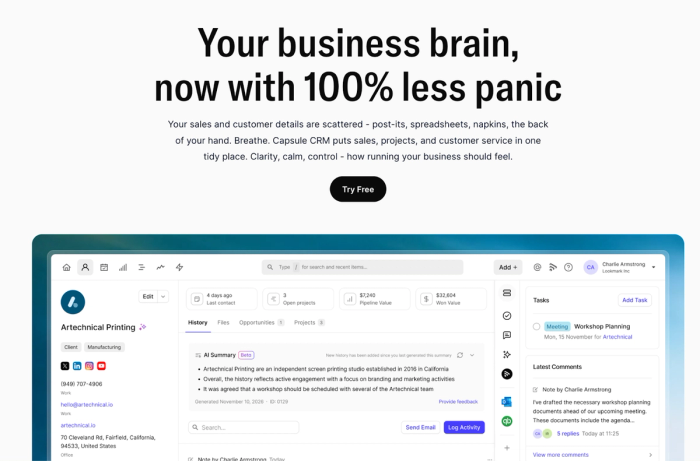
Rather than requiring you to switch between multiple apps or paste information into a separate tool, Capsule's AI works inside the CRM where all your customer data already exists, and where it can actually improve customer service, surface informed decisions, and help move your business forward. That distinction matters more than it might initially seem.
AI Summaries
Before a client call or meeting, Capsule's AI Summaries pull together the last 50 interactions for any contact or opportunity and surface a clear summary of where the relationship stands. Forget about digging through email threads or trying to remember what was discussed three weeks ago. Copy-pasting conversation history into a separate AI tool and hoping the result is accurate is becoming a thing of the past.
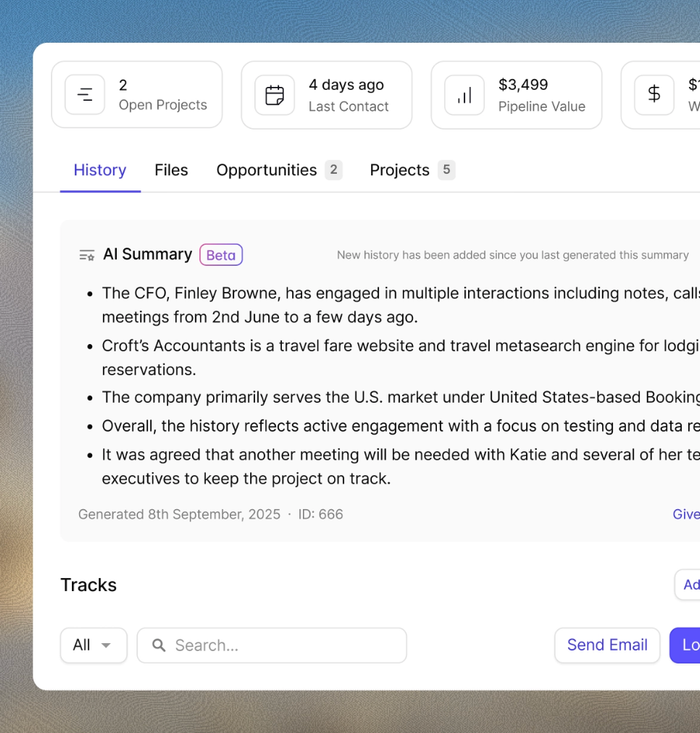
For small business owners managing a wide range of customer conversations simultaneously, this is the kind of real-time insight that changes how prepared you feel going into any interaction. The context is already there. The AI surfaces it.
AI Email Assist
Drafting follow-ups is one of the most consistent time costs in a small business. You know what needs to be said: getting it written, at the right tone, for this specific person and situation, is the friction. Capsule's AI Email Assist drafts follow-up emails based on a brief description of what you need to communicate, using the contact's existing data and communication history as context.
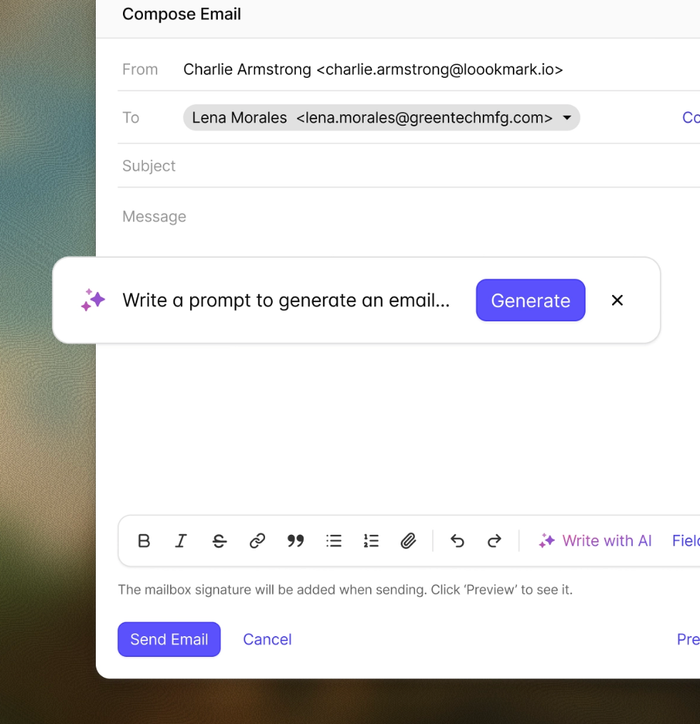
The difference between this and asking a general-purpose AI business assistant to write the same email is significant. Capsule already knows who this person is, what the open deal looks like, and what's been discussed.
The output is informed, which means less editing, more sending, and a more consistent customer experience that helps answer customer questions and follow up on conversations without dropping the thread.
AI Pipeline Generator
Setting up a sales pipeline from scratch is one of those tasks that sits on the to-do list longer than it should: not because it's technically difficult, but because it requires thinking through the full sales cycle in one sitting. Capsule's AI Pipeline Generator builds a customized pipeline based on your business needs, removing the blank-page problem and giving you a working structure to refine.
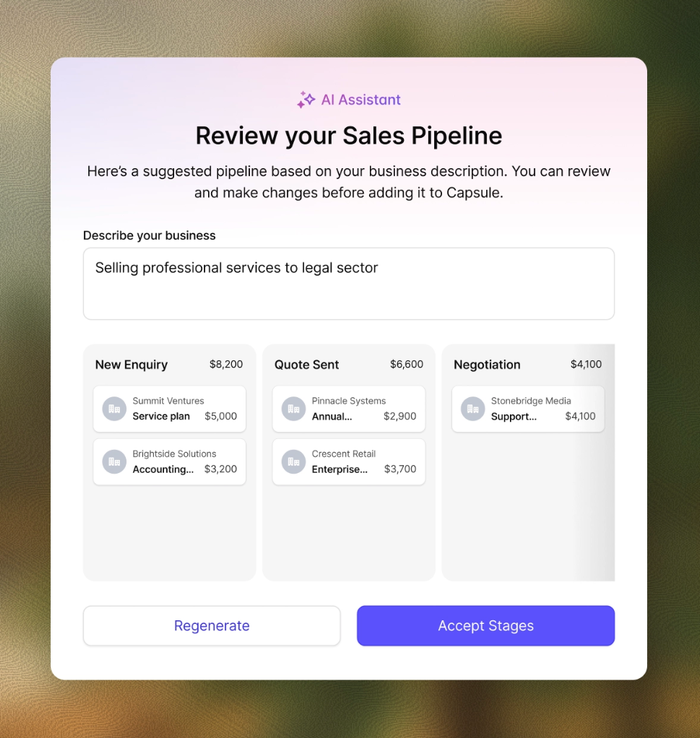
This removes a barrier that often delays getting the system working at all. A pipeline that's set up and used imperfectly is worth considerably more than one that never gets configured.
AI Contact Enrichment
Manual data entry is one of the most persistent sources of inefficiency in small business operations. Contact records that are incomplete or out of date make every other part of the CRM less useful, and keeping them accurate manually is a task that quietly absorbs hours every week.
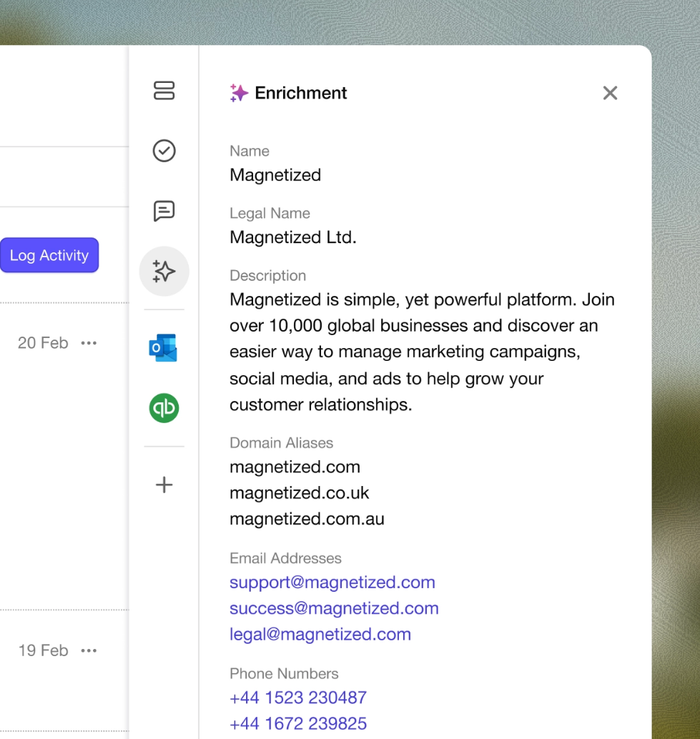
Capsule's AI Contact Enrichment automatically populates contact records with company data, reducing the data entry required to maintain an accurate contact database. For a small business owner managing customer information alone, that automation has a compounding effect: the contact database stays reliable without demanding constant upkeep, which means every other AI feature that depends on accurate data works better, too.
Data security
Capsule does not use customer data to train its AI models — a meaningful distinction for small business owners handling sensitive data and proprietary information about their clients. For businesses where data security and protection of intellectual property matter, that's worth knowing before committing to any AI-powered CRM platform.
AI features are available on the Growth plan and above. 14-day free trial on all paid plans, no credit card required.
Getting the most out of AI in your daily workflow
The small business owners who get the most from AI tools are the ones who are clear about which problems they're trying to solve and match the right tool to each one.
A practical way to think about it: general-purpose AI assistants are excellent for tasks that don't depend on your business data. Content creation, answering questions, thinking through decisions, summarizing external documents, and drafting content that doesn't require customer context. For this category of work, the best AI assistant is whichever one fits your existing workflows and pricing models. Most have free tiers or free plans worth testing before committing, and it's worth checking whether the full feature set is billed monthly or requires an annual commitment before choosing.
Context-dependent work is different. Anything that touches customer conversations, follow-ups, deal management, or customer relationships belongs in a system that has access to your business data, not in a separate tool that requires you to manually recreate that context every time. That's where CRM-embedded AI earns its place.
The combination of both: a general-purpose AI business assistant for context-free tasks, and AI built into your CRM for customer-facing work, covers most business needs, technical skills, or complex custom workflows to solve problems that simpler setups handle natively. Most small teams find they don't need more tools than that. They need the right ones, connected to the right data, doing the work that actually takes time.
Choosing the right AI assistant: what actually separates the good from the rest
With so many options available, it's worth knowing what distinguishes the most effective AI assistants from the ones that sound impressive in a demo and underdeliver in practice.
The best AI assistants for small businesses share a few characteristics:
- They require minimal technical setup. Most teams shouldn't need an IT resource or a week of configuration to get value from the tool.
- They improve efficiency on tasks that are already part of the working day rather than adding new processes to manage.
- They get more useful over time as they accumulate business data; data analysis that's meaningful on day one becomes very powerful at month six.
The pro plan question is worth addressing honestly, too. Most AI tools offer capable free tiers, but the features that make a real difference to business operations tend to live on paid plans. Before committing, test the tier you'd actually use, and assess whether the efficiency gains justify the cost at your current scale.
Key takeaways
AI assistants are genuinely useful for small businesses, but the category is broader than most people initially realize, and the most valuable AI for day-to-day business operations often isn't a standalone chatbot.
General-purpose AI tools handle context-free tasks well. Content creation, answering customer questions, and helping with a business plan, all legitimate use cases where the best AI assistants deliver real cost savings and time back.
The gap opens up as soon as the work requires understanding your customers. For follow-ups, call preparation, pipeline management, and the repetitive admin work that surrounds customer relationships, AI that's embedded in your CRM is categorically more useful than AI that requires you to supply that context manually.
That distinction is worth getting right. The most effective AI agents and AI virtual assistants aren't always the most powerful ones in isolation. They're the ones who understand context and use your business data to move your business forward.