Custom Fields
Every business is different with unique workflows and data that needs to be tracked. Capsule allows you to keep a record of all of this data through Custom Fields.
Are you or your team getting these mixed up? Our customer support team have pooled their top tips for differentiating Tags, Custom Fields, and DataTags to help you use Capsule more efficiently.
There are a variety of different Custom Fields available to cater to all data types. Here’s a breakdown of the field types that are available:
Text - enter any kind of information - words and/or numbers. These fields can be flagged as searchable so you can include this field when searching for a record. The character limit for text fields is 250 characters.
Date - record useful dates on your records and create lists based on these dates. Useful when tracking renewal dates, allowing you to easily create a list of the people or organizations you need to contact to discuss renewal. Learn how to capture a contact's birthday using a Date Field
Check Box - a simple check box for yes/no values. This is really useful for things like recording a contacts marketing consent or tracking which contacts are premium members. Again, records can be filtered by the checkbox value.
Single Select List - a single-select dropdown menu on your records with a pre-defined list of values to choose from. This is useful when you want to segment your contacts into different types for example and can be used as an alternative to Tags and avoids the problem of possible spelling mistakes by your users.
Multi Select List – allows you to choose more than one value from a predefined list. This is useful when multiple options apply to a single record.
Here are a couple of ways you might use them:
- Contacts: record all the services or products a contact is interested in, such as Consulting, Training, or Implementation.
- Opportunities: track multiple sales channels or regions linked to an opportunity, for example Online Store, Partner Referral, or Direct Sales.
Number - store numerical data on your records which in turn can be used to filter lists using conditions like “is more than” or “is less than”. This can be used for creating contact scores or tracking how many units a customer is interested in purchasing.
Generated links - a simple way to create links to external sites or services while passing details from the Capsule records to that site or service.
What is a Generated Link?
As mentioned above a Generated Link is a type of Custom Field that you define where the link uses fields from the Capsule record and passed the data in the URL. You form the structure of these URLs yourself and pull data from your Contacts in Capsule dynamically.
For example, if you want to search for a contact’s email address in Gmail, you can copy the URL of a Gmail search and then add a dynamic parameter to add your Capsule data from the current record to the URL - like this:
For the URL https://mail.google.com/mail#search/{email}, {email} will be replaced with the email address of the contact you are currently viewing. Clicking the link will take you directly through to a search in your Gmail account for that email address, showing you all emails sent to/from that contact. Regardless of what contact you click the link on, the {email} part of the link will be populated with the email address from that specific contact.
Another example of how they're used is with Quotient. They have built their service to let you create a quote from a URL where the values you pass in the URL get populated in the fields for the quote itself. That way with the click of a link in Capsule you get taken directly to create a new quote in Quotient with the name and email address from the contact in Capsule already populated in the quote. We have more details on how that is setup in our article on the Quotient integration.
This is just one of the use cases of Generated links but there are all sorts of other ways these can be used to help you link up to other services. Here are the parameters that can be used in your links to feed data from your Contacts
- {id} - id of the contact
- {name} - name of the contact
- {firstName} - first name
- {lastName} - last name
- {organizationName} - name of the organization that the person belongs to
- {email} - first email address of the contact
- {phone} - first phone number for the contact, {phone[Mobile]} first mobile number
- {custom[name of custom field]} - value of a custom field on the contact
- {user} - the username of the currently logged in user
How to add Custom Fields
For an organised CRM, follow our best practices to adding and manage Custom Fields.
Administrators can create a new Custom Field by following these steps:
- Navigate to the Account SettingsCustom Fields
- Here you can use the tabs to select whether the Custom Fields will be for People & Organizations, Opportunities or Projects
- Click to Add New Custom Field
- Select the type of field that you would like to add
- Give the Custom Field a Label and Save
Tags
Tags are a simple way to quickly add context to your Contacts, Opportunities, and Projects. You can add Tags for anything you like such as your relationship to a a Contact, the source of a sales Opportunity, or the type of work you are delivering with Projects.
You can filter all your records by Tags at any point to segment your Contacts, Projects or Opportunities. This can be really useful to help you focus on the records that need your attention or for locating records of a specific type easily.
How to add Tags
Administrators can create a new Tag by following these steps:
- Navigate to the Account SettingsTags and DataTags
- Here you can use the tabs to select whether the Tag will be for People & Organizations, Opportunities or Projects
- Click to Add Tag
- Give the Tag a Name and (optional) Description
- Choose the Save button to add it to your account
How to edit Tags
For a contact that doesn’t have any tags you’ll see a link under their profile picture saying Edit Tags. Click the link and add the tag you want and then use the ‘Add tag’ button to get it added.
If there are already tags on the record then hover the mouse over them and you’ll see the same link to Edit Tags.
'Edit Tags' link appears after hovering on 'Primary'
Tags can also be added in bulk on the list view of the People & Organizations tab, Sales Pipeline or Projects tab by filtering for the records you want to Tag and then selecting the Tag option at the top-right of the screen.
How to control new Tag creation
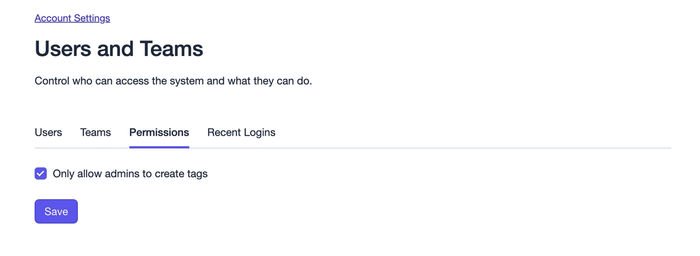
By default, only Administrator users can create New Tags from the left panel of a Contact, Opportunity or Project (or while using the bulk Tag button). To allow all user roles to do this too:
- Navigate to the Account SettingsUsers & TeamsPermissions
- Uncheck the option to Only allow admins to create Tags
- Click Save to apply the changes to the account
DataTags
DataTags are a useful feature that help you organize your data by grouping custom fields together. Only when you tag a record with a DataTag will you be prompted to populate the linked Custom Fields. In addition, the Custom Fields within the DataTag will be nicely grouped together on the screen to help make things easier to see. They're a great way to keep your records neat and tidy whilst displaying all the information.
Demonstration of adding a tag
You can setup DataTags by going to:
- Account Settings > Tags
- Select convert to DataTag on any tag you want to change into a DataTag
- Click the Tag name to open up the DataTag and add your Custom Fields
Applying a DataTag is exactly the same as applying a regular Tag. When you do this, a popup will be shown where you can enter your Custom Fields. You can edit the DataTag values on a record at any time by clicking the Edit button on your Contact, Opportunity or Project.
For more information on how and when to use these customization types in your CRM, read our best practices guide.
Important Fields
In order to keep your data accurate and complete, it’s important to make sure that you’re not missing any essential information on your records. To make this easier, you can mark your Custom Fields as being Important. When a Custom Field is marked as Important, it will be automatically expanded and highlighted when adding or editing a record. This makes it easier for your users to see the fields that they need to complete. As well as this, any records which are missing values for any Important Fields will have a small indicator to let you know they need to be updated. The indicator is shown on the record itself, on the list view and on the Sales Pipeline kanban view.
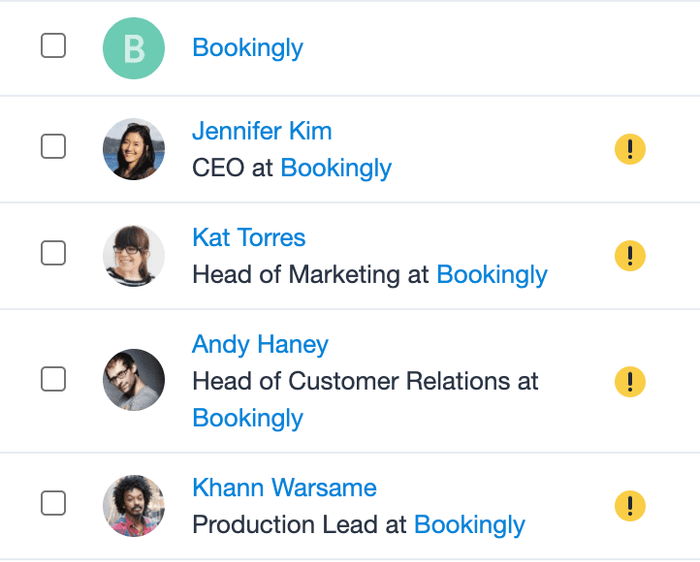
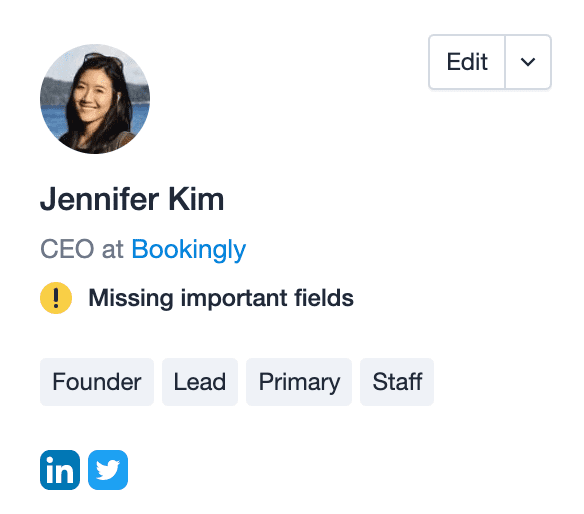
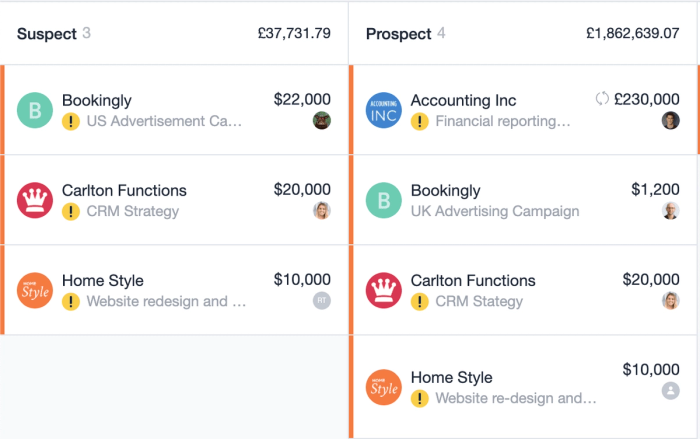
When editing a record, your Important Fields will automatically be expanded in the Custom Fields section and are highlighted with a yellow marker so you don't miss them. If you click the arrow, the rest of your Custom Fields will be expanded and your Important Fields will move to their position within the Custom Fields list based on the order that has been set in your Account Settings by an Admin.
Expanded view of custom fields with yellow markers for important fields
How to mark a Custom Field as Important
To create an Important Field, you would add a Custom field as normal and simply check the box that says “Important” before saving the field. This will mark the field as Important throughout Capsule. You can also mark existing Fields as Important by going to Account Settings > Custom Fields and clicking on the name of the field you want to mark as Important and then checking the Important checkbox and clicking Save. Important Fields can be added to your Contacts, Opportunities and Projects.
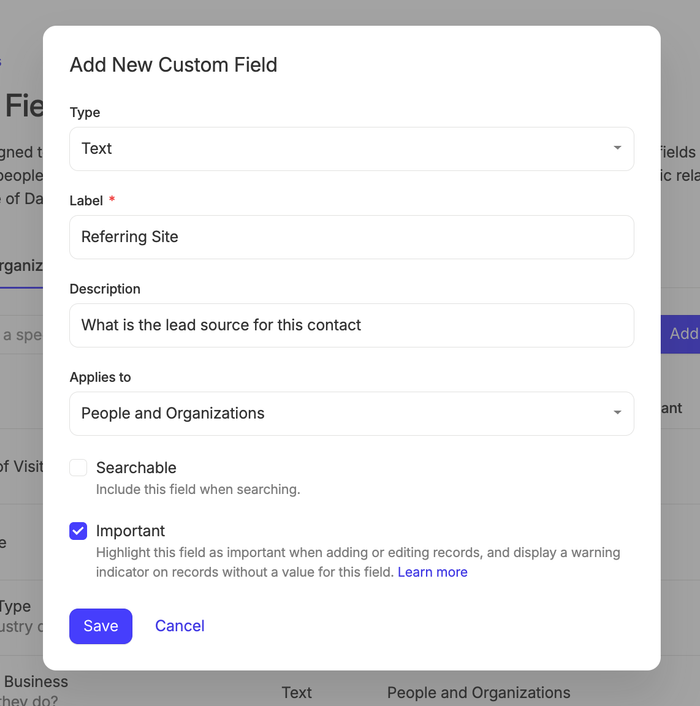
You also have the option of adding a Description to your Important Fields which will then be shown when adding/editing a record by hovering the Important Fields icon.
Using Important fields with DataTags
You can also add Important Fields to your DataTags. To do this, follow the normal steps to setup a DataTag and then add your Custom Fields within it, remembering to check the Important checkbox to mark the field as Important.
Custom Titles
Capsule has several default titles for your contacts built-in including Mr, Master, Mrs, Miss, Ms, Dr and Prof. As well as these, you can also add your own Custom Titles, allowing you to address your contacts in the most appropriate way.
You can setup Custom Titles by going to:
- Account Settings > Custom Titles
- Click Add Custom Title
- Enter your new title and click Save
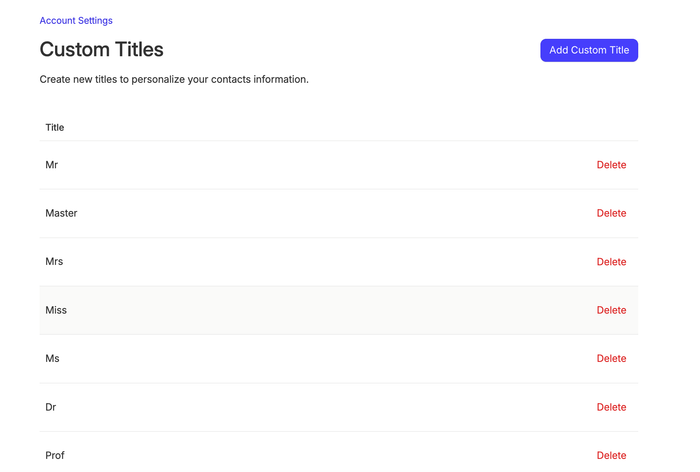
Your new title will now be shown as an option when creating or editing contacts under the Title dropdown.
Demo updating the title of a Person in Capsule
Activity Types
Keeping track of your communication with your Contacts is fundamental to staying organized. To do this you can log an activity against your Contacts, Opportunities or Projects. By default, there are 3 activity types : Note, Meeting and Call which you can use to keep track of the various types of communication you might have with your contacts. You can log activity on any record by clicking the Log Activity button.
Log activity button with option to add as a note, call, or meeting
Your activities are logged in the History section of the record.
Emails sent to the Mail Drop Box will also be logged in the history of the relevant record as an Email.
In the Activity reports on the Reports tab, you get a breakdown of the logged activity that has been completed by type.
Logging activity on a List of Contacts
To log activity on a list of Contacts in Capsule, you can follow these steps:
- Go to People & Organizations
- Choose an existing list or create a new list using your own filters
- Use the check boxes on the left to either select all (or a combination of Contacts)
- Choose the Log Activity button to the right of the filter menu
- Use the Activity Type dropdown to select your chosen type. This will also include Custom Activity types, if you have them
- Add the activity content to the box below
- Confirm your changes and select the Add button
adding a custom activity type to a list of Contacts in bulk
Custom Activity Types
On the Growth, Advanced and Ultimate plans, you can add custom activity types relevant to your business such as ‘site visit’ or ‘payment received’. These are also included in the reports tab so that you can get a more detailed view of the type of work that has been carried out. To create a new activity type:
1. Go to Account SettingsActivity Types
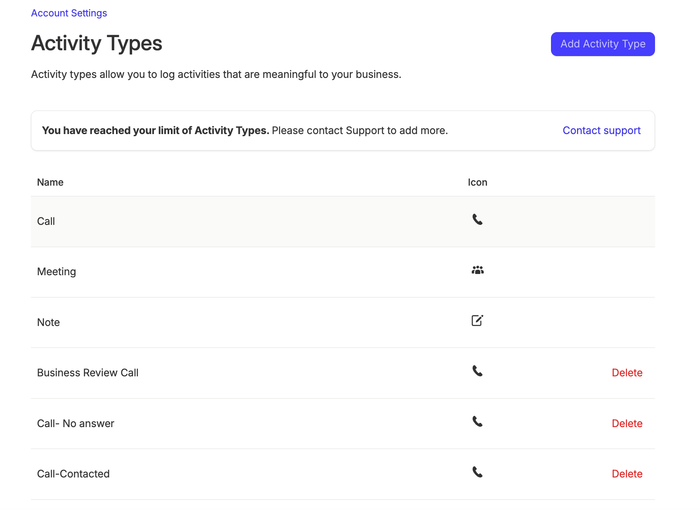
3. Click the Add Activity Type button.
4. Give the Activity Type a name and choose an icon that suits the type.
5. By default the activity type will update the 'Last Contacted On' date when an entry is created with this type however you can un-check the option if you prefer that it doesn't.
Once created, the Activity Type will immediately be ready to be used and it will be visible in the user activity reports.
How to add a Task, Opportunity or Project from logged Activity
There may be situations where a follow-up is needed after logging Activity in Capsule, to keep on top of the next steps.
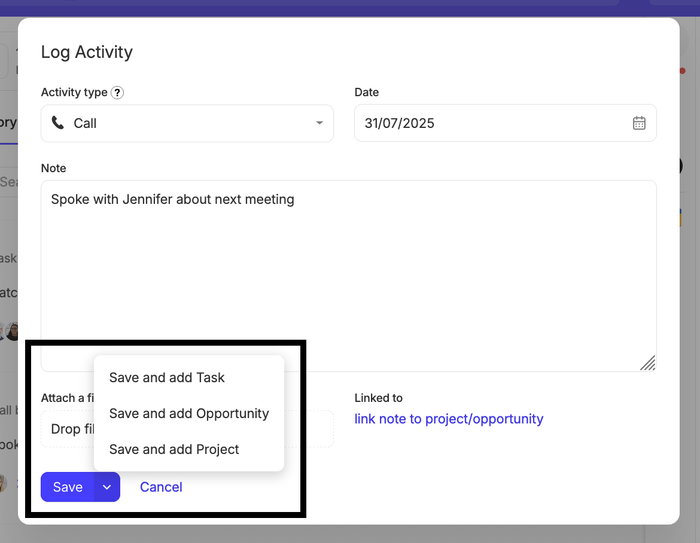
To help with this, there is a quick action to either add a Task or create an Opportunity/Project, whilst logging Activity.
To view these options, click the arrow next to the Save button, and select your choice from there:
Storing files
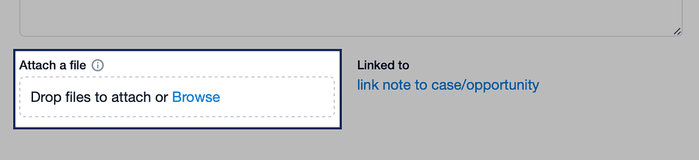
Whenever you add or edit an activity you can include files as reference material. Use the link to 'Browse' for a file to attach or simply drag and drop a file into the designated area to attach it to the activity entry you're creating or updating.
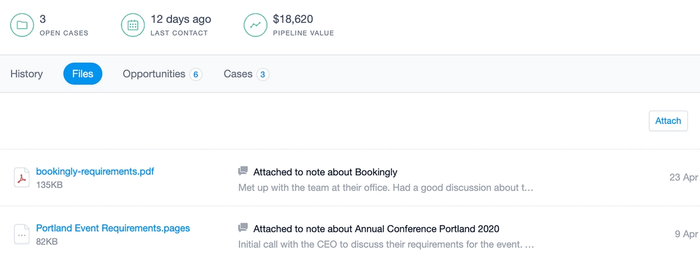
On each Contact, Project and Opportunity there's also a dedicated 'Files' tab where you can see all activities for that record that specifically contain files.
All files attached to activity entries and emails count towards the total storage quota for your account:
| Plan | Storage Quota |
|---|---|
Free | 50MB/account |
Starter | 10GB/user |
Growth | 20GB/user |
Advanced | 40GB/user |
Ultimate | 50GB/user |
Tracks
When managing contacts, tracking sales, or running projects, it’s common to have a repeatable set of steps to follow. Rather than adding the same set of Tasks each time, Tracks allow you to define a linear set of Tasks once and then apply that same set again and again as needed.
To set up your first Track, go to:
- Account Settings > Tracks
- Select whether the Track will be for People & Organisations, Opportunities or Projects using the tabs
- Click Add new Track
The Track should then be given a name that would be instantly identifiable to the rest of your team when they want to add a Track.
In the Tags box, you can opt to add a Tag that would be applied to the Contact, Opportunity or Project each time the Track is added. This means you can filter your Contacts, Opportunities or Projects by what Tracks they have on them. This comes in particularly useful when you have multiple Tracks for different purposes as the Tag can be used as a filter.
You can then choose whether you would like the due dates for tasks in a Track to be based on the start date the Track was added or to choose an end date when the Track is added.
Next is to set up your sequence of Tasks.
Creating a Track based upon a start date
Start by adding your first Task description, category, and owner. The first task in the Track has to be set to start a number of days, weekdays or weeks after the Track starts and you can define this by selecting a number and timeframe under the Due menu.
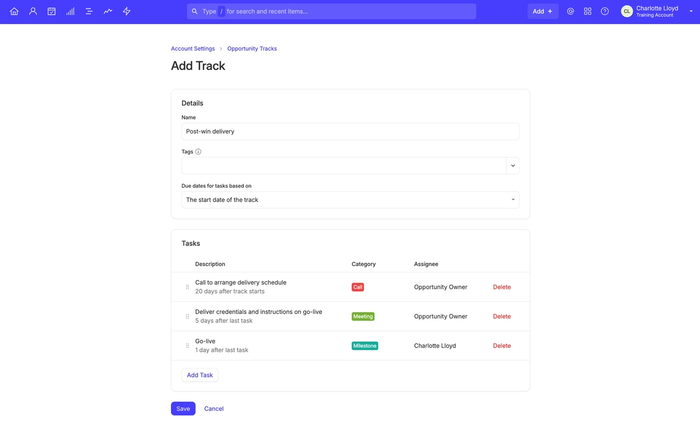
To add another Task to the sequence, click the Add Task button at the bottom of the page. You can define when you would like this Task to become active by changing it to become active a certain number of days/weekdays/weeks after the Track becomes active, or to become active after the previous Task in the sequence is completed.
Creating a Track based upon an end date
If your contact, project, or sales process works to a specific end date, you may find it useful to have the sequence of your Track tasks based on that date rather than relying on the completion of previous tasks or the date the Track was applied.
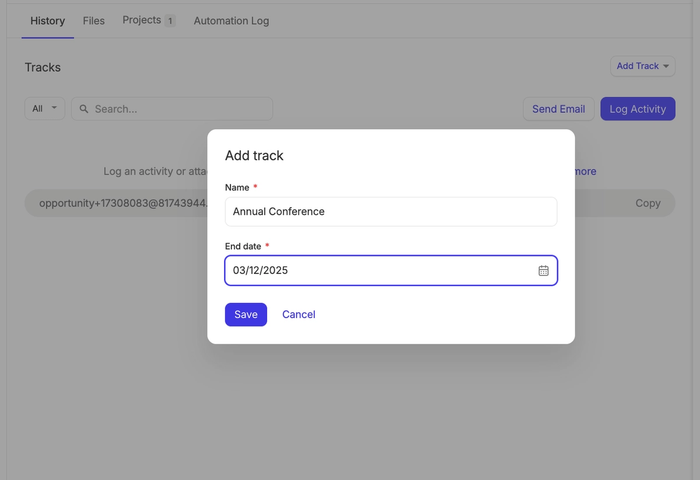
To do this, when setting up a Track click the drop down menu and change the selection to An end date chosen when adding the track.
When you add this Track to a Contact, Project or Opportunity you will be prompted to select an end date for it.
Custom Task Categories
Understanding the type of work that needs to be done is paramount to your productivity. Task categorization helps you to do this by breaking down your task list into your own custom categories. When you create your Capsule account there are a handful of categories set up for you, that we think cover the most common task types. To customize these for your business you can edit the existing ones or create completely new categories. To do this:
- Go to Account Settings > Task Categories
- Click Add New Category
- You can then give the category a name and select a category color from the color picker.
The Tasks in your calendar will have a colored indicator showing which category they belong to allow you to easily identify the type of tasks you need to work on.
How to customize the stages of a Sales Pipeline
By default, you have one Pipeline setup. On the Growth, Advanced and Ultimate plans, you can have the option to create more Pipelines.
Each column in the Sales Pipeline represents a different Milestone within your sales process. Capsule will populate your Sales Pipeline with default Milestones to help you to get started, however you can also customize the Milestones in the Sales Pipeline to match your company's workflow.
Customizing Milestones
To create a new Milestone:
- Go to the Account SettingsSales Pipelines
- Select the Pipeline where you want to add the Milestone
- Click the button to Add New Milestone
- Enter a Milestone name and the percentage for the Probability of winning. Optionally you can enter a value for ‘Days Until Stale’
- Click Save
To edit an existing Milestone:
- Go to the Account SettingsSales Pipelines
- Select the Pipeline where the Milestone is that you want to edit
- Click on the Milestone name
- Change the details you need
- Click Save
Customizing Lost Reasons
Opportunities can be lost for a variety of reasons and it may be important for your business to keep track of exactly why an Opportunity was lost. You can create lost Opportunity reasons by going to:
- Account SettingsSales Pipelines
- Then click on the Lost Reasons tab
Once set-up, when marking an Opportunity as lost you can decide which lost reason best applies.
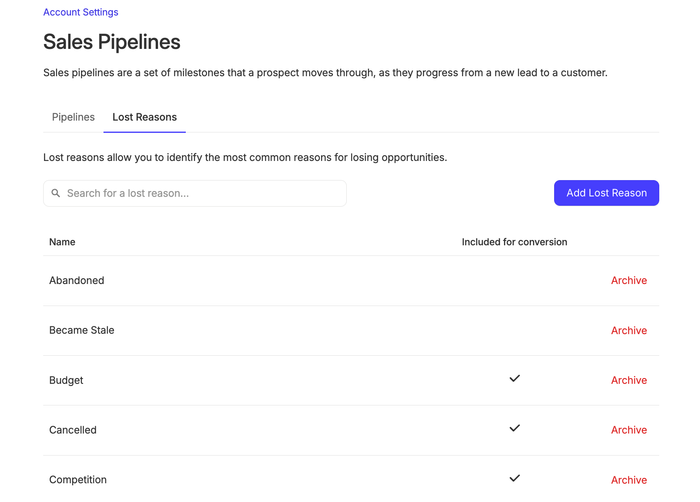
This information feeds into the Lost Opportunities Report which can be filtered by user or by team. This report can be viewed by going to ReportsSales
Impact on Conversion Rate
When creating Lost Reasons you can decide whether Opportunities marked with this reason will feed into the Sales Pipeline conversion rate. That's done using the checkbox.
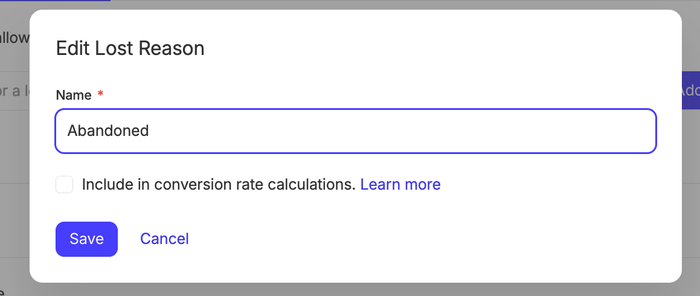
You might like to avoid including Opportunities with this Lost Reason in conversion metrics if perhaps the deal has been put on pause for the time being rather than lost completely for example.
How to customize the stages of a Project Board
By default, you have 1 board to set up. On the Growth, Advanced and Ultimate plans, you can have the option to create more Project Boards.
Each column in the Project Board is a different Stage within your process, which you can customize to match your workflow. Find out more details on how to Manage Projects using Boards here.
To create a new Stage:
- Go to the Account SettingsProject Boards
- Select the Project Board where you want to add the Stage
- Click the button to Add Stage
- Enter a Stage name and description
- Click Save
To change the order of your Stages, use drag and drop by clicking and holding the Stage name.
To edit an existing Stage:
- Go to the Account SettingsProject Boards
- Select the Board which includes the Stage you want to edit
- Click on the Stage name
- Make all of your changes to the name or description
- Click Save