Latest from the Capsule team
We've just launched a new feature in Capsule that makes it easy to find your contacts on social networks like Twitter and LinkedIn.
To get this working, you first need to link your Capsule account with your social network accounts so that Capsule can search those networks on your behalf. You can do this by clicking on your username in the top menu bar > My Preferences > Social Integrations. Once you've done that you'll start seeing a notification icon when you view a contact in Capsule that indicates Capsule has found social profiles for your contact. Click on the icon to see the matches and add the social profiles details to your contact.
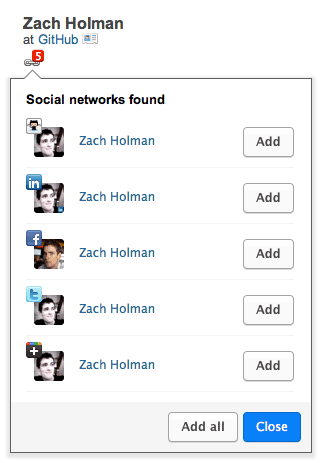
As part of this release we've also added Google+, Flickr, YouTube and GitHub to the list of social networks that you can record on a contact in Capsule.
We take privacy seriously and Capsule honours the privacy controls of each network when searching for profiles. As a result you'll only see matches where the contact has made their profile public.
I'd love to hear how you get on with this. In particular, if you spot matches that are for the wrong person I'd be grateful if you could email .(JavaScript must be enabled to view this email address) so that we can take a look at fine tuning our search algorithms.
We'd love to hear from you hello@capsulecrm.com
Capsule is a service of Zestia Ltd which is a company registered in England with company number 06418281. © 2008-2013 Zestia Ltd. All Rights Reserved.
Comments
manoj ranaweera Wed Mar, 7 2012 at 11:11 am
Hey guys
Many thanks for this. Very important feature. And its fast and non intrusive on performance compared with another product I know so well. Well done!
Best regards
Manoj
Matthieu Wed Mar, 7 2012 at 03:16 pm
Hi,
This great !
I am loking forward using that feature.
It would also be fantastic to integrate viadeo.com the same way…
Matthieu
Will Todd Wed Mar, 7 2012 at 04:47 pm
This is a great addition, well done.
A value adding feature would be to have an option to look up this data for all contacts rather than having to click on each individually.
It would also useful to be able import contact data from linkedIn to capsule
Thanks
Will
Duncan Stockdill Wed Mar, 7 2012 at 05:03 pm
@Will, each of the social networks have daily rate limits which make a bulk search unpractical unfortunately. Regarding storage, LinkedIn don’t allow contact data retrieved over the API to be stored unfortunately. You could export from LinkedIn as a CSV file and then import to Capsule as a workaround.
David Wed Mar, 7 2012 at 08:12 pm
Awesome! Great feature.
Rob Thu Mar, 8 2012 at 09:45 am
worked with one contact - but not the others
Matt Thu Mar, 8 2012 at 12:58 pm
Very good feature! Congrats.
It would be nice if you could add the same for Xing too.
Paul Sat Mar, 10 2012 at 03:20 pm
Thanks. Good feature and works well.
One tweak that would help is the ability to turn off the search on specific social networks.
For example, we have no interest in anything on Flikr, and yet it shows the icon saying it has found a network. We then need to click the icon only to dicover it is not anything useful to us.
So on your settings page for social networks, you need to show all the networks, not just those that require a login.
Cheers, Paul
Dave Yankowiak Mon Mar, 12 2012 at 07:02 pm
Thanks for adding this feature. It’s actually helped me find a few social profiles for existing contacts that I wasn’t aware of previously.
Side note: any chance you could take a look at your RSS settings for this blog? It mashes everything up when I view it in Google Reader. It also strips out any images. Very minor thing but it kind of defeats the purpose of RSS. Here’s a screenshot: http://cl.ly/0c0T1O3x1c0k2f3i0a1I
Dom Briggs Tue Mar, 13 2012 at 11:14 am
@Dave, good to hear and thanks for bringing our attention to the RSS settings. We’ve updated our feed and you should be getting images through later today.
Paul Thu Mar, 15 2012 at 12:54 pm
Thanks
It would be good to be able to mark a social network result as incorrect so it did not get shown every time you go back to a contact.
It is annoying to click on a result, only to realise it’s the same old wrong result you have seen before.
You need to be able to ‘blacklist’ a result so it does not show again for that contact.
Cheers, Paul