Latest from the Capsule team
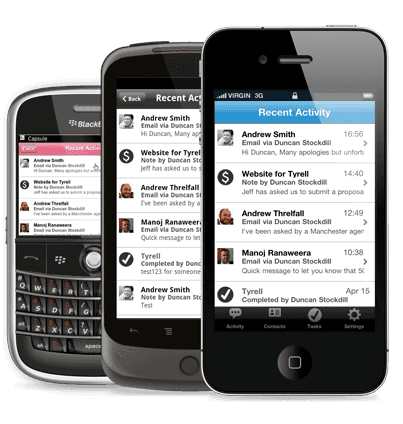
We're pleased to announce the launch of Capsule Mobile for the following devices:
We're sticking with the beta label on Capsule Mobile for now. It's had extensive testing over the past 6 weeks with help from a small group of beta testers and the feedback has been very encouraging. We figure it's time to open the beta up to all users since we know how popular the mobile application has been on our uservoice forums!
Enter the the following URL into the browser on your phone to install Capsule Mobile:
https://[your-account].capsulecrm.com/m
Be sure to replace the [your-account] bit with the relevant part from your Capsule account URL. You'll be prompted to enter your username and password and a pop-up message will ask your permission to allow additional storage space to be used on your phone. It may take several minutes for your contacts to be downloaded to your phone. Note that the application will only run on the default webkit browser. It won't run on Opera or Firefox.
Once you've logged into Capsule Mobile you can add a short cut to your home screen by tapping the bookmark button in the middle of the toolbar below the browser and then Add to Home Screen button.
It was clear by August last year when we started looking at a mobile application that we couldn't just focus on the iPhone. The Android has exploded in popularity and the BlackBerry continues to be a popular choice for business users. We spent time looking at options for our mobile application including building native applications for each platform. The obvious drawback is that each of these platforms has its own unique development and deployment environment. The other drawback is lack of control. For example if we had fixes we wanted to release quickly for a native iPhone app we'd need to wait for Apple to review and approve the update.
The great news is that the web browser has rapidly become a potent deployment environment for applications on newer phones especially those using the webkit browser like iPhone, Android, Blackberry 6 and WebOS. It turns out that the webkit browser on the current generation of smart phones is pretty powerful and can offer most of what users have come to expect from native apps.
Here are some of the things to expect from our application:
Building a browser based mobile application has been a steep learning curve, particularly with regards to offline storage. However we are very happy with the result and it's reassuring to see other application vendors treading the same path by releasing browser based mobile applications rather than native apps.
Keep in mind this is our first release and we will continue to refine. We hope to add support for opportunities and cases soon.
Unfortunately Windows phone 7 doesn't support the necessary standards for Capsule Mobile. It's unclear at this stage when or how Microsoft will implement the latest HTML5 standards on their platform. At this stage we don't have any plans to support Windows phone 7 devices.
Devices other than those we've listed above that deploy a recent WebKit browser may work with Capsule Mobile. However we haven't tested on these and so your millage may vary. This includes the likes of the PalmPre. We'd welcome any feedback on experience running Capsule Mobile on WebKit based devices that we haven't listed.
We'd love to hear from you hello@capsulecrm.com
Capsule is a service of Zestia Ltd which is a company registered in England with company number 06418281. © 2008-2012 Zestia Ltd. All Rights Reserved.
Comments
B Waltar Thu Apr, 21 2011 at 07:31 am
Love it - just tried it on an iPod Touch and it works well. Thanks so much. Love that the photos and tags come through.
Stephan Thu Apr, 21 2011 at 02:40 pm
very cool, opportunities are missing
123 Contracting Thu Apr, 21 2011 at 03:22 pm
Took a while but the most important thing is it works! Can’t wait for opportunities and cases to be added
Hedley Basford Thu Apr, 21 2011 at 03:38 pm
Entered the URL into my HTC Desire - told ‘Webpage not available’
Entered into my PC (64bit Windows 7) and just got a black screen.
Can anyone help, please?
Duncan Stockdill Thu Apr, 21 2011 at 04:11 pm
@Hedley, can you send us an email on support letting us know the URL you are using. The mobile app won’t work on your PC which is why you will be seeing the black screen on your PC.
Hedley Basford Thu Apr, 21 2011 at 04:31 pm
Hello Duncan,
It’s the one above (on your blog):
https://[your-account].capsulecrm.com/m
and the insert in the square brackets is: tripleicbank
Regards,
Hedley
Pashmina Thu Apr, 21 2011 at 04:40 pm
After almost 8 months of waiting, this mobile app is severely disappointing. Really has me concerned about the pace and efficiency of your development. Aside from easy access to contacts, this thing is lacking so much! I’m sad, because there’s so much I love about Capsule, and now I’m starting to doubt the long term sustainability of relying on your service to fulfill my CRM needs as part of my stack.
Duncan Stockdill Thu Apr, 21 2011 at 04:56 pm
@Pashmina,
Sorry to hear you feel that way. However, I do think you are underestimating what we have achieved here. We could have released a native iPhone app within a few months. However we took the more difficult route of supporting multiple devices, hence the longer road. I’m not aware of other application vendors in this end of the market that can claim to support iPhone, Android and BlackBerry with offline capability.
As mentioned in the post, this is the first release. We’ll be continuing to develop the functionality of the mobile application.
Tania Houston Thu Apr, 21 2011 at 05:15 pm
Love this - I keep everything on Capsule and having access on the iPhone is a bug plus. Well done.
Alex Simms Thu Apr, 21 2011 at 05:29 pm
Hey there, tried this link on my HTC Hero (running 2.1) and I just get a black screen. Any tips?
Brett Thu Apr, 21 2011 at 06:03 pm
Good job! I was a little disappointed that it isn’t a standalone app, but after trying it, I wasn’t at all. Works great.
Just needs cases and opportunities!
Hedley Basford Thu Apr, 21 2011 at 06:56 pm
Duncan - I have researched other CRMs and have found nothing that meets our requirements as well as Capsule. So, I hope you will find a way of perfecting your mobile Android app - do you have a solution for me now to use the beta version? Regards, Hedley
Duncan Stockdill Thu Apr, 21 2011 at 07:03 pm
@Hedley, glad to hear it. Did you get our email with questions to help us diagnose the problem? I’ve just forwarded it to the other email address for you also.
Bruce Williams Thu Apr, 21 2011 at 07:11 pm
Great work. Using on my Google Nexus running Android 2.3.3 and Dolphin HD Browser. Worked first time. Agree that opportunities is a must. Keep up the good work.
B Waltar Thu Apr, 21 2011 at 08:16 pm
To echo Duncan’s comments, producing a mobile web app is a lot of work, and will be fantastic for pushing out updates quickly across all platforms. We have folks using desktop PCs and Macs, and iPhones and Blackberries. So this universal model works great for us.
From what I’ve seen so far of the mobile app, what’s there works great. For starters, I’d rather have fewer features that work than many that don’t. That said, hope to see more features such as opportunities and such rolled out soon.
Duncan Stockdill Thu Apr, 21 2011 at 08:56 pm
@B Walter: Yep, with the web app approach we can iterate quickly as you point out. Now that we’ve completed the work to build a solid foundation it’s actually pretty quick for us to add new screens and functionality.
Mark McCurry Thu Apr, 21 2011 at 10:34 pm
I tried the app today. Two things:
1st this app is not password protected, anyone fishing sub domains could view our confidential information, companies and contact. I could probably figure out quite few just by looking through the urls of the responders on this post. This seems like a huge security hole.
2nd I accessed the app about 4 hours ago and it still has not downloaded all me contacts, nor recent activity or task. How long do think this will take?
Duncan Stockdill Thu Apr, 21 2011 at 10:38 pm
@Mark. Thanks for the feedback. Capsule Mobile is definitely password protected and your data is never exposed through subdomain fishing. It’s likely that you already had a Google Apps session open on your phone which meant you were automatically logged in via the session.
Can you send us details of your Capsule account and phone model to our support email and we’ll investigate the slow install for you.
Mark McCurry Thu Apr, 21 2011 at 10:47 pm
Duncan
Thank you you are right about the Google Domain log in. This is great to know. I will send over my information to support. Thank you for you help
Pashmina Fri Apr, 22 2011 at 11:19 am
@Duncan Yes, it’s cool that you support a wide variety of mobile devices. But look at what you’ve sacrificed by going this universal route.
As a former UX designer, having an app that wastes a whopping 20% of my iPhone screen real estate due to the web browser navigation has me screaming bloody murder. 20% is a lot to sacrifice and was immediately noticeable. The design forces the app to be locked within the browser, the persistent URL field on top and bottom navigation elements are a completely useless. In user testing, doesn’t this come up as a concern? By implementing it this way the design also eliminates the best hot spots, the corners of my screen. I just can’t understand how this is acceptable. It’s badly designed.
Duncan Stockdill Fri Apr, 22 2011 at 12:53 pm
@Pashmina,
The good news is there is a simple step for you to follow so that Capsule Mobile works in full screen mode. It’s just a matter adding Capsule Mobile to your home page. The step to add the shortcut is described in the blog post above.
When you launch Capsule Mobile from the home screen shortcut it will look and behave like any other native iPhone application.
Jon Appleton Sun Apr, 24 2011 at 04:47 am
Very well done - thank you! We have iPhones and Blackberrys, so having this as a universal app is simply genius. With the google integration, I didn’t even have to type in a password. Adding cases and opportunities is of course critical, but I’m sure its coming.
Sebastien Aubouin Mon Apr, 25 2011 at 10:41 pm
Hello, just downloaded to my HTC THunderbolt, is stuck at 2,945 contacts remaining, I think we have 10,000 or so. Do I somehow need to allocate more space?
Please advise. We are always in the field and have iPhone, Blackberry, Android phones, iPad gen1/gen2 and are excited with this app. Just need to be able to download all the contacts offline.
Please advise.
Trevor Gehman Mon Apr, 25 2011 at 11:22 pm
Good job. Thanks for the tip about adding to Home Screen…. definitely improves the usability of the app tremendously.
I will say, however, while I understand the issues of developing multiple native apps, I do very much prefer native apps to web apps.
Anyways, I appreciate every extension to your already fantastic product. Great job Capsule!
PetPalz Tue Apr, 26 2011 at 01:46 am
Great work, and appreciate how long it would have taken to develop across the platforms. We used this extensively over the last 3 days, and have identified a number of bugs, where do we go to report such?
Thanks, and given I was an early voter for this, now looking forward to permission access development, but you are allowed time off to watch a certain wedding this week, if its your cup of tea
Duncan Stockdill Tue Apr, 26 2011 at 05:00 pm
@PetPalz would be great if you could drop us an email on .(JavaScript must be enabled to view this email address) with details. Thanks.
Tom Brown Wed Apr, 27 2011 at 06:10 pm
I’m sure you’re going to get a flurry of ideas about improving the mobile app (which is already great btw) - can we have a separate forum for adding these please? they will get lost in the 791 other ideas for the main app!
My first one would be the ability to create or update a contact record on my phone from the details I have in capsule.
Cheers
Tom
Frank Stratmann Thu Apr, 28 2011 at 10:17 pm
We hope the german CRM community will notice this
Paul Sheraton Fri May, 6 2011 at 12:48 am
If anyone is having problems getting it to work on the default browser on an HTC Desire like I did ( i was getting a black screen) I just installed dolphin browser HD from the android app store and it worked fine!
Michelle Scott Sat May, 7 2011 at 10:26 pm
Wow! I have been searching for a CRM that would work on pc’s and my Mac, iphones and Blackberries, and not require a programming degree to use. I’m absolutely delighted to have discovered you. The CRM is brilliantly designed: quick to learn, multi-featured, fast-loading. It seemed to be stretching the bounds of wonder for you to have done mobile apps of similar excellence but there they are! ‘Thank you’ doesn’t seem enough - so I’ll just content myself with telling everyone I meet and tweet about you.
Mike Deam Wed May, 11 2011 at 01:43 pm
Great app and the tip for the home screen is a must. Any chance for a view of opportunities and cases? I can see the todo from the existing ones but if I could add these on the phone would assist - not critical but nice. But it’s a great leap forward. Well done.
Duncan Stockdill Wed May, 11 2011 at 01:52 pm
@Mike Thanks for the kind feedback. We’ll be adding opportunities and cases in the next major update of the mobile app.
Mark Taylor Thu May, 12 2011 at 07:40 pm
I have been trying to sync my Nexus One (v 2.3.4) to the mobile webpage without success since Monday. I have freed up more space then needed by deleted my contacts, accounts, everything I can think of but it still just hangs on Uploading Contacts. Any suggestions.
Simon Lovegrove Fri May, 13 2011 at 12:42 am
Looks lovely and simple Duncan (and the rest of the team). I look forward to adding funcionality for opps and pipeline. As a comparison, I had the SendPepper / OfficeAutopilot app. This already does more than that.